Chiropractic Payment Processing Guide for Clinics
Chiropractic Payment Processing Guide for Clinics
Chiropractic payment processing is the system that enables clinics to securely collect payments from patients and insurers while connecting billing, claims, and patient records into one workflow. Most clinic owners treat billing as an afterthought, but your revenue cycle starts the moment a patient books an appointment. This chiropractic payment processing guide covers the tools, setup steps, and optimization strategies that determine whether your practice gets paid accurately and on time. Platforms like ChiroTouch, Align, and CureAR have redefined what integrated payment processing looks like for chiropractic clinics, and the gap between practices that use them and those that don’t shows up directly in cash flow.
What tools does chiropractic payment processing require?
Chiropractic revenue cycle management depends on two categories of technology: integrated practice management systems and standalone payment processors. Integrated systems connect your scheduling, SOAP notes, billing, and payment collection into a single platform. Standalone processors handle card transactions but leave your team to manually reconcile payments against patient records, which creates errors and delays.

Integrated payment systems reduce administrative burden and speed up payment collections through automation of billing and reminders. That means fewer staff hours spent on follow-up calls and fewer claims that fall through the cracks.
The core features to look for in any chiropractic billing software include:
- Automated claim submission: The system generates and submits claims directly from SOAP notes without manual data entry.
- Recurring billing: Patients on membership or wellness plans get charged automatically on a set schedule.
- Claim tracking and follow-up: The software monitors claim status and flags denials or delays for your team to act on.
- Payment posting: Insurance and patient payments post directly to the patient ledger without manual entry.
- HIPAA-compliant data security: All patient payment data must be encrypted and stored in compliance with federal privacy rules.
- Secure payment gateways: Secure gateways protect patient data and simplify both cash and insurance billing workflows.
Pro Tip: Never select a payment processor that does not explicitly confirm PCI DSS compliance and HIPAA compatibility. A breach or compliance violation can cost your practice far more than any processing fee savings.
| Software | Key Features | Best For |
|---|---|---|
| ChiroTouch | Integrated billing, automated reminders, payment posting | Full-service chiropractic practices |
| Align | Claim lifecycle automation, underpayment flagging, dispute workflows | Insurance-heavy practices |
| CureAR | HIPAA-compliant billing, coding support, compliance tracking | Practices focused on regulatory compliance |
The right tool depends on your payer mix. If most of your revenue comes from insurance, Align’s claim automation and underpayment detection are worth prioritizing. If you run a cash-based or membership practice, ChiroTouch’s recurring billing and patient communication tools carry more weight.
How to set up chiropractic payment processing effectively
Setting up payment processing for chiropractors is not a one-day task. Done correctly, it takes one to two weeks of configuration, testing, and staff training. Rushing the setup is the most common reason practices end up with billing errors six months later.
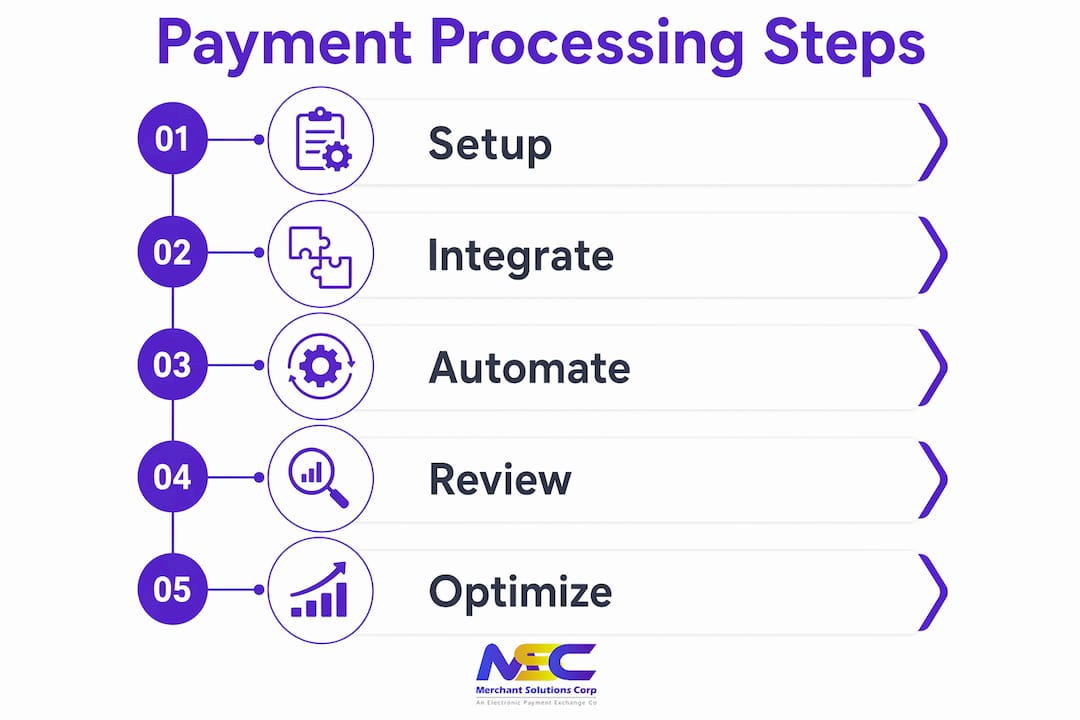
Follow these steps to build a reliable payment workflow from the start:
-
Audit your current billing process. Map every step from patient check-in to payment collection. Identify where manual entry happens, where claims get delayed, and where payments go unposted. You cannot fix what you have not measured.
-
Select an integrated billing platform. Choose software that connects your practice management system, billing module, and payment gateway. ChiroTouch and Align both offer this integration natively. Confirm that the platform supports your primary payers before signing any contract.
-
Configure your payer contracts. Enter your contracted rates for every insurance payer into the system. This step is what allows the software to flag underpayments automatically later.
-
Set up automated billing workflows. Configure claim submission to trigger automatically when a SOAP note is finalized. Set payment reminders to go out at 7, 14, and 30 days after a patient balance is created. Automated billing workflows improve accuracy and revenue capture across the full claim lifecycle.
-
Configure payment acceptance methods. Your practice should accept credit cards, debit cards, ACH transfers, cash, and mobile payments. Common payment forms for chiropractic clinics include cash, check, ACH, credit card, debit card, and mobile payments. Each method needs a corresponding workflow in your system so payments post correctly.
-
Integrate your payment terminal. Connect your card reader or POS terminal to your billing software so that patient payments post automatically to the correct account. Clover and Square terminals both support this kind of integration for health service providers.
-
Train your front desk staff. Your team needs to know how to collect copays at check-in, process card payments, and handle declined transactions. A 30-minute training session at launch prevents months of posting errors.
-
Run a two-week parallel test. Process payments through both your old system and the new one for two weeks. Compare the results daily. This catches configuration errors before they affect your revenue.
Pro Tip: Set up automated payment reminders before your first billing cycle runs. Automated reminders and recurring billing reduce outstanding accounts receivable significantly. Practices that skip this step consistently carry higher patient balances.
How to troubleshoot and optimize your payment workflows
Claim denials are the single biggest drain on chiropractic revenue cycle management. The most common causes are incorrect procedure codes, missing documentation, and payer-specific billing rules that your team did not know about. Catching these issues before submission is far cheaper than appealing denials after the fact.
Align’s platform flags underpayments against your contracted rates and automates dispute workflows to recover lost revenue. That feature alone recovers money that most practices never realize they are owed.
Common issues and how to address them:
- Claim denials: Use software with built-in claim validation to catch errors before submission. Automated claim validation and follow-up reduce denials and improve cash flow.
- Underpayments: Configure your contracted rates in the billing system so every payment is automatically checked against what the payer owes.
- Manual posting errors: Eliminate manual payment posting entirely by connecting your payment terminal directly to your billing software.
- High accounts receivable: Run an aging report weekly. Any balance over 60 days needs a direct follow-up call or an automated escalation workflow.
- Patient payment delays: Offer multiple payment options at check-in and send automated reminders. Patients pay faster when the process is easy and the reminder is timely.
“The practices that collect the most revenue are not necessarily the busiest ones. They are the ones with the tightest billing workflows and the fewest manual steps between service delivery and payment posting.”
Reviewing your denial rate monthly gives you a clear picture of where your billing process breaks down. A denial rate above 5% signals a systemic problem, not a one-off error. Fixing the root cause, whether that is a coding issue or a missing authorization step, pays off across every claim you submit going forward. Connecting your billing platform to a healthcare payment solution built for providers adds another layer of protection against compliance gaps.
Payment processing options compared: what works best for chiropractors?
Chiropractor payment methods fall into two broad categories: insurance-based and direct patient payments. Most practices handle both, which means your payment processing setup needs to support multiple workflows without creating extra work for your staff.
| Payment Method | Pros | Cons | Typical Cost |
|---|---|---|---|
| Credit card | Fast, widely accepted, easy to automate | Processing fees apply | Typically 1.5%–3.5% per transaction |
| ACH/bank transfer | Low cost, good for recurring billing | Slower settlement (2–3 business days) | Typically $0.25–$1.00 per transaction |
| Cash | No processing fees | Manual handling, no automation | None |
| Debit card | Lower fees than credit, fast settlement | Requires PIN pad hardware | Typically 1.0%–2.5% per transaction |
| Mobile payments | Convenient for patients, contactless | Requires NFC-enabled terminal | Varies by processor |
Interchange-plus pricing gives you the most transparency on processing costs. Interchange-plus models can save practices up to 25% on processing fees compared to flat-rate models. Flat-rate pricing is simpler to understand but often costs more for practices with high transaction volumes.
Best practices for managing patient payments in your clinic:
- Collect copays and patient balances at check-in, not after the appointment. Patients are more likely to pay before receiving care than after.
- Offer a payment plan option for larger balances. ACH recurring billing works well here because it automates the collection without requiring the patient to return.
- Use membership billing for cash-pay patients. Recurring monthly billing through ACH or credit card stabilizes your revenue and reduces the administrative work of collecting individual visit fees.
- Communicate fees clearly before treatment. Patients who understand their financial responsibility upfront generate fewer disputes and fewer unpaid balances.
For practices evaluating their overall cost-saving strategies, payment processing fees are one of the most controllable expenses in the business. Switching from flat-rate to interchange-plus pricing, or adding dual pricing to offset fees, can produce meaningful savings over a full year.
Pro Tip: Ask your payment processor about dual pricing programs. These programs display a cash price and a card price at checkout, which offsets processing fees legally and transparently without reducing your net revenue.
Key Takeaways
Effective chiropractic payment processing requires integrated software, automated billing workflows, and a clear strategy for managing both insurance claims and direct patient payments.
| Point | Details |
|---|---|
| Integration is non-negotiable | Connect billing, payments, and patient records to eliminate manual errors and speed up collections. |
| Automate before you launch | Set up claim submission, payment reminders, and recurring billing before your first billing cycle runs. |
| Know your pricing model | Interchange-plus pricing typically costs less than flat-rate for high-volume chiropractic practices. |
| Flag underpayments automatically | Configure contracted rates in your billing software so every insurance payment is checked against what you are owed. |
| Collect at check-in | Patient balances collected before the appointment have a significantly higher collection rate than post-visit invoices. |
Why integrated payment processing changes everything for chiropractic clinics
Most chiropractors underestimate how much revenue they lose to billing inefficiency, not to low patient volume. After working with health service providers across multiple practice types, the pattern is consistent: practices running disconnected billing and payment systems spend more staff time on collections and still collect less money than practices using integrated platforms.
The real value of integration between payment processing and practice management is not just speed. It is accuracy. When a payment posts automatically to the correct patient account the moment a card is swiped, your ledger is always current. Your staff is not reconciling at the end of the day. Your denial rate drops because claims go out clean. Your patients have a better experience because checkout is fast and their balance is always accurate.
Automation also changes the dynamic with insurance payers. When your system automatically tracks every claim, flags every underpayment, and generates dispute documentation without staff involvement, you recover revenue that previously went unnoticed. That is not a marginal improvement. For a practice billing 200 to 400 visits per month, the difference between a 3% denial rate and a 10% denial rate is thousands of dollars per year.
The practices that grow most consistently are not the ones with the most patients. They are the ones that collect the highest percentage of what they earn. Getting your payment processing right is how you close that gap.
— Jonathan
How Merchantsolutionscorp supports chiropractic payment processing
Merchantsolutionscorp works with health service providers, including chiropractic clinics, to set up payment processing solutions that fit the way your practice operates. The platform supports credit card and ACH processing, POS systems including Clover and Square, and dual pricing programs that offset processing fees without adding complexity for your front desk. Hardware setup comes with $0 upfront options, and the onboarding team configures your system before your first transaction. If you want to see how a properly configured chiropractic payment system compares to what your practice runs today, Merchantsolutionscorp makes it straightforward to find out.
FAQ
What is chiropractic payment processing?
Chiropractic payment processing is the system that collects, records, and reconciles payments from patients and insurers within a chiropractic practice. Integrated platforms connect billing, claims, and payment collection into a single workflow to reduce errors and improve cash flow.
What chiropractic billing software do most clinics use?
ChiroTouch, Align, and CureAR are among the most widely used platforms for chiropractic billing software. Each automates a different part of the claim lifecycle, from SOAP note to payment posting, with varying strengths in insurance billing versus cash-pay workflows.
How do I reduce claim denials in my chiropractic practice?
Automated claim validation catches coding errors and missing documentation before submission, which directly reduces denial rates. Practices using platforms like Align also benefit from automated follow-up workflows that track unresolved claims and generate dispute documentation.
What payment methods should a chiropractic clinic accept?
Chiropractic clinics should accept credit cards, debit cards, ACH transfers, cash, and mobile payments to cover the full range of patient preferences. Offering multiple payment options at check-in increases same-day collection rates and reduces outstanding balances.
Is interchange-plus pricing better than flat-rate for chiropractors?
Interchange-plus pricing is generally more cost-effective for chiropractic practices with consistent transaction volume because it passes the actual card network cost to the practice rather than a fixed markup. Flat-rate pricing is simpler but typically costs more per transaction for practices processing above a moderate monthly volume.