POS System Terminology for Medical Practices
POS System Terminology for Medical Practices
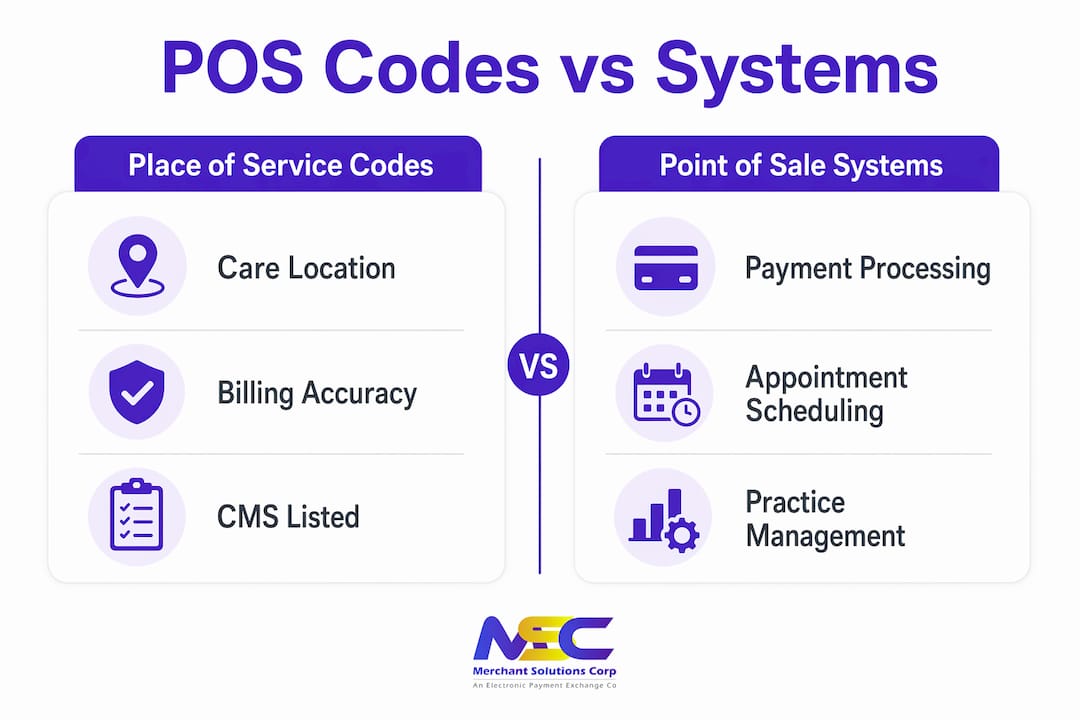
POS system terminology for medical practices covers two distinct concepts that every front desk coordinator and billing specialist must understand: Place of Service codes and Point of Sale technology. Place of Service (POS) codes are mandatory two-digit identifiers established by the Centers for Medicare and Medicaid Services (CMS) to indicate where care was delivered on professional claims. Point of Sale systems are the hardware and software your practice uses to collect payments, schedule appointments, and manage the billing lifecycle. Confusing these two meanings costs practices real money through denied claims, delayed reimbursements, and workflow breakdowns. This guide clarifies both, with 2026 billing updates included.
What are place of service codes and why do they matter in medical billing?
Place of Service codes are the foundation of accurate professional claim submission. Over 50 POS codes exist, maintained by CMS, covering every care setting from a private office to an inpatient hospital. HIPAA mandates their use on all professional claims submitted to Medicare, Medicaid, and most commercial payers. Selecting the wrong code is not a minor clerical error. It directly affects how much your practice gets reimbursed.
How POS codes affect reimbursement rates
Payers apply different fee schedules depending on the POS code on a claim. A service billed under POS 11 (Office) typically reimburses at a higher rate than the same service billed under POS 22 (On-Campus Outpatient Hospital). That difference exists because CMS assumes hospital outpatient settings receive a separate facility payment. When your practice is hospital-owned but you bill POS 11 instead of POS 22 or POS 49, you are not just risking a denial. You are triggering a compliance audit.
Common POS codes your billing team encounters daily include:
- POS 11 (Office): The most frequently used code for independent physician offices and freestanding clinics.
- POS 10 (Telehealth in Patient’s Home): Required when the patient receives a telehealth visit from their own residence.
- POS 02 (Telehealth Other than Home): Used when telehealth is delivered from a location other than the patient’s home.
- POS 21 (Inpatient Hospital): For services provided to admitted patients inside a hospital.
- POS 22 (On-Campus Outpatient Hospital): For outpatient services at a location within 250 yards of the main hospital campus.
- POS 19 (Off-Campus Outpatient Hospital): For outpatient services at a location more than 250 yards from the main campus.
- POS 49 (Independent Clinic): For clinics not owned or operated by a hospital.
The real cost of incorrect POS coding
Using POS 11 for hospital outpatient visits causes immediate claim rejection from most payers. Beyond the denial itself, repeated errors trigger overpayment recoupments and formal audits. Recovering recouped payments is time-consuming and expensive. Prevention through accurate coding is always the lower-cost path.
Pro Tip: Set up your practice management system (PMS) to flag any claim where the POS code does not match the rendering provider’s enrolled location. Automated validation catches errors before submission, not after.
How do point of sale systems work in medical practices?
Point of Sale systems in a medical context are the technology platforms your front desk and billing staff use to manage the financial and scheduling side of patient care. Modern practice management systems integrate real-time batch tracking, expiration monitoring, and audit trails into a single workflow. This is the “POS system” your administrator references when discussing payment terminals, copay collection, and appointment booking.
Understanding medical POS software terms helps your team communicate clearly with vendors, IT staff, and billing services. The core components of a clinical Point of Sale setup include:
- Payment terminal: The physical device that reads credit cards, debit cards, HSA cards, and contactless payments at the front desk or checkout station.
- Practice management software (PMS): The software layer connecting scheduling, billing, and payment collection. Examples include systems that integrate with EHR platforms like Epic or athenahealth.
- Patient ledger: A real-time record of charges, payments, adjustments, and outstanding balances for each patient account.
- Batch processing: The end-of-day process that groups all transactions and submits them to the payment processor for settlement.
- Audit trail: An automatic log of every transaction, adjustment, and user action within the system. Audit trails are required for HIPAA compliance and internal fraud prevention.
- Dual pricing module: A feature that displays a cash price and a card price separately, allowing practices to offset processing fees legally and transparently.
Pro Tip: When evaluating POS system features for clinics, confirm that the system supports HSA and FSA card acceptance. Many patients use these accounts for copays and deductibles, and a terminal that cannot process them creates friction at checkout.
POS hardware and software used in medical practices support scheduling, payment collection, and compliance while improving cash flow and the patient experience. A well-configured system reduces the time your front desk spends on manual reconciliation and gives your billing team cleaner data to work with.

How to use place of service codes correctly in 2026
Accurate POS code selection in 2026 requires more than memorizing a list. It requires understanding the relationship between your practice’s CMS enrollment status, physical location, and the specific service being billed. CMS enrollment status and ownership structure drive POS code selection more than the physical appearance of a clinic. A clinic that looks like a private office but is owned by a hospital system must bill outpatient hospital codes.
The 250-yard rule for POS 19 vs. POS 22
The distinction between POS 19 and POS 22 is strictly geographic. The 250-yard rule defines the difference between off-campus outpatient (POS 19) and on-campus outpatient (POS 22). Practices located within 250 yards of the main hospital building use POS 22. Those beyond that boundary use POS 19. The fee schedule eligibility differs between the two codes. Automated PMS determination based on NPI and location data removes the manual guesswork that triggers payer audits.
Telehealth POS codes require payer-level verification
Telehealth billing remains one of the highest-risk areas for POS errors in 2026. POS 10 applies when the patient is at home. POS 02 applies when the patient is at another location, such as a school or community center. Payer enforcement of these distinctions has tightened considerably since 2023. Verify each payer’s telehealth policy before submitting, because a code that one payer accepts may trigger a denial from another.
POS code comparison table
| POS Code | Setting | Key Billing Note |
|---|---|---|
| POS 11 | Office | Highest non-facility fee schedule; for independent practices only |
| POS 10 | Telehealth in Patient’s Home | Patient must be at their residence; payer policy verification required |
| POS 02 | Telehealth Other than Home | Used when patient is at a non-home location during telehealth |
| POS 19 | Off-Campus Outpatient Hospital | More than 250 yards from main campus; lower facility-related fee |
| POS 21 | Inpatient Hospital | For admitted patients only; not for outpatient encounters |
| POS 22 | On-Campus Outpatient Hospital | Within 250 yards of main campus; triggers facility fee schedule |
| POS 49 | Independent Clinic | For non-hospital-owned freestanding clinics |
Aligning POS codes with CPT and ICD codes
POS codes must align with CPT and ICD codes to prevent claim rejections. A mismatch between the care setting and the procedure code signals an inconsistency to the payer’s system. For example, billing a hospital-only procedure under POS 11 will generate an automatic denial. Your billing team should treat POS code selection as part of the charge entry process, not an afterthought.
A complete charge, as defined in structured PMS workflows, requires the correct CPT or HCPCS code, diagnosis linkage, unit counts, provider NPI, and POS code before the charge enters the billing queue. Missing any one element delays the claim.
Best practices for integrating POS knowledge into practice management
Knowing the terminology is only half the work. Applying it consistently across your team and your systems is what protects revenue. The following practices reduce billing errors and improve operational efficiency across both meanings of POS.
- Train billing staff on POS code typologies annually. CMS updates its code set periodically. A staff member who learned POS codes three years ago may not know the current telehealth distinctions. Schedule a structured review each January using the updated CMS Place of Service Code Set.
- Configure your PMS to enforce POS validation at charge entry. Your system should block a charge from entering the billing workflow if the POS code conflicts with the provider’s enrolled location or the procedure code. This is a system configuration decision, not a manual review task.
- Treat authorization as a dynamic process, not a static checkbox. Authorization must be tracked with specific CPT scope, date spans, unit limits, and diagnosis linkages in structured PMS fields. Free-text notes in a patient chart do not constitute a valid authorization record for billing purposes.
- Audit claim submissions quarterly for POS accuracy. Pull a sample of denied claims each quarter and categorize them by denial reason. POS code errors that appear in more than 5% of denials signal a training gap or a system configuration problem.
- Use integrated POS hardware and software for payment collection. A payment terminal that connects directly to your PMS eliminates manual payment posting errors. Dynamic authorization processes linked to POS codes significantly reduce revenue leakage by blocking claims that lack proper CPT scope or have expired authorizations.
- Verify hospital ownership status before assigning POS codes to new providers. Proper classification of hospital-owned versus independent clinics is a compliance requirement, not an administrative preference. Misclassification exposes your practice to recoupment demands.
Key takeaways
Accurate POS terminology in medical practices requires understanding both Place of Service codes and Point of Sale systems, applying each correctly to protect revenue and maintain compliance.
| Point | Details |
|---|---|
| Two meanings of POS | Place of Service codes identify care location; Point of Sale systems manage payments and scheduling. |
| CMS controls POS codes | Over 50 codes exist; selecting the wrong one causes denials, recoupments, and audits. |
| Ownership drives code selection | Hospital-owned clinics must use outpatient hospital codes regardless of how the office looks. |
| Telehealth codes need payer verification | POS 10 and POS 02 have distinct rules; payer enforcement has tightened significantly in 2026. |
| Integrated systems reduce errors | PMS validation at charge entry and dynamic authorization tracking prevent the most common billing mistakes. |
Why POS confusion costs more than most practices realize
Working with medical practice administrators over the years, I have seen the same pattern repeat itself: a billing coordinator who is confident in their coding skills submits claims for months using POS 11 across the board, not realizing the practice was acquired by a hospital system 18 months earlier. The claims pay at first because the payer’s edits have a lag. Then the audit hits, and the recoupment demand covers two years of overpayments.
The uncomfortable truth is that most POS code errors are not caused by ignorance. They are caused by process gaps. Nobody updated the PMS configuration after the ownership change. Nobody told the billing team that the 250-yard rule applied to their new satellite location. The knowledge existed somewhere in the organization. It just was not connected to the workflow where it mattered.
The same principle applies to Point of Sale technology. Practices that run payment collection on disconnected terminals and post payments manually are not just inefficient. They are creating reconciliation errors that compound over time. When your payment system does not talk to your PMS, you are doing double the work for half the accuracy.
The industry is moving toward fully integrated systems where POS code validation, payment processing, and authorization tracking happen in a single connected workflow. Practices that adopt this model earlier will spend less time on denials and more time on patient care. The technology to do this exists right now. The barrier is usually organizational, not financial.
— Jonathan
How Merchantsolutionscorp supports medical practice payments
Merchantsolutionscorp provides medical-grade payment processing and Point of Sale systems built for practices that need reliable, compliant payment collection at the front desk. The platform supports credit card, debit card, HSA, and FSA acceptance, with real-time transaction monitoring and audit trail automation that keeps your billing records clean. Features like dual pricing help offset processing costs without adding friction to the patient checkout experience. Merchantsolutionscorp also offers fully configured POS hardware and software with $0 upfront options, so your practice can upgrade its payment infrastructure without a large capital outlay. Setup is fast, support is ongoing, and the systems are built to connect with your existing practice management workflow.
FAQ
What is a place of service code in medical billing?
A Place of Service code is a mandatory two-digit identifier established by CMS that indicates where a healthcare service was delivered on a professional claim. Over 50 codes exist, and selecting the wrong one directly affects reimbursement rates and claim approval.
What is the difference between POS 19 and POS 22?
POS 19 (Off-Campus Outpatient Hospital) applies to locations more than 250 yards from the main hospital campus, while POS 22 (On-Campus Outpatient Hospital) applies to locations within that boundary. The distinction affects fee schedule eligibility and is strictly geographic.
Which POS code applies to telehealth visits in 2026?
POS 10 applies when the patient receives telehealth services from their home. POS 02 applies when the patient is at a non-home location. Payer policies on telehealth codes vary, so verify each payer’s requirements before submitting claims.
How do point of sale systems differ from place of service codes?
Point of Sale systems are the hardware and software used to collect payments, schedule appointments, and manage the billing lifecycle at the front desk. Place of Service codes are billing identifiers submitted on professional claims to indicate care location. The two concepts share the abbreviation POS but serve entirely different functions.
What happens if a POS code does not match the CPT code on a claim?
A mismatch between the Place of Service code and the CPT or ICD code triggers an automatic denial from most payers. Billing a hospital-only procedure under POS 11, for example, signals an inconsistency that the payer’s system flags immediately. Aligning all three elements at charge entry prevents this error.