POS Systems Overview for Chiropractors: 2026 Guide
POS Systems Overview for Chiropractors: 2026 Guide

A chiropractic point of sale system is a payment and practice management platform that processes patient payments, tracks billing, and integrates with scheduling and electronic health records in a single interface. The right POS system does more than accept credit cards. It connects every financial touchpoint in your clinic, from co-pay collection at the front desk to automated recurring billing for care plans, reducing the administrative load that pulls your staff away from patient care. This pos systems overview for chiropractors covers the key features to prioritize, how leading platforms compare in 2026, and what real-world integration looks like for clinics of every size. Platforms like Jane App, Square, and Clover each serve different practice profiles, and understanding those differences saves you from paying for tools you will never use.
What key features should chiropractors look for in a POS system?
The most critical features for a chiropractic POS system are HIPAA compliance with a BAA, HSA/FSA card acceptance, recurring billing, and EMR integration. These four capabilities separate a healthcare-grade platform from a generic retail terminal. Missing any one of them creates compliance gaps or workflow friction that compounds over time.
Here is a breakdown of the features that matter most for chiropractic offices:
- HIPAA compliance and Business Associate Agreement (BAA). Any POS system that handles protected health information (PHI) must operate under a signed BAA. Without it, your practice carries full liability for data breaches. Square, Jane App, and Clover all offer BAA agreements for qualifying accounts.
- HSA and FSA card acceptance. Chiropractic services qualify as medical expenses, so patients frequently pay with health savings or flexible spending accounts. HSA and FSA cards are accepted like standard credit cards on properly classified merchant accounts. The key requirement is that your Merchant Category Code (MCC) reflects healthcare services.
- Recurring billing for care plans. Many chiropractic clinics offer monthly wellness memberships or multi-visit treatment packages. A POS system with automated recurring billing removes the need to manually charge patients each cycle, reducing missed payments and front-desk friction.
- EMR and EHR integration. When your POS connects directly to your electronic health records, appointment data, clinical notes, and billing codes sync automatically. This eliminates double data entry, which is one of the most common sources of billing errors in small practices.
- Multi-user roles and provider access. Clinics with multiple chiropractors or front-desk staff need role-based access controls. This protects sensitive financial data while giving each team member the permissions they need to do their job.
- Transparent pricing structure. Pricing varies widely based on features and practice size, from $0 per month for basic tools to $394 per month for full-featured platforms. Knowing your monthly patient volume and billing complexity helps you match cost to actual need.
Pro Tip: Before signing any POS contract, request the BAA in writing and confirm it covers your specific use case. Some vendors offer HIPAA-eligible features only on higher-tier plans, so read the fine print before committing.
How do top POS systems for chiropractic clinics compare in 2026?
The best POS systems for chiropractic offices in 2026 fall into two categories: lean payment tools suited for cash-pay or solo practices, and full practice management platforms built for multi-provider or insurance-based clinics. Choosing between them depends on your billing model, staff size, and growth plans.

Square for Healthcare
Square offers HIPAA-eligible payment features with BAA support, HSA/FSA card acceptance, and in-person processing at 2.6% plus $0.10 per transaction. Pricing starts at $0 per month, making it the most accessible entry point for solo chiropractors or cash-pay practices. The trade-off is that Square has no native insurance billing, so practices that bill insurance carriers will need a separate clearinghouse or practice management tool.
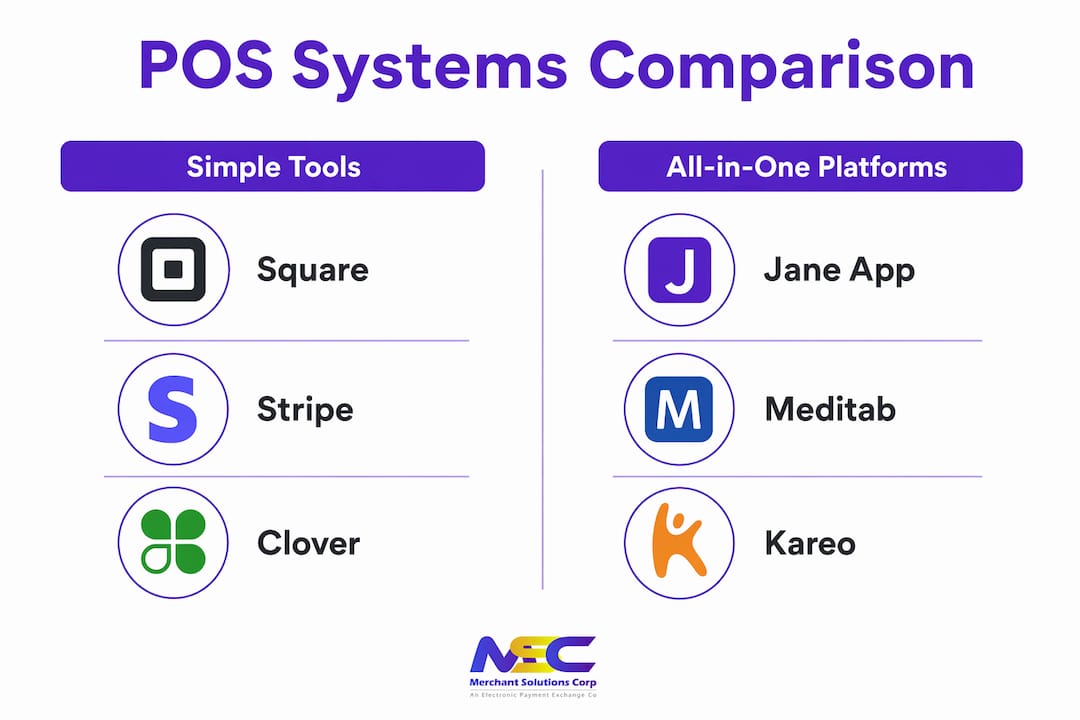
Jane App
Jane App provides an all-in-one platform covering scheduling, charting, billing, and POS in a single system designed specifically for allied health providers including chiropractors. It supports insurance billing and online patient portals, which makes it a strong fit for practices that handle both cash-pay and insurance patients. Pricing runs from $54 to $394 per month depending on the number of practitioners, with processing fees around 2.45% plus $0.25 per transaction.
Clover POS
Clover supports multi-provider clinics with role-based access and connects to EMR systems through third-party integrations. Monthly software fees range from $14.95 to $49.95, though hardware costs add up. The Clover Mini, a compact countertop terminal well-suited for chiropractic front desks, is priced at approximately $599. Clover works well for practices that want reliable hardware with flexible software options.
Stripe Terminal
Stripe Terminal is built for practices with technical resources or a developer on staff. Its API-first design allows deep custom integrations with scheduling and EHR platforms, but it requires more setup than plug-and-play solutions. It is best suited for growing group practices that need a payment layer woven into a custom-built workflow.
Meditab and Kareo
Meditab and Kareo offer full medical practice management with in-depth billing integration and POS functionality, priced between $150 and $400 per month. These platforms include electronic claims submission, ERA/EOB processing, patient statements, and co-pay collection at the point of sale. They are the right choice for insurance-heavy practices that need a single system to manage clinical and financial operations end to end.
| Platform | Monthly Cost | Best For | Insurance Billing | EMR Integration |
|---|---|---|---|---|
| Square | $0–$60 | Solo, cash-pay practices | No | Limited |
| Jane App | $54–$394 | Allied health, mixed billing | Yes | Built-in |
| Clover | $14.95–$49.95 + hardware | Multi-provider clinics | Via third party | Third-party |
| Stripe Terminal | Custom | Tech-forward group practices | Via API | Custom |
| Meditab/Kareo | $150–$400 | Insurance-based practices | Yes | Built-in |
The table above makes one pattern clear: the more complex your billing model, the more you benefit from a platform built specifically for healthcare rather than a general retail POS adapted for clinic use.
Why does integration with practice management and EHR systems matter?
Integrated all-in-one platforms reduce the number of systems your staff must manage and make workflows smoother by centralizing clinical and payment processes. When your POS, scheduling software, and EHR operate as separate tools, your front desk spends significant time re-entering the same data across multiple screens. That repetition introduces errors and slows down every patient interaction.
Here is how a well-integrated POS workflow actually functions in a chiropractic clinic:
- Patient books an appointment online. The scheduling system creates a visit record and attaches the patient’s insurance and payment information automatically.
- Chiropractor completes the visit and documents notes in the EHR. Billing codes are generated from the clinical record without manual input from administrative staff.
- POS system pulls the billing codes and calculates the patient’s responsibility. Co-pays, deductibles, and any outstanding balances appear at checkout without staff needing to calculate them manually.
- Patient pays at the front desk or through a patient portal. The payment posts directly to the patient’s account, updating the ledger in real time.
- Insurance claim is submitted automatically. ERA and EOB responses are reconciled against the original claim, flagging discrepancies for review rather than requiring manual comparison.
This workflow eliminates at least three manual steps that exist in disconnected systems. Practice management experts observe a 2026 trend toward all-in-one chiropractic platforms combining scheduling, charting, and POS, with practices reporting higher workflow efficiency after moving to unified systems. That efficiency gain is not abstract. It translates directly into fewer billing errors, faster claim turnaround, and more time for patient-facing work.
Pro Tip: When evaluating any POS system, ask the vendor for a live demo of the integration between the POS and your existing EHR. A smooth demo is a reliable indicator of how the system will perform under real clinic conditions.
Accurate insurance billing also depends on integration. Superbills, which are itemized receipts that patients submit to insurers for reimbursement, require precise procedure codes and provider information. A POS system that pulls this data directly from the EHR produces accurate superbills consistently, rather than relying on staff to manually compile them from multiple sources.
What practical benefits do chiropractic clinics gain from a specialized POS?
Chiropractic clinics that implement purpose-built POS systems report measurable improvements across four operational areas: patient check-in speed, cash flow consistency, staff efficiency, and billing transparency. Each of these benefits compounds over time, making the investment in the right platform pay off well beyond the first year.
- Faster patient check-in and payment. When patient records, insurance details, and outstanding balances are visible at the front desk in a single screen, check-in takes minutes rather than the back-and-forth of looking up information across multiple systems. Patients notice the difference, and so does your schedule.
- Consistent cash flow through recurring billing. Automated billing for wellness memberships and multi-visit care plans removes the gap between service delivery and payment collection. Patients on payment plans are charged on schedule without requiring staff to initiate each transaction manually.
- Improved staff efficiency with role-based access. When each team member sees only the data relevant to their role, they work faster and make fewer errors. A front-desk coordinator does not need access to clinical notes, and a chiropractor does not need to navigate billing screens to document a visit.
- Audit trails that protect your practice. Every transaction in a well-designed POS system generates a timestamped record tied to a specific user. This protects you during audits, disputes, and insurance reviews by providing a clear, unalterable history of every financial event.
- Revenue insights that inform business decisions. POS reporting tools show you which services generate the most revenue, which providers are the most productive, and where payment collection is lagging. That data gives you a factual basis for decisions about staffing, pricing, and service offerings.
“The right POS system does not just process payments. It gives you a real-time picture of your practice’s financial health, so you can make decisions based on data rather than instinct.”
The point of sale software for clinics that delivers these benefits is not necessarily the most expensive option on the market. It is the one that fits your billing model, integrates with your existing tools, and scales as your practice grows.
Key takeaways
The most effective POS system for a chiropractic practice is one that combines HIPAA compliance, EMR integration, and billing automation at a price point matched to your clinic’s actual complexity.
| Point | Details |
|---|---|
| HIPAA compliance is non-negotiable | Any POS handling patient data must include a signed BAA and secure data handling protocols. |
| Match platform complexity to clinic size | Solo cash-pay practices benefit from lean tools; insurance-based clinics need full practice management platforms. |
| Integration eliminates manual work | Connecting POS to EHR and scheduling removes double data entry and reduces billing errors significantly. |
| Recurring billing stabilizes cash flow | Automated payment plans and membership billing reduce missed payments without adding front-desk workload. |
| Pricing ranges vary widely | Costs run from $0 to $400 per month depending on features, so audit your actual needs before selecting a platform. |
My take on POS systems for chiropractic practices
After working with healthcare-adjacent businesses across the country, one pattern stands out clearly. Chiropractors consistently over-invest in POS complexity during their first technology upgrade, then spend months trying to use features that do not fit how their clinic actually operates.
Smaller or solo chiropractic clinics benefit from lean, reliable tools rather than complex enterprise software they may underutilize. That is not a knock on full-featured platforms. It is a recognition that a $300-per-month system with 40 features you do not use is a worse investment than a $60-per-month system that handles everything your clinic actually needs.
The compliance piece is where I see the most risk. Practices sometimes adopt a general retail POS because it is familiar or inexpensive, without confirming that the vendor will sign a BAA or that the system handles PHI appropriately. That shortcut can create serious liability exposure. Healthcare compliance is not optional, and it is not something to address after the fact.
The trend toward all-in-one platforms in 2026 is real and worth paying attention to. When scheduling, charting, and payment processing live in the same system, the administrative burden on your staff drops noticeably. But “all-in-one” only delivers that benefit if the platform is actually designed for chiropractic workflows, not just marketed to healthcare providers as an afterthought.
My practical advice: start with a clear list of your billing model, patient volume, and integration requirements. Then evaluate platforms against that list rather than against feature counts or marketing claims. The right system is the one your staff will actually use correctly, every day.
— Jonathan
How Merchantsolutionscorp supports chiropractic clinics
Merchantsolutionscorp works with chiropractic practices across the US to configure payment processing solutions that fit clinical workflows and compliance requirements. The platform supports Clover, Square, and smart terminal hardware with $0 upfront options, dual pricing to offset processing fees, and industry-specific setup for healthcare providers. Whether you are a solo practitioner looking for a straightforward terminal or a multi-provider clinic that needs a fully integrated POS system with role-based access and recurring billing, Merchantsolutionscorp provides configured equipment and hands-on support from onboarding through daily operations. Contact the team for a custom recommendation matched to your practice size and billing model.
FAQ
What is a chiropractic POS system?
A chiropractic POS system is a payment and practice management platform that processes patient payments, manages billing, and integrates with scheduling and EHR tools. It differs from a standard retail POS by supporting HIPAA compliance, HSA/FSA acceptance, and healthcare-specific billing workflows.
Do chiropractic POS systems need to be HIPAA compliant?
Yes. Any POS system that stores, processes, or transmits protected health information must operate under a signed Business Associate Agreement and meet HIPAA security standards. Platforms like Jane App, Square for Healthcare, and Clover offer BAA agreements for qualifying accounts.
Can patients pay with HSA or FSA cards at a chiropractic clinic?
HSA and FSA cards are accepted like standard credit cards on POS systems when the merchant account carries a healthcare-related MCC. No special certification is required beyond proper merchant classification, which your payment processor sets up during account configuration.
What is the typical cost of a chiropractic POS system?
Pricing ranges from $0 to $394 per month depending on the platform and number of practitioners. Basic tools like Square start at no monthly cost, while full practice management platforms like Jane App or Kareo run $54 to $400 per month plus processing fees.
Which POS system is best for a solo chiropractic practice?
Square is the most practical starting point for solo or cash-pay chiropractic practices, offering HIPAA-eligible features, HSA/FSA acceptance, and no monthly software fee. Practices that bill insurance should consider Jane App or a comparable allied health platform with built-in insurance billing capabilities.