Stop Paying Over 3%? Read Your Merchant Statement With This SMB Audit
Stop Paying Over 3%? Read Your Merchant Statement With This SMB Audit
The fastest way to know if you’re overpaying is to calculate your effective rate: total fees divided by total volume, multiplied by 100. If that number is higher than a fair range commonly expected for many small businesses, something on the statement needs a second look. Compare it against last month’s figure, then bring anything that looks off to whoever handles your processing setup, including a Merchant Solutions Corp audit, if you want a second set of eyes.
TL;DR:
- Most processing fees are split into non-negotiable interchange and assessments, with the processor markup being the only layer you can negotiate.
- Using interchange-plus pricing reveals exact costs, while tiered models obscure fee details, making rate negotiations more difficult.
- Regularly verifying key figures like total fees, volume, and flat fees can identify hidden charges and assess if your effective rate exceeds typical small business ranges.
- Reading statements thoroughly each month, especially before network rate updates, helps catch unexplained fees, timing issues, or fee increases early.
- Improving operational practices, such as using AVS or batching daily, and negotiating specific fee components can significantly reduce overall processing costs.
Table of Contents
- What a Merchant Statement Actually Shows You
- The Three Fee Layers Hiding in Every Statement
- Interchange-Plus vs. Tiered: Why Your Pricing Model Changes Everything
- Your Step-by-Step Statement Audit Checklist
- Red Flags Worth Questioning Immediately
- Practical Fixes That Actually Lower Your Costs
- How Merchant Solutions Corp Approaches a Statement Review
- Get a Professional Statement Review
- Sources
- FAQ
What a Merchant Statement Actually Shows You
A merchant statement is the monthly record your processor issues showing every card transaction your business ran, plus every fee taken out before the money lands in your bank account. It’s the paper trail behind the gap between what customers paid and what actually deposited.
Most processors deliver statements through an online portal, with a PDF emailed around the same time each month. Some businesses still get paper copies by mail, though that’s increasingly rare.
Four key figures matter most and should be quickly identifiable:
- Gross sales volume representing all card transactions processed
- Transaction count indicating the number of sales processed
- Total fees accounting for all deductions before deposit
- Net deposit amount that reached your bank account
If those four figures don’t reconcile with your point-of-sale reports, that’s your first flag. A POS system that syncs directly with your processor makes that reconciliation far less painful than pulling numbers from two disconnected systems.
The Three Fee Layers Hiding in Every Statement
Every dollar you pay in processing fees breaks into three distinct layers, and understanding the split is what separates a merchant who can negotiate from one who can’t.
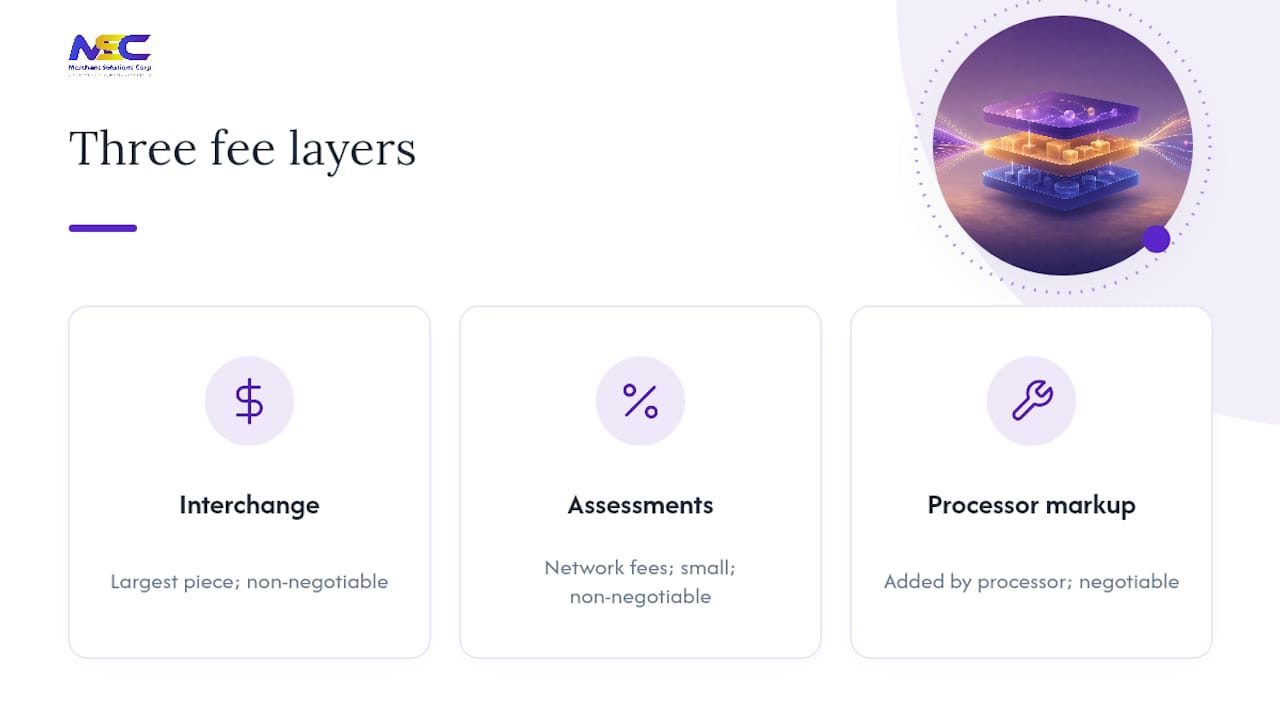
Interchange is the largest piece for most businesses. Card-issuing banks set this rate, and it’s non-negotiable. It varies by card type, business category, and even how the card was entered. According to J.P. Morgan’s merchant guide, interchange typically makes up the bulk of what you pay per transaction.
Assessments come next. These are network fees charged by Visa, Mastercard, and American Express for running their rails. They’re small, usually a fraction of a percent, and also non-negotiable.
Processor markup is the layer that actually matters for negotiation. This is what your processor adds on top of interchange and assessments to make its profit, and it’s the only piece you can push back on.
Watch for common flat fees that may appear alongside percentage-based charges, such as statement or service fees, PCI compliance fees, batch or settlement fees, gateway or terminal rental fees, and early termination or account closure fees. Some are standard industry costs, while others may be added without clear justification.
Interchange-Plus vs. Tiered: Why Your Pricing Model Changes Everything
Your statement’s format tells you which pricing model you’re on, and that single fact determines how much visibility you actually have into your own costs.
An interchange-plus statement lists interchange, assessments, and processor markup as separate line items. You can see exactly what the bank took, what the network took, and what your processor kept. WeAudit’s statement breakdown confirms this is the format that exposes the real math.
A tiered statement does the opposite. Instead of itemizing, it buckets every transaction into “qualified,” “mid-qualified,” or “non-qualified” rates. Those labels sound technical, but they’re really just a way to blend interchange, assessments, and markup into one number you can’t unpack.
Here’s how to tell which one you have:
- IC+ statements show a line for “interchange,” a separate line for “assessment,” and a separate markup percentage or per-transaction fee.
- Tiered statements show three or fewer bucketed rates with no interchange detail underneath them.
If you’re on tiered pricing and can’t get a straight answer about your actual markup, request interchange detail from your processor or ask about switching to interchange-plus. Tiered pricing exists mainly to obscure the processor’s margin, and once you see it laid out, the incentive to switch becomes obvious.
Your Step-by-Step Statement Audit Checklist
Reading one statement carefully takes about fifteen minutes once you know the order to check things in. Work through these five steps every month, not just when something feels wrong.
-
Verify account information. Confirm your merchant ID (MID), the statement dates, and that the deposit amount matches what actually hit your bank account. A mismatch here usually means a timing issue, but it’s worth ruling out first.
-
Find total fees and total volume, then calculate your effective rate. Divide total fees by total volume and multiply by 100. A fair range for many small businesses runs roughly 2.0% to 2.8%; above 3% is worth questioning, though retailers often see tighter ranges than ecommerce businesses given differences in card-present risk.
-
Identify your pricing model and separate the layers. Confirm whether you’re on interchange-plus or tiered, then break down how much came from interchange, assessments, and markup.
-
Add up every flat monthly fee and compare it to what you expect. PCI fees, statement fees, gateway fees. If a new line item appeared that wasn’t there three months ago, that’s a question to ask.
-
Spot-check the math and compare against prior months. Look specifically at April and October, since card networks typically update interchange rates during those two windows, and your effective rate can shift as a result.
Pro Tip: Start your review with the flat fees, not the percentage rates. Flat fees are the easiest for a processor to change quietly, and they’re the fastest to spot because they don’t move with your sales volume the way interchange does.
Red Flags Worth Questioning Immediately
Some statement entries deserve an email to your processor the same day you see them, not a mental note for later.
- Vague, round-number monthly charges labeled something like “regulatory recovery fee” or “service fee” with no clear explanation
- PCI fees billed after you’ve already submitted compliance paperwork — ask for proof the fee is still warranted
- Assessment rates that don’t match published network rates, or markup buried inside what should be a pass-through assessment line
- Unexplained chargebacks or reversals that don’t match your own sales records
- Batching or settlement timing that pushes transactions into a higher interchange tier than they should qualify for
- Small-print notices announcing a fee increase taking effect next cycle, easy to miss if you only skim the summary page
Reading every page, not just the summary, is the only reliable way to catch that last one before it costs you a full billing cycle.
Practical Fixes That Actually Lower Your Costs
Some of the biggest savings come from operational changes that have nothing to do with switching providers.

Using AVS (Address Verification Service) and CVD checks on card-not-present transactions helps you qualify for better interchange tiers, since unverified transactions carry more risk and cost more to process. For B2B and government-facing sales, submitting Level II or Level III data (purchase order numbers, tax amounts, line-item detail) can meaningfully reduce interchange on qualifying transactions, though it usually requires your POS or invoicing system to populate those fields automatically.
Settling batches daily, rather than every few days, also helps avoid the downgrade penalties some networks apply to late settlement. And matching your entry mode correctly, swiped or dipped for in-person sales, keyed only when unavoidable, keeps transactions in the lowest-cost category they qualify for.
On the contractual side:
- Ask your processor directly for interchange-plus pricing if you’re currently on tiered
- Request a full interchange detail report going back three to six months
- Audit every flat fee and ask what each one covers
- Negotiate the markup percentage specifically, since it’s the only layer that’s actually up for discussion
Pro Tip: If your statement runs more than a few pages and you can’t reconcile the math in fifteen minutes, that’s usually a sign it’s time for a formal audit rather than another self-review.
How Merchant Solutions Corp Approaches a Statement Review
Merchant Solutions Corp reviews statements in three stages: audit the current fee structure, identify where markup or downgrades are inflating costs, then implement fixes like AVS, correct entry modes, or Level II/III integration through the POS setup. Merchants considering a switch or a second opinion usually start with a side-by-side comparison of their last three statements.
— Jonathan
Get a Professional Statement Review
If your effective rate keeps drifting above the range it should sit in, or your statement format makes that number impossible to pin down, a professional review closes the gap fast. Merchant Solutions Corp audits your current statement, identifies where interchange downgrades or processor markup are adding unnecessary cost, and maps out the operational fixes, from AVS settings to Level II/III integration, that bring the number back down. The review typically flags savings opportunities within days, not weeks, and comes with a clear breakdown of what’s negotiable and what isn’t. Start with a payment processing review to see where your current setup stands.
Sources
- How to Read Your Merchant Statement (2026 Guide)
- A merchant’s guide to card acceptance fees (J.P. Morgan)
- How to Read Your Merchant Statement: Every Fee Explained (WeAudit)
FAQ
What Is a Merchant Statement?
A merchant statement is the monthly record from your payment processor showing every card transaction, every fee deducted, and your net deposit for the billing period.
How Do I Get My Merchant Statement?
Most processors deliver statements through an online merchant portal or by email each month, though some still offer paper statements by mail on request.
How Do I Read a Statement of Account Step by Step?
Verify your account details first, then calculate your effective rate by dividing total fees by total volume, identify your pricing model, total your flat fees, and compare the whole statement to the prior month.
What Effective Rate Should I Expect to See?
A fair range for many small businesses runs roughly 2.0% to 2.8%, though retailers often see tighter ranges than ecommerce businesses, and anything above 3% is worth investigating.