Step by Step Payment Processing Guide for Small Businesses
Step by Step Payment Processing Guide for Small Businesses

Payment processing is defined as the sequence of steps that moves a customer’s payment from transaction initiation through authorization, clearing, and final settlement into your business bank account. Every time a customer swipes a card, taps a phone, or checks out online, a chain of events involving a merchant account, payment gateway, payment processor, and issuing bank executes in seconds. This guide walks you through each phase of that process, from choosing a provider like Stripe, Square, or PayPal to understanding PCI DSS compliance and settlement timing, so you can build a payment setup that works reliably from day one.
What is payment processing and why does it matter for small businesses?
Payment processing is the infrastructure that connects your customer’s bank to yours. Without it, you cannot accept credit cards, debit cards, digital wallets, or ACH transfers. For small businesses, understanding this infrastructure is the difference between a checkout experience that converts and one that loses sales.
The core components of any payment processing system are:
- Merchant account: A specialized bank account that holds funds from card transactions before they transfer to your operating account. You open one directly with a bank or through a payment service provider (PSP).
- Payment gateway: The technology that encrypts and transmits transaction data between your point of sale or website and the payment processor. Providers like Square offer secure gateway integration for ecommerce platforms.
- Payment processor: The company that routes transaction data between the acquiring bank (your bank) and the issuing bank (the customer’s bank).
- Issuing bank: The customer’s bank that approves or declines the transaction based on available funds and fraud checks.
- Acquiring bank: Your bank, which receives the approved funds and deposits them into your merchant account.
PSPs like Stripe, PayPal, and Square bundle merchant accounts, gateways, fraud tools, and reporting into a single platform. This makes them the fastest path to accepting payments for most small businesses. The tradeoff is that PSPs use pooled accounts, which can mean slightly less control over fund timing compared to a dedicated bank merchant account.
Pro Tip: If you expect monthly card volume above $10,000, compare the per-transaction fees of a PSP against a dedicated merchant account. The savings on a dedicated account often outweigh the added setup complexity at that volume.
Efficient payment processing also directly affects customer experience. Offering multiple payment methods, including cards, ACH, digital wallets, and buy now pay later (BNPL) options, increases customer conversion and reduces cart abandonment. Customers who cannot pay the way they prefer simply leave.
How to set up payment processing: step by step merchant account and gateway setup
The step by step payment setup guide below applies whether you are opening a retail store, launching an ecommerce site, or running a restaurant. The process follows the same logical sequence regardless of industry.
Step 1: Define your payment channels. Decide where you will accept payments: in person, online, mobile, or all three. This determines which hardware and software you need before you contact any provider.

Step 2: Choose between a bank merchant account and a PSP. Bank merchant accounts offer dedicated accounts, negotiated rates, and faster settlement for high-volume businesses. PSPs like Stripe, PayPal, and Square offer faster onboarding, often within one business day, with bundled services. Visa confirms that merchants can open merchant accounts via banks or PSPs, with PSPs simplifying setup for businesses that want to start quickly.
Step 3: Gather your documentation. Most providers require a government-issued ID, business license, EIN (Employer Identification Number), voided business check, and three to six months of bank statements for underwriting.
Step 4: Complete the merchant application. PSP applications typically take minutes online. Bank merchant account applications involve underwriting review and can take three to seven business days. High-risk industries, including CBD businesses and certain service categories, face additional scrutiny and may need a specialized provider.
Step 5: Select and integrate your payment gateway. For ecommerce, your gateway must integrate with your platform, whether that is Shopify, WooCommerce, or a custom site. For in-person sales, your POS terminal handles gateway functions automatically. Review the online payment setup options available for small businesses before committing to a provider.
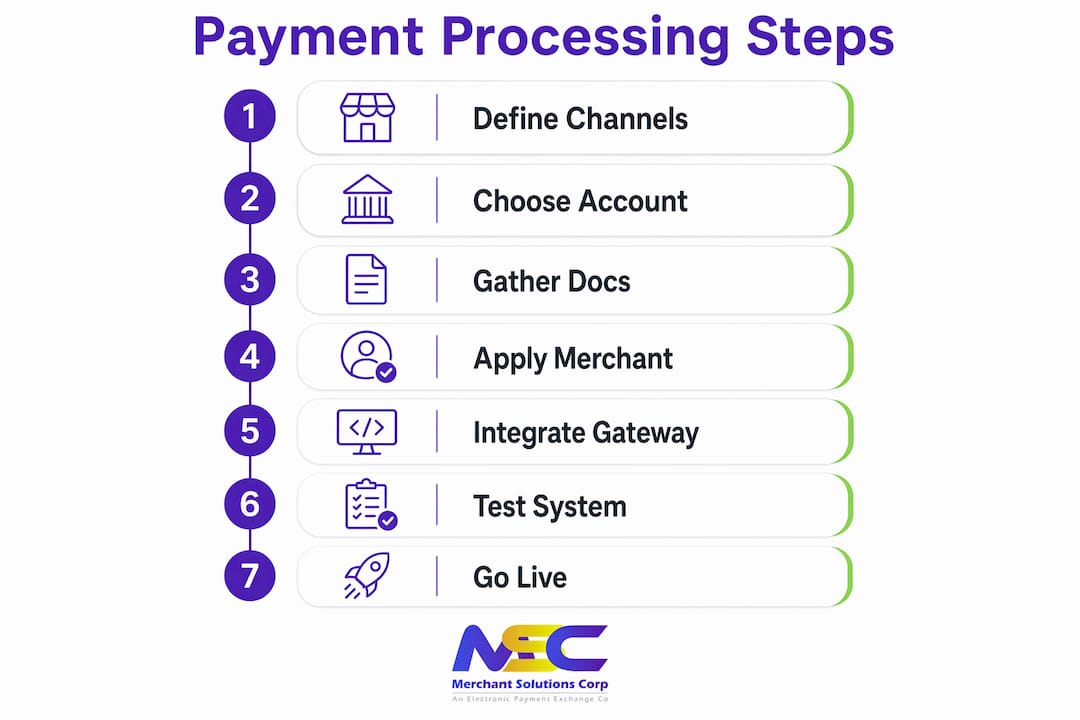
Step 6: Configure pricing and fees. Payment processing fees typically fall into three models:
| Pricing Model | How It Works | Best For |
|---|---|---|
| Flat rate | Fixed percentage per transaction (e.g., 2.6% + $0.10) | Low-volume or new businesses |
| Interchange plus | Interchange cost plus a fixed markup | Mid to high-volume businesses |
| Tiered pricing | Transactions sorted into qualified, mid-qualified, non-qualified tiers | Variable; often less transparent |
Step 7: Test before going live. Run test transactions across every payment method you plan to accept. This step is covered in detail later in this guide.
Pro Tip: Ask every provider about their support model before signing. A provider that offers 24/7 phone support is worth more than one with slightly lower rates if a payment outage hits during a Friday dinner rush.
How does the payment workflow work from checkout to settlement?
The step by step payment processing workflow has four distinct phases. Understanding each phase helps you diagnose problems, manage cash flow, and set accurate expectations for when funds arrive.
Phase 1: Transaction initiation and encryption
When a customer pays by card or digital wallet, the payment gateway captures the card data and encrypts it immediately using TLS (Transport Layer Security) or end-to-end encryption. The encrypted transaction data then moves from the gateway to the acquiring bank, which routes it to the card network (Visa, Mastercard, American Express, or Discover) and on to the issuing bank.
Phase 2: Authorization
The issuing bank checks the transaction against the customer’s available balance, credit limit, and fraud rules. It returns an approval or decline code within two to three seconds. An approved authorization places a hold on the customer’s funds but does not yet move money to your account. This distinction matters: authorization confirms the funds exist; settlement is when you actually receive them.
Phase 3: Batching and clearing
Authorized transactions accumulate throughout the day in a batch. At the end of the business day, the batch closes and is submitted to the processor for clearing. Timely batch closing is critical because delayed or missed batch submissions push your settlement back by a full business day. Most modern POS systems and PSPs close batches automatically, but older terminal setups may require a manual close.
Phase 4: Settlement
After clearing, the processor calculates the net amount owed to you after deducting interchange fees and processing fees, then initiates a deposit to your merchant account. Standard settlement timing for credit and debit card payments is one to three business days. Cross-border transactions involving currency conversion can take three to seven business days due to additional intermediaries.
Key factors that affect settlement speed:
- Your processor’s funding schedule (next-day funding is available from some providers for an added fee)
- Whether you use a PSP pooled account or a dedicated merchant account
- The payment method: ACH transfers typically settle in two to three business days; digital wallet payments often settle faster
- Any holds placed by your processor for risk review, which are more common for new accounts or unusually large transactions
How to ensure security and PCI compliance in your payment setup
PCI DSS (Payment Card Industry Data Security Standard) compliance is the set of security requirements that every business accepting card payments must meet. It is not optional, and it is not something you can delegate entirely to your payment processor.
Merchants remain responsible for PCI compliance within their own cardholder data environment, even when using a fully compliant processor. This means you are accountable for how card data flows through your systems, who has access to it, and how you document your controls.
Here is the step by step compliance process for most small businesses:
- Determine your SAQ type. The Self-Assessment Questionnaire (SAQ) you complete depends on how you accept payments. Businesses that only use hosted payment pages (where the customer enters card data directly on the processor’s page, never touching your server) qualify for SAQ A, the simplest form. Businesses that process card data on their own servers face more complex requirements.
- Reduce your scope. The fewer systems that touch card data, the smaller your compliance burden. Using a payment gateway with tokenization means your system never stores raw card numbers. Tokenization replaces card data with a non-sensitive token that is useless if intercepted.
- Enable 3D Secure authentication. 3D Secure (used by Visa as Visa Secure and by Mastercard as Mastercard Identity Check) adds an authentication step for online transactions, reducing fraud liability and chargebacks.
- Complete your annual SAQ and quarterly scans. Most small businesses must complete an annual SAQ and run quarterly network scans through an Approved Scanning Vendor (ASV).
- Document everything. Keep records of your security policies, access controls, and any changes to your payment environment.
“PCI compliance is not a one-time checkbox. It is an ongoing operational responsibility that requires documentation, proactive management, and regular review as your business and technology change.” — PCICompliance.com
Pro Tip: Work with a payment processor that provides a compliance portal, such as the tools offered through Merchantsolutionscorp, to track your SAQ status, scan results, and compliance deadlines in one place. Missing a renewal deadline can result in non-compliance fees from your acquiring bank.
How to test, optimize, and troubleshoot your payment processing setup
Testing is the step most small businesses skip, and it is the step that prevents the most expensive problems. A payment setup that works for Visa credit cards may fail silently for ACH transfers or Apple Pay if you never test those channels before going live.
Comprehensive transaction testing should cover every payment method and channel you plan to accept, with end-to-end checks from authorization through settlement and reconciliation. This means running test transactions for in-person card swipes, chip reads, NFC (tap to pay), online checkout, and any mobile payment options.
Common setup mistakes to avoid:
- Overcomplicated checkout flows: Every additional step in your online checkout reduces conversion. Guest checkout is not optional for ecommerce. Requiring account creation before payment is one of the leading causes of cart abandonment.
- Missing payment method coverage: If your POS terminal does not accept contactless payments, you are turning away customers who no longer carry physical cards.
- Ignoring settlement reports: Review your daily settlement reports against your transaction records. Discrepancies between authorized amounts and settled amounts indicate fee errors, partial captures, or processor issues that compound over time if ignored.
- No chargeback process: Every business that accepts card payments will eventually receive a chargeback. Having a documented response process, including saved receipts, delivery confirmations, and customer communication records, is the difference between winning and losing a dispute.
Pro Tip: Set up automated reconciliation alerts through your POS or accounting software. Tools like QuickBooks, Xero, and most modern POS systems can flag settlement discrepancies automatically, saving hours of manual review each month.
Staying current with payment technology also protects your business long term. Contactless payments, digital wallets, and BNPL options are now standard customer expectations, not premium features. A payment setup built in 2020 may be missing the methods your customers prefer in 2026.
Key takeaways
Effective payment processing requires the right provider, a documented compliance posture, and end-to-end testing across every payment method before you go live.
| Point | Details |
|---|---|
| Choose the right account type | PSPs offer fast setup; dedicated merchant accounts suit higher-volume businesses with better rate control. |
| Understand the four-phase workflow | Authorization, batching, clearing, and settlement each affect when funds reach your account. |
| Own your PCI compliance | Merchants are responsible for their cardholder data environment regardless of which processor they use. |
| Test every payment channel | Run end-to-end tests for all payment methods before launch to catch authorization and settlement gaps. |
| Monitor settlement reports daily | Daily reconciliation catches fee errors and discrepancies before they become costly accounting problems. |
What most payment guides get wrong about small business setup
Most payment processing guides treat setup as a one-time event. You pick a provider, plug in a terminal, and move on. That framing causes real problems six months later when a business discovers its batch closing is set to the wrong time zone, its PCI SAQ expired, or its checkout flow is losing 20% of mobile customers because it never supported Apple Pay.
The businesses that handle payment processing well treat it as an operational system, not a one-time installation. That means scheduling a quarterly review of your settlement reports, revisiting your PCI compliance status annually, and testing new payment methods before your customers ask why you do not accept them.
The provider selection decision also deserves more attention than most guides give it. Switching payment processors mid-operation is disruptive. It requires re-integrating your gateway, retraining staff, and potentially re-underwriting your merchant account. Choosing a provider with scalable pricing, strong support, and hardware flexibility from the start saves significant operational friction later. Merchantsolutionscorp works with businesses across retail, restaurants, and service industries precisely because those sectors have different volume patterns, hardware needs, and compliance considerations. A restaurant doing $80,000 per month in card volume has different settlement and hardware requirements than a service business billing $15,000 per month.
The security piece is where I see the most complacency. Tokenization and 3D Secure are not advanced features reserved for enterprise businesses. They are baseline protections that every small business accepting online payments should have active. A single chargeback fraud event can cost more than a year of compliance fees. The math is straightforward.
— Jonathan
Get your payment processing set up with Merchantsolutionscorp
Merchantsolutionscorp provides payment processing and POS systems for restaurants, retail stores, and service businesses across the US and Canada. The platform covers credit card and ACH processing, Clover and Square POS systems, mobile terminals, and dual pricing solutions that offset processing fees. Free hardware programs with $0 upfront options mean you can get fully configured equipment without a large initial investment. Whether you are building your first payment setup or replacing an underperforming system, Merchantsolutionscorp handles onboarding, compliance support, and daily operations so you can focus on running your business. Review current processing pricing to find the right fit for your volume and business type.
FAQ
What is the difference between a payment gateway and a payment processor?
A payment gateway encrypts and transmits transaction data from your checkout to the payment network. A payment processor routes that data between your acquiring bank and the customer’s issuing bank to complete the authorization.
How long does it take to set up a merchant account?
PSP accounts through providers like Stripe or Square can be active within one business day. Dedicated bank merchant accounts typically take three to seven business days due to underwriting review.
How long does payment settlement take for small businesses?
Standard settlement for credit and debit card payments takes one to three business days. Cross-border transactions can take three to seven business days depending on currency conversion and intermediary banks involved.
What is PCI DSS compliance and do small businesses need it?
PCI DSS is the security standard that applies to every business accepting card payments, regardless of size. Merchants are responsible for their own compliance even when using a compliant processor, and non-compliance can result in fines and increased processing fees.
What payment methods should a small business accept?
At minimum, accept Visa, Mastercard, and contactless payments including Apple Pay and Google Pay. Offering ACH, digital wallets, and BNPL options increases conversion and reduces cart abandonment across customer segments.