Tableside Ordering for Restaurant Managers: Two Week Pilot to Go Live
Tableside Ordering for Restaurant Managers: Two Week Pilot to Go Live
Tableside ordering lets servers or guests place and pay for orders directly at the table using a handheld device, tablet, or QR code, sending the ticket straight to the kitchen. Restaurants that deploy it correctly see faster order-to-kitchen times, fewer entry errors, and higher average checks through built-in upsell prompts. None of that happens automatically. The gains depend entirely on solid POS integration, a trained staff, and a network that doesn’t drop mid-service.
TL;DR:
- Only systems with real-time inventory sync and seamless POS integration prevent selling items that are no longer available after a tableside order is placed.
- Choosing the correct delivery model—handheld, tablet, QR, or hybrid—depends on your restaurant type, with each model suited to specific service styles and customer expectations.
- Proper pilot testing with set KPIs and staff training is crucial to avoid service disruptions and ensure the system delivers speed and accuracy improvements.
- Hardware resilience, dedicated Wi-Fi, and automatic backup connections are essential to keep tableside ordering reliable during busy service times.
- Staff resistance can be mitigated by emphasizing how tableside tools reduce manual work and increase tips through effective upselling prompts.
Table of Contents
- What Is Tableside Ordering, and Which Model Fits Your Restaurant?
- How Does Tableside Ordering Work From Table to Payment?
- What Business Benefits Come From Tableside Ordering, and How Do You Measure Them?
- How Do You Implement Tableside Ordering Step by Step?
- What Hardware and Network Setup Keeps Tableside Ordering Reliable?
- How Do You Train Staff and Troubleshoot Tableside Ordering Issues?
- How Does Merchant Solutions Corp Support a Tableside Ordering Rollout?
- How Does Tableside Ordering Change the Guest Experience?
- How Does Tableside Ordering Integrate With Existing POS and Inventory Systems?
- What Does Tableside Ordering Cost, and What’s the Realistic ROI?
- What Security and Privacy Steps Go Beyond PCI Compliance?
- Why Do Staff Resist Tableside Ordering, and How Do You Manage the Shift?
- The Real Bottleneck Isn’t the Technology
- Ready to Evaluate Tableside Ordering Hardware for Your Restaurant?
- Sources
- FAQ
What Is Tableside Ordering, and Which Model Fits Your Restaurant?
Tableside ordering covers four distinct delivery models, and picking the wrong one for your concept is the most common rollout mistake. Staff handheld POS puts a rugged device in the server’s hand, replacing the notepad and the trip to a stationary terminal. Dedicated table tablets sit at each table so guests browse and order at their own pace, common in casual dining and sports bars. QR-based self-ordering lets guests scan a code and order from their own phone, popular in QSR and fast-casual settings where labor is tight. Hybrid models combine staff handhelds for full service with QR ordering for drink refills or add-ons.
Fine dining tends to favor handhelds, since guests expect a server relationship, not a screen. Casual dining and pubs do well with table tablets that encourage browsing and add-on orders. QSR and fast-casual concepts lean hardest on QR ordering to cut labor per transaction, a shift documented in restaurant tableside ordering guides covering use cases across concepts.
Whatever model you choose, baseline features matter more than the hardware brand:
- Modifier support for allergies, substitutions, and special requests
- Split-check functionality for group dining
- Contactless and chip payment acceptance at the table
- Real-time sync with your kitchen display system
How Does Tableside Ordering Work From Table to Payment?
The workflow starts with table or session activation. A server taps into a table on a handheld, or a guest scans a QR code that opens a session tied to that specific table number. This step matters more than it sounds: unique per-table codes prevent orders from landing on the wrong ticket, a failure mode flagged repeatedly in step-by-step table ordering guidance.
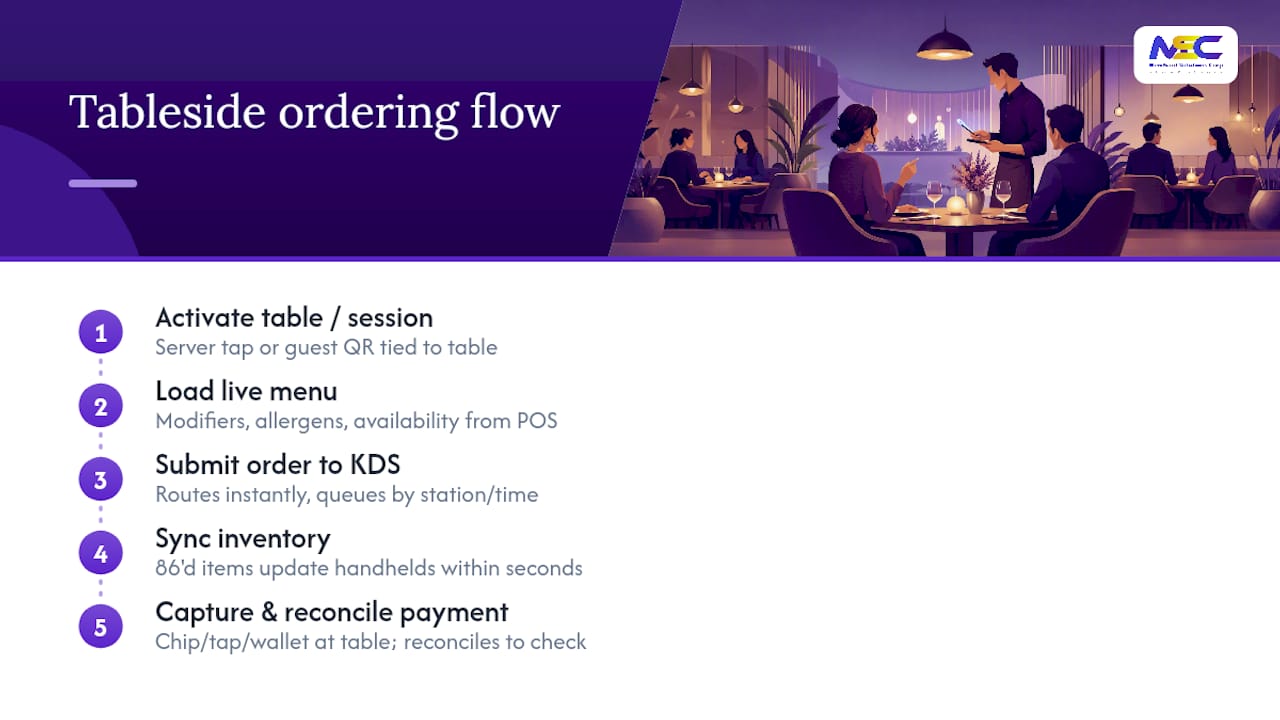
Once the session is active, the menu loads with live modifiers, allergen flags, and item availability pulled from your POS. A guest or server selects items, customizes them, and submits. That order routes instantly to the kitchen display system, where it queues by prep station and ticket time. There’s no walk to a terminal, no handwritten ticket, no delay while a server finishes a lap of the floor.
Inventory sync happens in the background. When the kitchen marks an item as 86’d, that change should propagate to every handheld and tablet within seconds, not minutes. This is where cheaper systems fall apart. If your inventory feed lags, servers keep selling items the kitchen can’t make, which creates the exact error rate tableside ordering is supposed to eliminate.
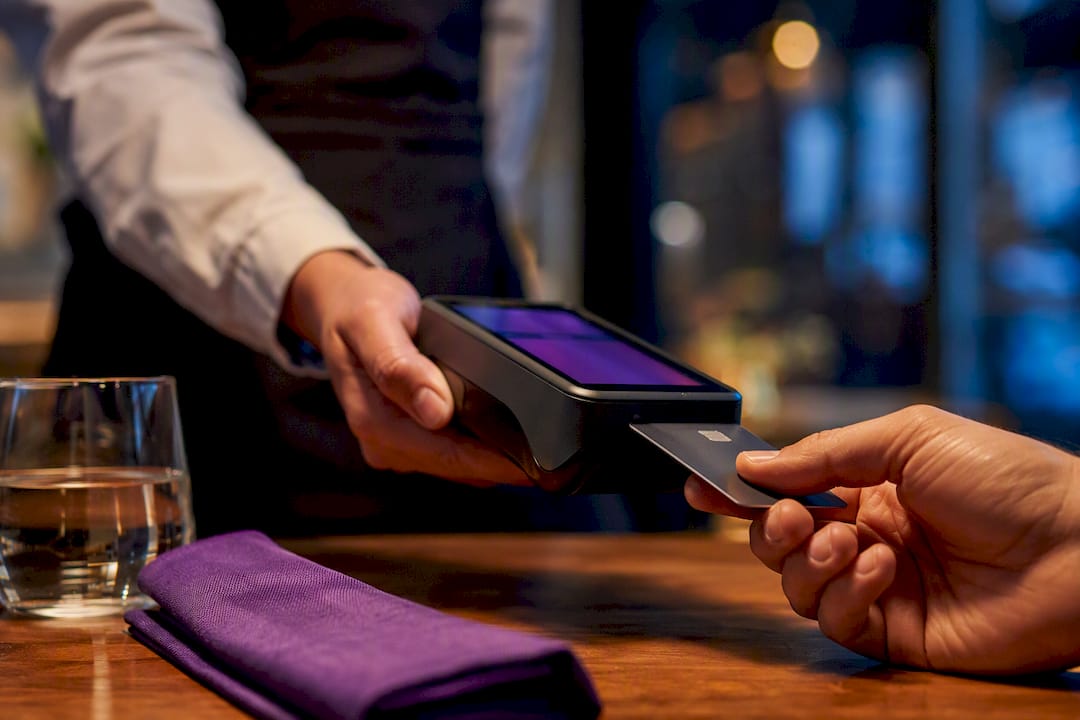
Payment capture at the table closes the loop. The guest pays via chip, tap, or mobile wallet directly from the handheld or tablet, and that transaction reconciles automatically against the open check in your POS. No walking a card to a register, no holding a card at the host stand. For restaurants tracking labor against guest experience, this single step often accounts for several minutes of reclaimed server time per table, which lines up with the labor pressure driving broader adoption of mobile POS tools, as NetSuite’s analysis of restaurant staffing points out.
Integration testing under simulated peak load, meaning firing many simultaneous orders at the KDS to confirm queuing holds and payment authorization times don’t slip, separates rollouts that work from rollouts that stall on a Friday night.
What Business Benefits Come From Tableside Ordering, and How Do You Measure Them?
Speed, accuracy, and upsell revenue are the three levers tableside ordering pulls, and each one converts into a specific KPI you should be tracking from week one.
Speed shows up as order-to-kitchen time, the gap between when a guest decides what to order and when the ticket hits the kitchen display. Cutting the walk-to-terminal step out of that process is where most of the time savings comes from.
Accuracy shows up as order error rate. Manual re-entry, illegible handwriting, and misheard modifiers are the usual causes of kitchen mistakes, and digital entry at the source removes most of them.
Upsell potential shows up in average check. A tablet or handheld interface can surface a suggested appetizer or a premium pour at the exact moment a guest is deciding, something a rushed server on a packed Friday night might skip entirely.
Pro Tip: Track order error rate for two full weeks before rollout and two full weeks after. That before-and-after comparison is the single most convincing number you’ll bring to a franchise owner or investor meeting.
The KPIs worth watching on a rolling basis:
- Order-to-kitchen time (target: seconds, not minutes)
- Order error rate (percentage of tickets requiring a remake)
- Average check size (pre- and post-rollout comparison)
- Covers per hour (a proxy for table turnover)
Case studies from vendors and operators consistently point to measurable gains in speed, accuracy, and table turn once mobile POS and kitchen display integration are dialed in correctly. The National Restaurant Association’s industry research is a useful benchmark when you want to compare your own numbers against broader labor and service trends, rather than guessing whether your gains are typical.
How Do You Implement Tableside Ordering Step by Step?
A rollout that skips steps is a rollout that fails during a busy Saturday, not during the quiet Tuesday test run. Follow this sequence in order.
- Assess your service style and pick a delivery model. Match handhelds, tablets, or QR ordering to your concept, as covered above, and confirm the choice with your floor managers before you sign anything.
- Verify POS, KDS, and payment integration. Confirm your chosen tableside system talks natively to your existing point-of-sale and kitchen display, and read the integration terms in your contract closely. A step-by-step guide to menu setup in Square POS is a useful reference if that’s your existing platform.
- Build your digital menu with modifiers and upsell prompts baked in. Every allergen flag, substitution option, and suggested add-on needs to be configured before launch, not patched in after guests start complaining.
- Run a hardware and network checklist. Confirm device battery life covers a full shift, charging stations are placed near service stations, and Wi-Fi coverage reaches every dining area, including the patio.
- Pilot test with a single section or shift. Simulate peak-load ordering by firing multiple simultaneous tickets in the kitchen display to confirm queuing holds, a test practitioners flag as a key differentiator between smooth launches and chaotic ones, according to reporting on tableside ordering’s effect on server workflow.
- Train staff on the full workflow, not just the happy path. Cover what to do when a device loses connection or a payment declines.
- Soft launch during a slower shift, then monitor error rates and order times daily for the first two weeks.
Pro Tip: Keep your old order-taking method available as a manual backup for the first two weeks. A single dead device shouldn’t take a table out of service.
A short pilot with clear KPIs, meaning order accuracy, average check, and table turn tracked against a defined rollback plan, reduces launch risk far more than jumping straight to a full-restaurant rollout.
What Hardware and Network Setup Keeps Tableside Ordering Reliable?
Devices that survive a restaurant floor need drop resistance, a screen readable under dim lighting, and a battery that lasts a full dinner shift without a mid-service charge. Cheap consumer tablets rarely hold up past a few months of nightly drops and spills.
Network design matters more than device choice. A dedicated POS SSID, separate from guest Wi-Fi, with VLAN tagging and reserved bandwidth for transaction packets, keeps payment traffic from competing with a table full of guests streaming video. Cellular failover at the router level, meaning a 4G LTE backup that kicks in automatically during a Wi-Fi outage, keeps payments flowing when your primary connection drops.
Key connectivity and hardware considerations:
- Enterprise-grade Wi-Fi or mesh coverage reaching every dining area, including patios and back rooms
- A dedicated POS SSID separate from guest and back-office networks
- Cellular backup that activates automatically, not manually
- Charging stations positioned near service stations, not the back office
- Kitchen display redundancy, meaning a second screen or printer fallback if the primary KDS goes down
Offline mode behavior deserves its own test during your pilot. A well-built system should queue orders locally when connectivity drops and sync them automatically once the connection returns, without duplicating tickets or losing modifiers. Kitchen display reliability and inventory sync are common failure points worth stress-testing before your first live shift, not after a guest complains about a missing order.
How Do You Train Staff and Troubleshoot Tableside Ordering Issues?
Training needs a real timeline, not a five-minute huddle before open. Give servers and kitchen staff at least two full shifts of hands-on practice before the system touches a live table, and walk hosts through how table activation and QR codes work so they can help confused guests.
On-shift, assign one manager or lead server per shift to monitor the KDS queue and device health during the first two weeks. That person catches problems before they become guest complaints.
Common issues and their fixes:
- Orders not appearing on the kitchen display: check the device’s network connection first, then confirm the KDS itself hasn’t lost sync with the POS.
- Payment declines at the table: retry once, then fall back to a manual card swipe at the register if the handheld’s connection is unstable.
- QR code mix-ups between tables: confirm every table has a unique, clearly labeled code, and recheck any table that was recently rearranged.
Pro Tip: Ask servers for informal feedback after every shift during the first two weeks. The fixes that matter most usually surface in day-to-day complaints, not formal surveys.
How Does Merchant Solutions Corp Support a Tableside Ordering Rollout?
Merchant Solutions Corp builds tableside ordering around the same POS backbone that handles your payment processing, so tickets, inventory, and payments stay in one system instead of three disconnected apps. The company’s restaurant-focused solutions cover QR code mobile ordering for self-service concepts, kitchen display integrations for real-time ticket routing, and free hardware programs that lower the upfront cost of outfitting a full dining room with handhelds or tablets.
Industry-specific setups extend to high-risk and specialty restaurant categories that struggle to get approved with standard processors. Onboarding is built to move fast: apply, get approved, and start taking tableside orders on configured equipment without a drawn-out implementation cycle. For operators comparing self-ordering kiosks against server-driven handhelds, the iTab QSR kiosk POS page outlines a kiosk-based alternative that fits fast-casual and quick-service floors particularly well.
How Does Tableside Ordering Change the Guest Experience?
Guests notice the wait less when the order goes in faster, and that’s the part of tableside ordering that shows up in feedback before it shows up in any spreadsheet. A tablet or handheld interface also gives guests visual menu items, which tends to increase confidence in ordering unfamiliar dishes compared to a verbal description from a rushed server.
Feedback mechanisms built into tableside systems, such as a quick rating prompt after payment or a comment field on the digital receipt, give operators a faster read on service quality than waiting for a third-party review weeks later. That immediacy matters: a guest who had a rough experience with a confusing QR flow will tell you right after the meal, not three days later on a review site.
There’s a tradeoff worth naming honestly. Some guests, particularly older diners or those who value the ritual of a server’s recommendation, find tablet-first ordering impersonal. The hybrid model exists for exactly this reason, letting a server keep the relationship while the tablet handles the transactional parts of the visit. Restaurants that ignore this split and force every table onto a tablet often see a small but real drop in guest satisfaction scores among their most loyal, older customer base.
Clear digital menu design also affects how guests perceive your food before it ever reaches the table, which is why menu photography and item descriptions deserve as much attention as the ordering flow itself. Pairing a tableside rollout with sharper restaurant marketing and menu visibility work tends to reinforce the same goal: guests decide faster, and the decision feels good.
How Does Tableside Ordering Integrate With Existing POS and Inventory Systems?
Integration quality determines whether tableside ordering feels like one system or three bolted together. The tableside app needs a live, two-way connection to your POS for menu items, pricing, and modifiers, and an equally live connection to your inventory tracking so items get pulled the moment they run out.
Most modern POS platforms, including Clover and Square, support this kind of integration through APIs built for exactly this purpose. The failure mode to watch for is a one-way sync, where the tableside app pulls menu data on a schedule instead of in real time. That lag is where 86’d items keep getting ordered and where price changes take hours to reach the floor instead of seconds.
Ask any vendor directly how their system handles inventory depletion in real time and how quickly a price change in the back office reaches a guest-facing tablet. If the answer involves a manual sync button or a nightly batch job, that’s a warning sign, not a minor inconvenience. Restaurants running multiple locations should also confirm whether inventory and menu changes can be pushed centrally across every site at once, rather than requiring a manager at each location to update settings manually.
What Does Tableside Ordering Cost, and What’s the Realistic ROI?
Costs break into three categories: hardware, software or subscription fees, and integration or setup work. Handheld devices and tablets typically range from budget consumer-grade units to ruggedized commercial hardware, and many providers, including Merchant Solutions Corp, offer free hardware programs that shift the cost model away from a large upfront purchase.
ROI shows up fastest in labor reallocation and average check lift. A server who spends less time walking to a terminal and back can turn tables faster and cover more sections, which either reduces the staff needed per shift or increases the covers that same staff can handle. Upsell prompts built into the ordering flow add incremental revenue per check without requiring the server to remember every suggestive-selling script.
The realistic timeline for seeing a return depends heavily on execution. A rollout with a tight pilot, clear KPIs, and a rollback plan tends to show measurable gains in error rate and order speed within the first month, according to guidance on phased table ordering rollouts. A rushed rollout without staff training or network testing often shows the opposite: higher complaint volume and slower service for the first several weeks before it stabilizes.
What Security and Privacy Steps Go Beyond PCI Compliance?
PCI DSS compliance covers how card data moves through your payment system, but tableside ordering introduces data touchpoints that PCI doesn’t fully address. Guest phone numbers collected for order updates, loyalty program enrollment through a tablet, and order history tied to a specific table or device all count as guest data that needs its own handling policy.
Tokenization, meaning replacing sensitive card data with a randomized token immediately at the point of capture, should happen at the device level before any data travels across your network. This matters even more with tableside systems because the transaction originates farther from your secured back-office terminal than a traditional register.
Guest-facing tablets sitting on an open table also create a physical security consideration that PCI never covers: a device left logged into an active session, or a QR code that doesn’t expire after a session closes, can expose a previous guest’s order history to the next table. Session timeouts and automatic logouts after payment completion close that gap.
Device management matters too. Every tablet and handheld should run on a locked-down operating system that prevents staff or guests from installing unauthorized apps, which reduces the risk of malware capturing keystrokes or screen data. Restaurants handling guest data across multiple locations should also confirm where that data is stored and for how long, since a breach affecting loyalty or contact information carries reputational damage well beyond the immediate financial exposure of a card breach.
Why Do Staff Resist Tableside Ordering, and How Do You Manage the Shift?
Servers often see tableside ordering as a threat before they see it as a tool, and that resistance usually comes from a legitimate fear: will this device replace part of my job, or my tips? Addressing that fear directly, before training even starts, does more for adoption than any feature walkthrough.
The most common friction points are muscle memory and pace. A server who has taken orders by memory or notepad for years has to relearn a workflow, and that relearning slows them down temporarily, which can feel like a step backward during a busy shift.
Change management works best when it’s staged. Start with your most tech-comfortable servers on a single section, let them become internal champions, and use their feedback to smooth out the rough edges before expanding floor-wide. Framing the shift around what it removes, less time walking to a terminal, fewer disputes over illegible tickets, rather than what it adds, tends to land better with staff who are skeptical of new technology.
Tie the rollout to something servers actually care about: tip potential. If upsell prompts genuinely increase average check, that’s a direct case for buy-in worth making explicitly, backed by your own order error rate and average check numbers once the pilot data comes in.
The Real Bottleneck Isn’t the Technology
Every vendor pitch leads with speed and accuracy, and the data backs that up. What gets underplayed is that the technology rarely fails on its own. Rollouts fail because of skipped integration testing, undertrained staff, or a network that wasn’t built to carry transaction traffic alongside guest Wi-Fi.
The conventional advice treats tableside ordering as a hardware decision: pick a tablet, pick a vendor, done. That framing skips the part that actually determines success, which is whether your POS, kitchen display, and payment processor talk to each other cleanly under real Friday-night load, not a quiet Tuesday demo.
If there’s one place to spend disproportionate attention, it’s the pilot phase. A two-week test with clear KPIs and a rollback plan will surface almost every problem a full rollout would hit later, at a fraction of the guest-facing risk. Skip that step to save a week, and you’ll likely lose a month to fixes made in front of frustrated guests instead.
— Jonathan
Ready to Evaluate Tableside Ordering Hardware for Your Restaurant?
Merchant Solutions Corp brings payment processing, POS hardware, and tableside ordering under one system, so you’re not stitching together separate vendors for handhelds, kitchen displays, and card processing. That single-system approach is the real advantage over piecing together a rollout from multiple providers: one point of integration, one support line, one contract to manage instead of three.
A discovery call walks through your current POS setup, your dining room layout, and which delivery model, handheld, tablet, or QR, fits your service style best. From there, you’ll see hardware options, including free hardware programs that reduce upfront cost, and a realistic timeline for onboarding.
Request a consultation on payment processing and POS systems to explore which tableside setup might fit your floor and budget.
Sources
- Restaurant labor shortage and its operational impacts — NetSuite
- Step-by-step table ordering: boost service efficiency now — Ezee POS
- Tableside ordering: how it changes server workflow — NerdBot
- Restaurant tableside ordering: definitive guide — Restaurantify
FAQ
What Does “Tableside” Mean in a Restaurant Context?
Tableside means an action, ordering, payment, or service, that happens directly at the guest’s table rather than at a host stand, register, or separate terminal.
What Is a Tablet Menu Ordering System?
A tablet menu ordering system places a dedicated tablet at each table, letting guests browse a digital menu, customize items, and submit orders directly to the kitchen without waiting for a server.
What Is a Pay-at-Table Device?
A pay-at-table device is a handheld or tablet-based terminal that lets guests complete payment, including tap, chip, or mobile wallet, without the card ever leaving the table.
What Is the 30/30/30 Rule for Restaurants?
Definitions of this rule vary across the industry, and no single standard version applies universally, so operators should confirm which specific metric a given source means before applying it to their own KPIs.
How Does Tableside Ordering Reduce Order Errors?
Digital order entry removes manual re-entry and handwriting misreads, since the guest’s or server’s selection routes directly to the kitchen display without a second transcription step.