Tap to Pay on iPhone: The Ultimate Guide for Business Owners in 2026
The era of expensive, tethered hardware is officially over; by 2026, nearly 80% of modern storefronts will prioritize mobile-first transaction technology to stay competitive. You've likely felt the sting of high maintenance fees or watched customers walk away because your checkout line moved too slowly. It's a common frustration for growing businesses that want to scale without being weighed down by complex, legacy systems. Fortunately, the ability to accept tap to pay on iphone means your most powerful business tool is already sitting in your pocket.
We understand that security and integration are your top priorities when switching to a mobile solution. This guide shows you how to turn your iPhone into a professional-grade payment terminal while maintaining strict PCI DSS compliance through advanced encryption. You'll learn the exact steps to lower your overhead costs and create a seamless checkout experience that keeps your customers coming back. We will also explore why connecting this technology to a robust merchant service provider is the only way to ensure your data stays protected as your volume grows.
Key Takeaways
- Streamline your operations by converting your iPhone into a professional payment terminal without the need for external hardware or Bluetooth dongles.
- Safeguard your business and customer trust by leveraging Apple’s Secure Element technology to ensure payment data is never stored on the device.
- Learn to strategically deploy tap to pay on iphone for mobile events and deliveries while knowing exactly when to transition to a high-volume Clover terminal.
- Future-proof your payment strategy by moving beyond personal IDs to a professional merchant account designed for scalability and security.
- Discover how a dedicated merchant partner provides the transparent rates and specialized support needed to optimize your processing costs.
What is Tap to Pay on iPhone and How Does it Work?
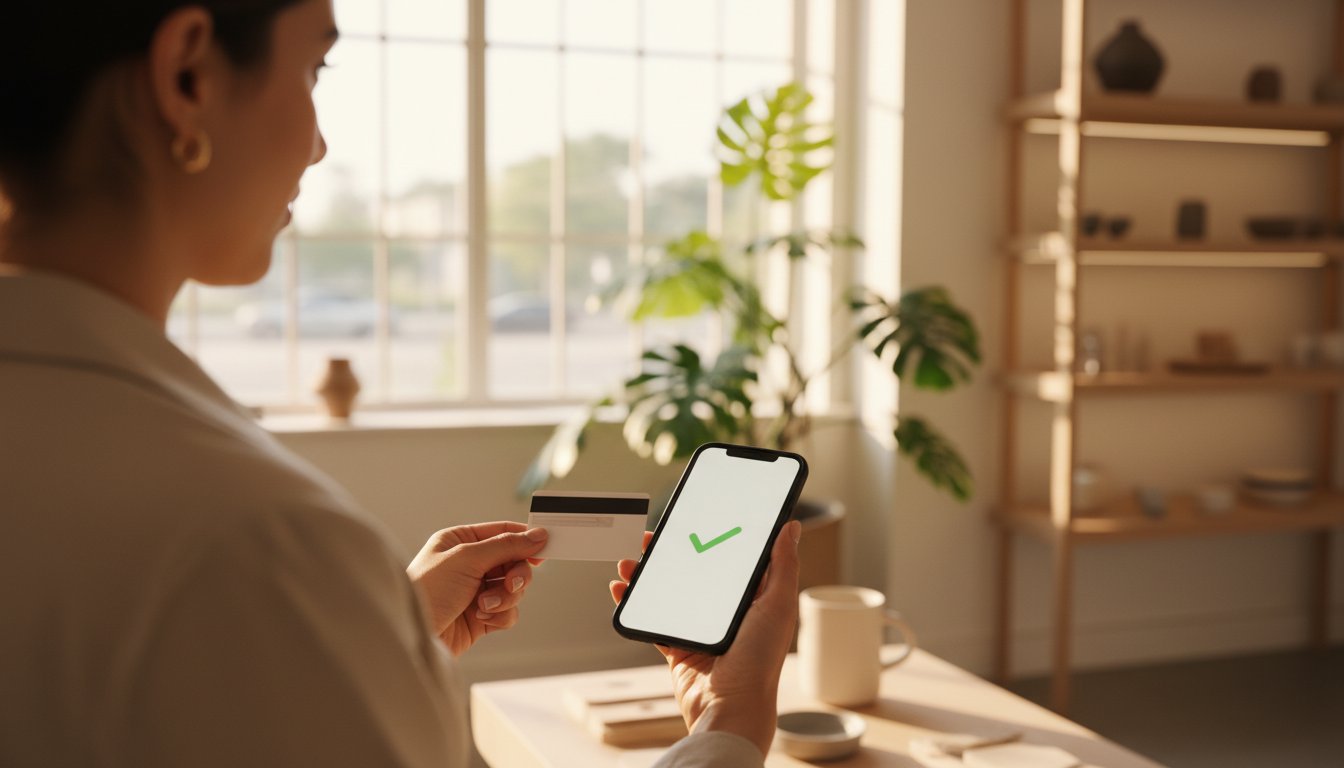
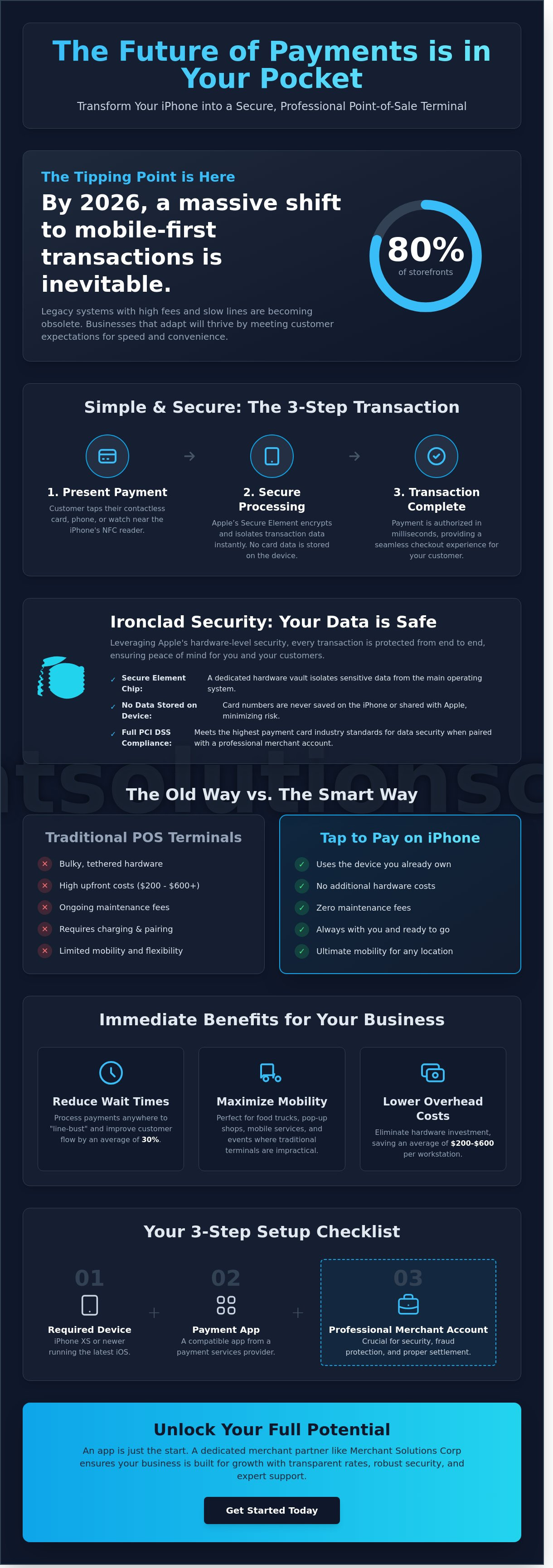
Tap to Pay on iPhone transforms your smartphone into a high-performance point-of-sale terminal without the need for additional equipment. It relies on Near Field Communication (NFC) to facilitate secure exchanges between devices. By 2026, industry data suggests that over 80% of global in-person transactions will utilize contactless payment technology. This feature eliminates the need for bulky Bluetooth dongles or external card readers that often lose connectivity or require constant charging.
To better understand how this technology integrates into your daily operations, watch this helpful video:
Security is the foundation of tap to pay on iphone. Apple utilizes a dedicated hardware component known as the Secure Element. This chip isolates sensitive transaction data from the rest of the phone's operating system. It ensures that card numbers are never stored on the device or shared with Apple during the process. You can confidently accept Apple Pay, Google Pay, and physical EMV chip cards while maintaining the highest standards of data integrity.
The Core Technology Behind Contactless iPhone Payments
This system functions as a "soft POS," where software handles the tasks previously reserved for specialized hardware. The iPhone's NFC antenna reads encrypted data from a customer's digital wallet or card chip in milliseconds. As of early 2026, contactless has become the global standard for in-person sales, making traditional magnetic stripe readers nearly obsolete. Transitioning to a software-based model allows you to streamline your overhead and focus on growth rather than hardware maintenance.
Immediate Benefits for North Miami Small Businesses
For entrepreneurs in the North Miami area, this technology removes significant financial hurdles. New startups can begin processing sales immediately without waiting for hardware shipping or paying high upfront costs for traditional terminals. Use these benefits to optimize your workflow:
- Line-Busting: Retail boutiques on NE 125th Street use this to process transactions anywhere on the sales floor, reducing wait times by an average of 30% during peak hours.
- Mobile Flexibility: Food truck vendors and mobile service providers don't have to worry about fragile equipment in high-paced environments.
- Lower CapEx: Eliminating external readers saves businesses an average of $200 to $600 per workstation in initial hardware investment.
It's a scalable, professional solution that fits the fast-paced nature of South Florida commerce. By adopting tap to pay on iphone, you future-proof your business against the rapid shifts in consumer payment preferences.
Hardware Requirements and Setup: Getting Started in 2026
To leverage tap to pay on iphone in 2026, you don't need a bulky terminal, but you do need the right digital foundation. This technology turns a standard smartphone into a secure payment terminal using Near Field Communication (NFC). While Apple introduced this feature years ago, the 2026 standard requires specific hardware and software configurations to ensure PCI compliance and transaction speed. You cannot simply use a personal Apple ID for these transactions; a professional merchant account is required to manage settlements and fraud protection effectively.
Device and Software Compatibility Check
Your business must use an iPhone XS or a newer model. This requirement exists because models released before September 2018 lack the Secure Element chip architecture necessary to securely accept contactless payments. By 2026, your device should be running the most current iOS version to maintain the latest encryption protocols. Older software versions often lack the patches required by modern banking regulations.
Ensure your "Automatic Date & Time" setting is toggled on in your system preferences. If your device's internal clock is off by even a few seconds, the encrypted handshake with the bank will fail. For mobile vendors, a stable 5G connection is recommended. Industry data from 2025 shows that 5G reduces transaction latency by 30% compared to older LTE networks, which prevents customer frustration during peak hours. This setup is currently supported for businesses operating in the United States, Canada, and several Caribbean territories.
The 3-Step Integration Process
Setting up tap to pay on iphone is a streamlined process designed to get you running in minutes. Follow these steps to modernize your checkout experience:
- Step 1: Partner with a Provider. You must link your device to a certified merchant service provider. Partnering with a provider like Merchant Solutions Corp for merchant account services ensures your funds are processed securely and deposited quickly into your business account.
- Step 2: Enable the Feature. Once your account is active, download your provider's business application. Navigate to the settings menu to enable "Tap to Pay." This links your iPhone's NFC antenna to the global payment gateway.
- Step 3: Staff Training. Teach your team the "horizontal card hold." For the best read, the customer should hold their card or digital wallet horizontally across the top of your iPhone where the sensor is located.
If you want to optimize your transaction costs while upgrading your hardware, choosing a partner that offers transparent pricing and 24/7 support is the most effective way to future-proof your success.
Security and Privacy: Is Mobile Processing Safe for Your Customers?
Security remains the primary barrier for many business owners, yet the architecture behind this technology is more robust than legacy systems. Apple ensures card numbers never touch their servers or your device's local storage. When a customer uses tap to pay on iphone, the transaction happens within the Secure Element; this is an industry-standard, certified chip designed to protect sensitive data. According to Apple's official Tap to Pay on iPhone documentation, the system leverages the same hardware-based security that protects Apple Pay and Face ID. The hardware-level isolation ensures that even if a device is compromised, the payment data stays isolated and secure.
Data Encryption and Tokenization
Security relies heavily on tokenization. This process replaces your customer's actual card details with a unique, one-time digital identifier during the transaction. It means even if a hacker intercepts the signal, the data they find is useless for future purchases. Point-to-point encryption ensures data is unreadable to hackers during transit by scrambling information at the moment of the tap. Mobile payments are significantly safer than traditional magnetic stripe swipes because they don't transmit static data that can be easily cloned or skimmed.
High-Risk Business Considerations
For Florida merchants in regulated sectors, security is a prerequisite for longevity. Specialized providers facilitate high risk merchant account approvals by pairing Apple's hardware security with robust backend monitoring. In industries like CBD or gaming, maintaining PCI DSS 4.0 compliance is mandatory to avoid fines that often exceed $10,000 per month for non-compliance. Using a professional payments gateway streamlines this process by handling the complex encryption requirements on your behalf.
Managing chargeback risks is also simpler with mobile-only solutions. Since every tap to pay on iphone transaction requires biometric authentication or a passcode, "friendly fraud" becomes much harder for customers to claim. You get a digital trail that proves the card was physically present, reducing your liability for disputed charges. Such protection allows high-risk businesses to scale without the constant fear of sudden account freezes or data breaches. By 2026, these security protocols will be the baseline expectation for every consumer entering your storefront.
Tap to Pay vs. Traditional POS Terminals: Choosing the Right Tool
Choosing between a mobile-first approach and a heavy-duty terminal depends on your specific operational flow. While tap to pay on iphone offers unmatched mobility, a traditional terminal provides the robust hardware required for stationary checkouts. High-volume retail environments often require the speed of a dedicated processor to handle hundreds of transactions daily without lag. Conversely, mobile solutions empower staff to meet customers exactly where they are.
Use Cases: From Street Fairs to High-End Boutiques
A North Miami cafe provides a perfect example of this balance. During the morning rush, a fixed terminal at the counter handles the bulk of orders with speed and precision. When the patio fills up for weekend brunch, servers use iPhones to accept payments directly at the table. This eliminates the bottleneck at the register and speeds up table turnover by an average of 15 minutes per party. It makes your brand look modern and tech-savvy to a younger demographic. One limitation exists; you can't print a physical receipt from an iPhone. You'll need to send digital receipts via email or text, which 43% of customers now prefer according to recent retail surveys.
- When to use an iPhone: Pop-up shops, home deliveries, outdoor events, and line-busting during peak hours.
- When to use a terminal: High-volume counters, businesses needing physical receipts, and shops with complex inventory needs.
Cost structures differ significantly between these options. Traditional hardware often involves monthly leases or upfront costs for devices like Ingenico terminals. Using tap to pay on iphone typically removes the need for extra hardware leases, though transaction fees still apply. Many savvy owners now adopt a hybrid approach. They maintain a primary pos system as their anchor and use iPhones to scale their capacity instantly without buying more gear.
Scalability and Growth Potential
Effective growth requires centralized data. Modern point of sale for small business ecosystems sync mobile sales directly into your main reporting dashboard. This ensures your inventory counts stay accurate whether a sale happens on the sidewalk or in the store. Evaluating the ROI of mobile flexibility means looking at the potential for captured sales that might have been lost to long lines. Skip the hassle of bulky equipment when your business needs to stay agile and responsive.
Ready to find the perfect hardware mix for your storefront? Explore our transparent pricing and equipment options today.
The Merchant Solutions Corp Advantage: Beyond the App
Choosing a payment provider involves more than just downloading an app from a digital storefront. While generic tech giants offer basic functionality, they often lack the industry-specific depth required for scaling a professional operation. Merchant Solutions Corp provides a dedicated partnership that secures your revenue streams and protects your margins. We move beyond the "one-size-fits-all" approach by offering lower, transparent processing rates that reflect your actual transaction volume. Unlike standard apps that charge high flat fees regardless of your industry, our team analyzes your processing history to find cost-saving opportunities that keep more capital in your business.
Support is where the difference becomes critical for your daily operations. If a transaction fails during a busy Friday night rush, a chatbot or an automated email queue won't solve your problem. We provide 24/7 local support specifically for Florida-based businesses. You'll speak with a human expert who understands the regional market and can resolve technical hurdles instantly. This level of reliability ensures that using tap to pay on iphone stays a competitive advantage rather than a technical bottleneck for your staff. By 2026, industry reports suggest that over 80% of in-person transactions will be contactless, making this uptime more vital than ever.
Tailored Payment Solutions for Every Industry
High-volume retail and high-risk sectors require robust infrastructure to prevent unnecessary account freezes or funding delays. We customize your payment gateway to handle complex transactions with ease. Our team simplifies the underwriting process for credit card processing for small business, ensuring you get approved quickly without the typical bureaucratic hurdles found at big-box banks. Merchant Solutions Corp handles all the backend complexity and security protocols so you can focus entirely on serving your customers.
Next Steps: Activating Your Mobile Strategy
The 2026 market is contactless-first, and your business needs a mobile strategy that integrates with your existing accounting and inventory tools. We help you activate a mobile merchant account that syncs effortlessly with professional systems like Clover or Payanywhere. This integration ensures your sales data isn't siloed in a single device, allowing for better reporting and tax compliance.
Ready to modernize your checkout experience? Contact us today for a free quote on a fully integrated mobile merchant account. Our consultants will review your current statements and show you exactly how much you can save by switching to a professional merchant partner. Secure your business's future and start using tap to pay on iphone with the backing of a team that cares about your bottom line. Reach out now for a personalized consultation to get started.
Future-Proof Your Business with Mobile Payments
By 2026, global mobile wallet transaction values are projected to exceed $10 trillion according to industry analysts. Adopting tap to pay on iphone allows you to ditch bulky hardware and meet your customers exactly where they are. You've seen how this technology uses the secure enclave within Apple devices to provide enterprise-level safety for every swipe and tap. Merchant Solutions Corp brings North Miami local support and specialized high-risk approval expertise to every partnership. We ensure your business stays ahead of the curve with PCI DSS compliant solutions that protect your revenue and your brand reputation. Whether you're running a boutique or managing a high-volume service business, the right tools make all the difference. It's time to stop worrying about technical hurdles and start focusing on your next big sale. You have the power to transform your checkout experience in minutes.
Ready to accept payments on your iPhone? Contact Merchant Solutions Corp today for a custom quote.
Your business deserves a payment partner that moves as fast as you do.
Frequently Asked Questions
Is there a transaction limit for Tap to Pay on iPhone?
Tap to Pay on iPhone doesn't have a pre-set transaction limit imposed by Apple, though individual banks or payment apps might set their own. Most major networks allow high-value purchases because the technology uses the Secure Element for authorization. Since its release in 2022, this feature has enabled merchants to accept thousands of dollars in a single tap without requiring external hardware.
Do I need a separate card reader to use this feature?
You don't need any additional hardware or external card readers to start processing sales. Your device's built-in NFC technology handles the entire communication process. Simply download a supported payment app on an iPhone XS or later model to turn your phone into a fully functional point-of-sale terminal.
Can I use Tap to Pay on my iPad?
You can't use this specific feature on an iPad because the hardware lacks the necessary NFC configuration found in iPhones. Apple designed tap to pay on iphone specifically for their smartphone lineup to ensure portability for mobile merchants. If you need a tablet-based solution, you'll still need to pair your iPad with a Bluetooth-connected card reader.
What are the fees for accepting payments on an iPhone?
Transaction fees are determined by your chosen payment service provider rather than Apple itself. Most providers charge a percentage-based fee, often around 2.6% plus a small per-transaction cost, which is consistent with standard mobile processing rates. You won't pay extra Apple fees for the convenience of using your phone as a reader.
Does Tap to Pay work without an internet connection?
You need an active internet connection via Wi-Fi or cellular data to process transactions in real-time. The system must communicate with the card issuer to verify funds and authorize the payment instantly. If your signal drops below 3G speeds, you'll likely experience timeouts or failed processing attempts during the checkout process.
Is Tap to Pay on iPhone secure for high-risk businesses?
This technology is highly secure for all industries because it uses hardware-based encryption and tokenization. It protects sensitive data by never storing actual card numbers on the device or Apple servers. For high-risk businesses, this security helps reduce chargebacks and prevents fraudulent disputes by verifying every physical tap.
How do I provide a receipt to my customer when using my phone?
You can provide receipts instantly by sending them to the customer's email or phone number through your POS application. Most modern business apps include a prompt immediately after the transaction is approved. Statistics from 2024 show that 65% of retail customers now prefer these eco-friendly digital options over traditional paper slips.
Can I accept international credit cards with Tap to Pay on iPhone?
You can accept international contactless cards from major networks like Visa, Mastercard, and American Express. The tap to pay on iphone system automatically handles the currency conversion and cross-border protocols through your merchant account. This makes it an ideal solution for businesses in tourist-heavy areas or those attending international trade shows.