Go Live in 1–2 Weeks: Virtual Terminal Payments for SMBs (Onboarded)
Go Live in 1–2 Weeks: Virtual Terminal Payments for SMBs (Onboarded)
A virtual terminal is a browser-based payment screen that lets your staff key in phone, mail, or remote card and ACH payments without a card reader. Most small and mid-size businesses that take orders by phone, bill clients remotely, or run recurring invoices benefit from one. If your business only sells face-to-face at a counter, a standard point-of-sale system still makes more sense.
TL;DR:
- Most virtual terminals support multiple payment types, including credit, debit, ACH, and eCheck, with ACH often costing less per transaction.
- Security depends on PCI DSS Level 1 certification, data encryption, tokenization, and staff adherence to verification and no-storage policies.
- Costs are typically a higher percentage and fee for card-not-present transactions, with additional monthly gateway or access fees possible, especially with high dispute rates.
- Businesses in healthcare, nonprofits, government, and B2B sectors are primary users, especially for remote invoicing, donations, or fee collection.
- Setup usually takes one to two weeks and involves configuring permissions, testing, staff training, and reviewing hardware compatibility.
Table of Contents
- What Is a Virtual Terminal and How Does It Work?
- Who Actually Uses Virtual Terminals?
- What Features and Payment Types Should You Expect?
- How Secure Is a Virtual Terminal, and What Should You Verify?
- How Much Does a Virtual Terminal Cost?
- How Do You Set Up a Virtual Terminal?
- How Merchant Solutions Corp Supports Virtual Terminal Deployment
- How Do You Handle Payment Disputes and Chargebacks?
- What Fraud Prevention Techniques Work Best for Virtual Terminals?
- Can You Use a Virtual Terminal on a Phone or Tablet?
- What Compliance Rules Apply Beyond PCI DSS?
- Choosing Between a Virtual Terminal, a POS, or Online Payments
- Get Started With Virtual Terminal Payments
- Sources
- FAQ
What Is a Virtual Terminal and How Does It Work?
A virtual terminal is a secure, browser-based interface. Your staff type in a customer’s card number, expiration date, and billing address instead of swiping, dipping, or tapping a physical card. No hardware required, just a computer or tablet with an internet connection and a login.
Once someone hits submit, the transaction doesn’t stop there. The data travels from the browser to a payment gateway, which routes it to the processor and then to the card network for authorization. A proper setup sends that information directly to the processor rather than storing it on your own systems, which keeps you further out of PCI compliance headaches.
This is where the term MOTO comes in, short for mail-order/telephone-order. MOTO transactions are card-not-present by definition, and that status changes how card networks price and monitor them.
- Staff manually enter payment details through a web browser
- The gateway authorizes and routes the transaction to the processor
- Card data should flow straight to the processor, never sitting in local files
- The transaction is logged as card-not-present, which affects both risk and cost
Who Actually Uses Virtual Terminals?
You don’t need a call center to benefit from this technology. Businesses that collect payment somewhere other than a checkout counter are the most natural fit for a virtual terminal.
- Service businesses and freelancers who invoice clients after a job is finished
- Healthcare offices billing patients for balances after insurance processes a claim
- Nonprofits taking phone-in or mail-in donations, especially during campaigns
- Government offices collecting fees, permits, or fines without in-person visits
- B2B companies running recurring invoices or subscription billing set up over a call
Retailers and restaurants with a physical counter usually pair a virtual terminal with their existing point-of-sale system. That hybrid setup covers walk-in customers at the register and phone or mail orders through the browser, without asking staff to juggle two unrelated workflows.
What Features and Payment Types Should You Expect?
Not every virtual terminal offers the same toolkit, and the gap between a bare-bones version and a fully built one shows up fast once you’re running daily transactions. A capable platform handles more than a single card swipe equivalent.
- Credit and debit card acceptance for one-time and recurring charges
- ACH and eCheck support, which often costs less per transaction than card processing
- Recurring billing tools for memberships, installment plans, and subscriptions
- Card-on-file tokenization so returning customers don’t re-enter details
- Receipts, transaction history, and reporting exportable for your books
- User roles and permission settings so staff only see what their job requires
- Custom fields and department or location tags for multi-site businesses
Gateway providers increasingly bundle ACH support alongside cards specifically because bank-to-bank payments reduce processing costs on larger transactions and give customers a second way to pay.
How Secure Is a Virtual Terminal, and What Should You Verify?
Security is where a cheap virtual terminal and a well-built one part ways. Before you sign a contract, confirm your processor holds PCI DSS Level 1 certification, the highest tier a processor can carry.
Ask whether the setup lets you qualify for SAQ C-VT, a shorter PCI self-assessment reserved for merchants whose virtual terminal keeps card data off local systems entirely. That distinction saves your team hours of compliance paperwork every year.
Beyond certification, confirm the terminal encrypts data between the browser and the processor, and that it tokenizes stored card details rather than saving raw numbers anywhere. Turn on Address Verification (AVS) and CVV checks for every keyed transaction. Train staff never to write card numbers on paper or in email, and review chargeback reports monthly so patterns surface early.
Pro Tip: Require two-factor authentication and strong, unique passwords for every staff login on your virtual terminal. A stolen password is still the fastest way fraud gets into a manual-entry system.
How Much Does a Virtual Terminal Cost?
Pricing usually follows the same structure as standard card processing: a percentage of the transaction plus a fixed per-transaction fee, as detailed in the Square Payment Processing Terms. The catch is that card-not-present transactions typically carry a premium over card-present swipes, because manually keyed data carries more fraud risk for the processor.
- Expect rates for card-not-present transactions to be higher than in-person rates, reflecting the increased fraud risk and processing costs
- Watch for monthly gateway or terminal access fees on top of per-transaction costs
- ACH transactions often cost less than card transactions, especially on larger invoices
- Batch or settlement fees can apply depending on your processor’s structure
- High dispute rates push your effective cost up over time, regardless of your quoted rate
Ask any processor directly whether they charge monthly access fees, per-user fees, or gateway fees separate from transaction rates. Those extras add up fast for a business processing dozens of manual entries a week.
How Do You Set Up a Virtual Terminal?
Getting a virtual terminal running doesn’t take long once you know the order of operations. Most businesses can go from application to first live transaction within a week or two.
- Open or enable a merchant account with virtual terminal access, and submit any required verification documents
- Choose which payment types to enable, cards, ACH, or both, based on your customer base
- Set up user accounts with role-based permissions so staff only access what their job needs
- Run a low-value test authorization to confirm the connection works end to end
- Configure receipt templates and reporting so your bookkeeping matches from day one
- Schedule a short training session so every staff member understands the manual-entry process and your no-storage policy
- Set a recurring calendar reminder to review chargeback and dispute reports
Pro Tip: Run your first week of live transactions with a tighter review process, checking every batch report daily. Once you’re confident the setup behaves as expected, you can shift to weekly reviews.
Reviewing compatible payment terminals before you commit to a provider helps you avoid buying hardware that doesn’t talk to your chosen gateway.
How Merchant Solutions Corp Supports Virtual Terminal Deployment
Merchant Solutions Corp provides nationwide payment processing with virtual terminal access, ACH support, and POS integrations built for restaurants, retail, healthcare, and service businesses. Onboarding is built around faster setup and configured equipment rather than a long do-it-yourself installation.
Industry-specific setups exist for high-risk and specialty businesses that standard processors often decline. Businesses researching hardware options before going live can check the payment terminal overview for guidance on compatible equipment.
How Do You Handle Payment Disputes and Chargebacks?
Chargebacks hit virtual terminal transactions harder than card-present sales, simply because a card-not-present transaction gives you less proof the cardholder authorized it. Building a response process before your first dispute lands saves you from scrambling later.
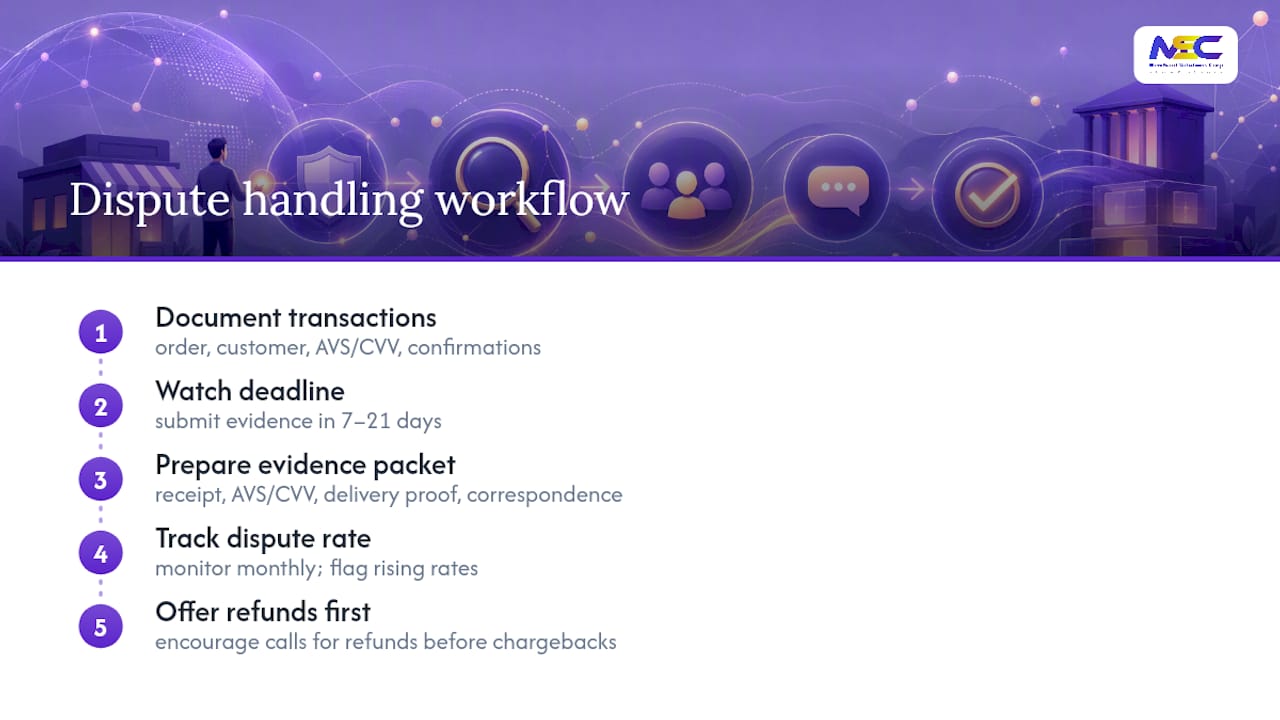
Start by documenting every transaction thoroughly. Save the order details, the customer’s name and contact information, the AVS and CVV match results, and any email or call confirmation tied to the sale. When a chargeback notice arrives, most processors give you a fixed window, often around 7 to 21 days, to submit evidence. Miss that window and you typically lose by default, regardless of whether the charge was legitimate.
Respond with a clear, organized packet: the receipt, the AVS/CVV results, proof of delivery or service completion, and any correspondence showing the customer agreed to the purchase. Weak or incomplete evidence is the most common reason a merchant loses a dispute it should have won.
Track your dispute rate monthly. Card networks flag merchants who cross certain chargeback thresholds for monitoring programs, which can mean higher fees or account review. A rising chargeback rate is often an early signal of a fraud pattern worth investigating, not just a billing nuisance.
Set a policy for refunds versus disputes, too. Encouraging customers to call for a refund before they call their bank resolves many issues before they ever become a formal chargeback, and it costs you far less in fees and administrative time.
What Fraud Prevention Techniques Work Best for Virtual Terminals?
Manual card entry removes the physical checks a card reader performs automatically, which means your fraud controls have to work harder in software and process. A layered approach catches far more than any single tool.
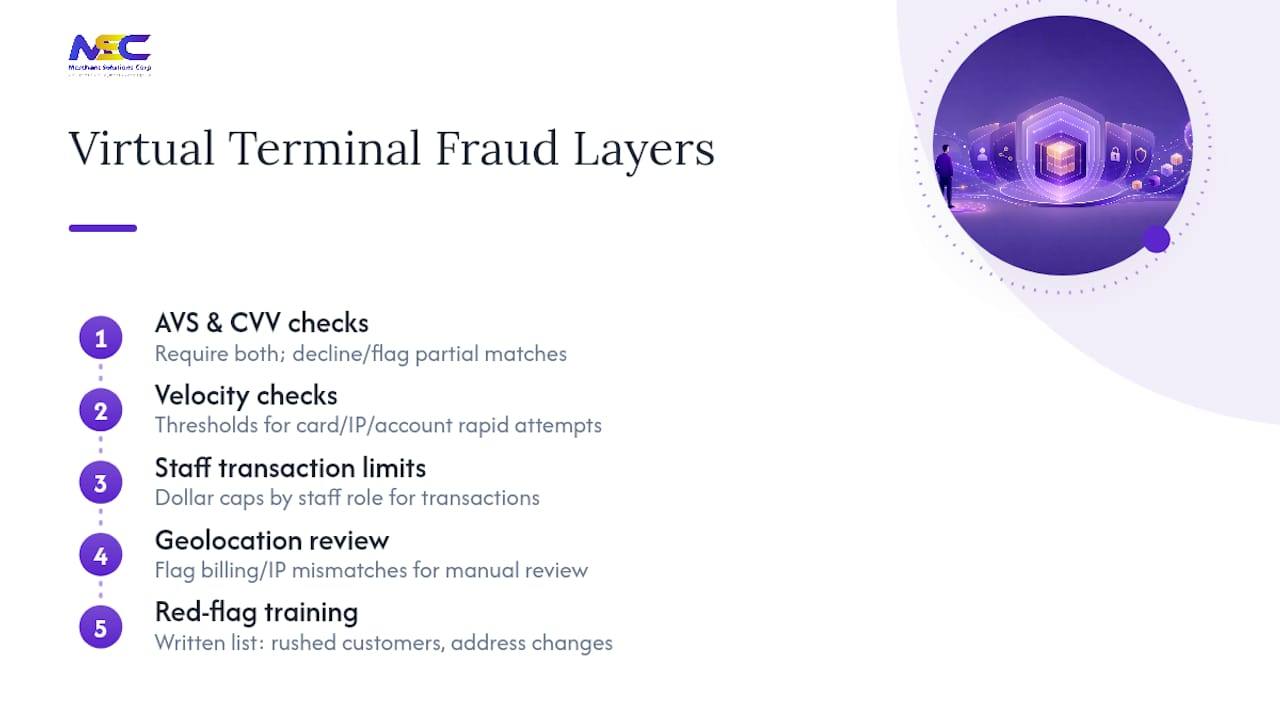
AVS and CVV checks are the baseline. Require both on every keyed transaction, and set your system to decline or flag partial matches rather than approving them automatically. A mismatched billing address is one of the strongest fraud signals available on a remote transaction.
Velocity checks matter too. If the same card, IP address, or customer account attempts several transactions in a short window, that pattern deserves a manual review before you approve it. Most gateway dashboards let you set these thresholds yourself.
Set dollar-amount limits for staff roles. A front-desk employee taking routine payments rarely needs authority to process a transaction above a certain size, and capping that authority limits your exposure if a login is compromised.
Geolocation mismatches, a billing address in one state and an IP address in another country, are worth flagging for a second look rather than an automatic block, since legitimate customers travel too. The goal is a manual review step, not a blanket rejection.
Finally, keep a written list of red flags for staff: rushed customers who resist verification questions, orders placed just before a shipping deadline, or requests to change shipping addresses after the sale. Training your team to recognize these patterns catches fraud that automated rules sometimes miss.
Can You Use a Virtual Terminal on a Phone or Tablet?
Yes, and for many service businesses that’s the primary way it gets used. Because a virtual terminal runs in a browser rather than dedicated hardware, it works on any device with internet access and a modern browser, a laptop at a desk, a tablet at a job site, or a smartphone between appointments.
Compatibility depends more on your browser than your device. Most providers support current versions of Chrome, Safari, and Edge, but older browser versions sometimes cause display or input issues on the payment form. Keeping staff devices updated avoids most of these problems before they start.
Mobile access matters most for field-based businesses: home service contractors, mobile healthcare providers, and delivery-based operations that need to collect payment away from a desk. A technician finishing a repair can pull up the virtual terminal on a phone and process payment on the spot instead of mailing an invoice and waiting for a check.
One tradeoff worth knowing: typing a full card number on a phone screen is slower and more error-prone than a desktop keyboard. Businesses with high call volume tend to keep desktop or tablet access for phone orders and reserve mobile access for on-site collection.
Screen size also affects which features are practical on mobile. Detailed reporting and multi-field custom entry work better on a larger screen, while the core task, taking a payment and issuing a receipt, functions fine on a phone.
What Compliance Rules Apply Beyond PCI DSS?
PCI DSS covers how you handle card data, but it’s not the only regulation touching a virtual terminal, especially once ACH payments and customer records enter the picture.
If your business collects, stores, or processes payment and contact data for customers in the European Union or the UK, GDPR rules apply to that data regardless of where your company is based. That means clear consent language for stored payment information, a defined data retention policy, and a process for customers to request deletion of their records.
ACH transactions fall under NACHA operating rules, separate from card network rules, covering authorization requirements, error resolution timelines, and how you notify customers about recurring bank debits. Skipping proper ACH authorization documentation is a common compliance gap for businesses that add eCheck support without updating their consent forms.
Healthcare-related billing through a virtual terminal often intersects with HIPAA if payment records connect to protected health information. Keeping billing systems separate from clinical records, or ensuring your processor supports that separation, matters here.
State-level data breach notification laws also apply if a virtual terminal is compromised. Requirements for how quickly you must notify affected customers vary by state, so knowing your obligations before an incident happens, rather than during one, saves critical time.
Choosing Between a Virtual Terminal, a POS, or Online Payments
Ask three questions before picking a payment setup: Is the customer usually present in person? Do you need recurring billing? Is your transaction volume steady or sporadic?
A virtual terminal paired with a POS system suits omnichannel sellers taking both walk-in and phone orders. A virtual terminal paired with a gateway fits remote service providers with no physical storefront. High foot traffic retail with continuous in-person sales and high dispute rates is the clearest sign a virtual terminal alone isn’t the right fit.
Get Started With Virtual Terminal Payments
Merchant Solutions Corp gives service businesses, healthcare offices, and B2B companies a faster path to virtual terminal payments than building one from scratch with a patchwork of vendors. Nationwide payment processing pairs with ACH support, POS integrations, and industry-specific setups for high-risk and specialty businesses that many processors turn away.
Configured equipment and onboarding support mean your team isn’t left figuring out gateway settings alone. Whether you need a virtual terminal on its own or paired with in-person hardware, the payment processing solutions page walks through what’s included. Businesses that also want counter hardware can review POS system options alongside their virtual terminal setup.
If you’re ready to move forward, request onboarding through Merchant Solutions Corp and get a setup built around how your business actually collects payment, by phone, by mail, or through recurring billing.
Sources
- Virtual Terminals Explained: What They Are and When You Need One
- What Is Virtual Terminal for Processing Credit Cards | PayPal US
- What Is a Virtual Terminal? Definition, Benefits, and Risks - Shopify
FAQ
What Is a Virtual Terminal Payment in PayPal?
PayPal’s virtual terminal lets merchants manually key in a customer’s card details through a browser to process phone, mail, or other remote orders, without needing a card reader.
How Much Does a Virtual Terminal Cost?
Costs typically follow standard processing structures, a percentage plus a fixed fee per transaction, with card-not-present rates usually higher than in-person rates due to added fraud risk. Expect additional gateway or monthly access fees depending on your provider.
How Does a Virtual Terminal Work?
Staff enter payment details into a secure browser form, which sends the data to a payment gateway for authorization and routing to the processor. A properly built terminal transmits that data directly without storing it locally.
Can You Give an Example of a Virtual Terminal Use Case?
A landscaping company takes a customer’s card number over the phone to bill for a completed job, logs into its virtual terminal, keys in the amount and card details, and emails a receipt immediately after approval.
Is a Virtual Terminal the Same as a POS System?
No. A POS system is built for in-person, card-present sales, often with physical hardware, while a virtual terminal handles remote, manually keyed transactions through a browser alone.