Contractor Invoicing Workflow Process: A Field Guide
Contractor Invoicing Workflow Process: A Field Guide
A well-run contractor invoicing workflow process moves in five stages: capture → validate → approve → submit → pay → reconcile, with schedule of values (SOV) mapping, retainage tracking, and change-order controls built into every step. Every invoice package that leaves your office should carry an SOV reference, the current retainage amount, lien waiver status, all change-order numbers, and any required backup attachments. Miss one of those elements and you are handing the owner’s payables team a reason to hold your check.
Here is the short version of who owns what:
- Field superintendent: Captures delivery receipts, daily logs, and T&M tickets within 48 hours of the work or delivery.
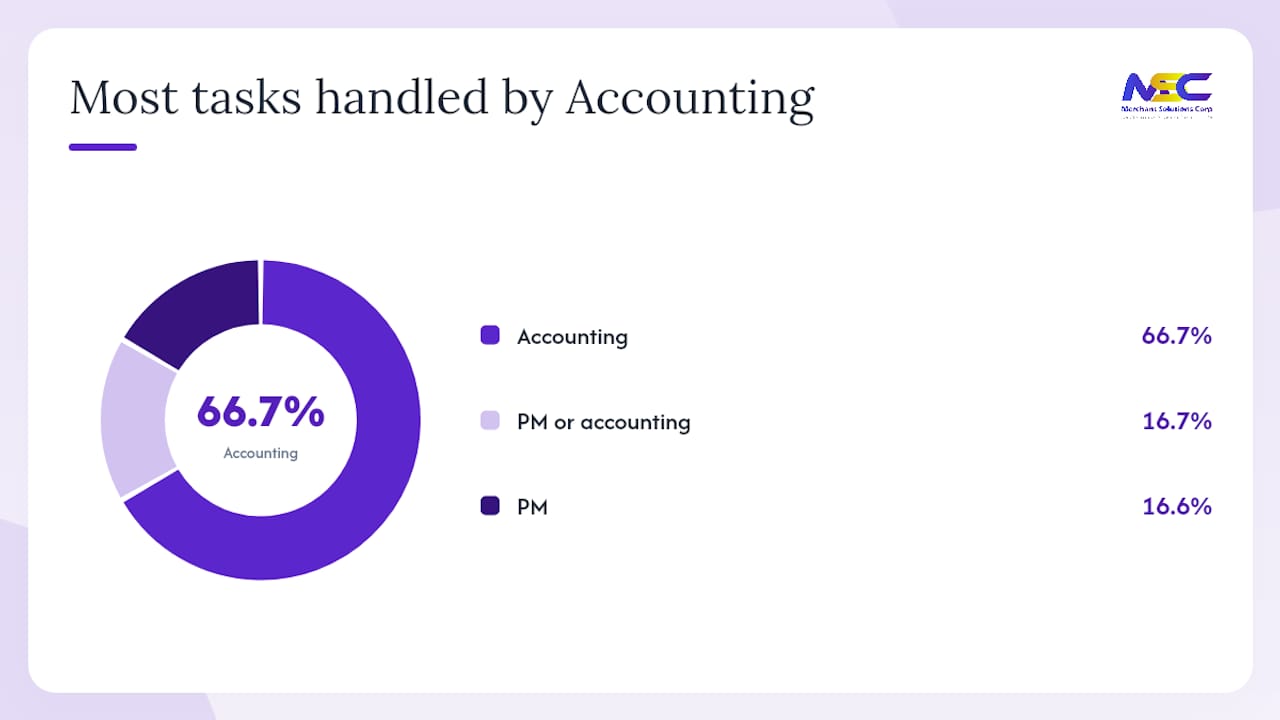
- Project manager (PM): Cross-checks quantities against the SOV, codes costs to the correct job and cost code, and signs off within three business days.
- Scheduler/estimator: Confirms percent-complete figures align with the project schedule before the pay application goes out.
- Accounting: Routes the approved pay application to the owner or GC on the agreed billing date, tracks payment status, and posts receipts to the job-cost ledger.
- Owner/GC payables: Reviews, approves, and releases payment per contract terms, typically within 30 days.
Table of Contents
- Which billing method fits your contract type?
- How the step-by-step invoicing workflow runs from capture to reconciliation
- Standardizing templates, naming conventions, and documentation
- Your rollout plan: phases, milestones, and KPIs
- How to choose a payments and integration partner
- Key Takeaways
- The case for putting payments inside your invoicing workflow
- Merchantsolutionscorp payment solutions built for contractor billing
- Useful sources
- FAQ
Which billing method fits your contract type?
Construction invoicing is not one-size-fits-all. The billing method you use should match the contract structure, the owner’s draw requirements, and the level of documentation your team can consistently produce.
| Billing Method | Best For | What to Include on the Invoice | Common Pitfall |
|---|---|---|---|
| Progress billing | Long-duration contracts with a defined SOV | AIA G702/G703 or equivalent, percent-complete per line, retainage held | Billing ahead of actual completion; SOV not agreed before first application |
| Milestone billing | Fixed-price contracts with defined deliverables | Milestone description, completion evidence, retainage per contract | Vague milestone definitions that trigger disputes at completion |
| Time & materials (T&M) | Cost-plus or allowance scopes | Labor hours by trade, material receipts, equipment logs, markup rate | Missing receipts; unburdened labor rates that conflict with contract markup |
| Lump sum | Small scopes or fixed-fee contracts | Single line invoice, contract reference, CO log if scope changed | No CO documentation when scope creeps beyond original contract |
| Change order billing | Any approved scope addition | Signed CO number, original contract reference, revised SOV if applicable | Billing unapproved COs; missing owner signature on the CO before billing |
Progress billing is the dominant method on commercial construction projects. You submit a pay application, typically on the AIA G702 Application for Payment form with a G703 Continuation Sheet, at the end of each billing period. The schedule of values must be agreed before the first application; changing SOV line items mid-project without owner approval invites disputes that can freeze payments for weeks.
Milestone billing works well for design-build or specialty contractors where deliverables are discrete and verifiable. The risk is definition: if the milestone says “structural steel complete” but the owner interprets that as painted and inspected, you have a dispute before you have a check.
T&M billing requires the most documentation discipline. Every labor ticket, material receipt, and equipment log must be signed by the owner’s field representative at the time of the work. Collecting signatures retroactively is nearly impossible on a busy job site.
Retainage display on every invoice: show the gross amount earned, the retainage withheld (typically 5–10% per contract), and the net amount due. Retainage mechanics directly affect your cash flow throughout the project, as the CFMA explains in its guidance on construction retention payments. Attach a conditional lien waiver with each progress payment request and provide an unconditional waiver only after you have confirmed the payment has cleared your account.
How the step-by-step invoicing workflow runs from capture to reconciliation
The goal of a structured workflow is to move every invoice from field capture to posted payment without a single document going missing. Here is the operational sequence your team should follow.
The seven-step process
-
Capture (Field, within 48 hours): The superintendent photographs or scans delivery tickets, T&M sheets, daily logs, and subcontractor invoices. All documents go into a shared job folder, named by job number, date, and document type (e.g.,
2024-JOB101-DEL-0312). No paper sitting on a truck dashboard. -
Validate and cross-check (PM, within 3 business days): The PM compares quantities on the invoice against the PO, subcontract, and SOV line items. Any discrepancy gets flagged as an exception before coding. Three-way matching at this stage, PO versus subcontract versus SOV, catches overbilling before it becomes a dispute.
-
Code to job and cost code (PM or accounting, same day as validation): Every line item gets a job number and cost code that matches your ERP or accounting system chart of accounts. Miscoding here is the root cause of most job-cost report errors at closeout.
-
Route to approver (PM or accounting, within 1 business day of coding): The coded invoice goes to the designated approver, typically the PM for field costs and the controller for overhead or subcontractor invoices above a threshold. Mobile approval tools let PMs sign off from the field without delaying the cycle.
-
Submit pay application to owner or GC (Accounting, on the agreed billing date): The complete pay application package, including the G702/G703 or equivalent, backup documentation, lien waivers, and CO references, goes to the owner on the contract’s billing cutoff date. Late submissions almost always push payment to the next cycle.
-
Track payment status (Accounting, weekly): Log the expected payment date against the contract’s pay terms. Follow up in writing if payment has not arrived within five business days of the due date. Document every follow-up communication.
-
Reconcile and close (Accounting, within 2 business days of receipt): Post the payment to the job-cost ledger, match the payment ID to the invoice, file the unconditional lien waiver, and update the retainage balance. Close the billing period in your project management system.
Role and timing matrix
| Step | Owner | Timing SLA |
|---|---|---|
| Capture documents | Field superintendent | Within 48 hours of delivery or work |
| Validate quantities | Project manager | Within 3 business days of capture |
| Code to job/cost code | PM or accounting | Same day as validation |
| Approve invoice | PM / controller | Within 1 business day of coding |
| Submit pay application | Accounting | On contract billing date |
| Track payment | Accounting | Weekly until received |
| Reconcile and post | Accounting | Within 2 business days of receipt |
Pay application document checklist
Every pay application package should include:
- Completed AIA G702 (or owner-required equivalent)
- G703 Continuation Sheet with SOV line-item detail
- Conditional lien waiver for the current billing period
- Unconditional lien waiver for the prior period (once payment confirmed)
- Subcontractor lien waivers for all subs paid in the prior period
- Signed change orders referenced in the current billing
- T&M tickets or daily logs (if applicable)
- Certified payroll (if prevailing wage applies)
- IRS-required documentation for any 1099-reportable subcontractor payments
Standardizing templates, naming conventions, and documentation
The fastest way to cut invoice rejections is to make every pay application look identical from the owner’s perspective. Payables teams process dozens of applications per month; a familiar format gets reviewed first.
Required fields for every invoice header
| Field | What to Include |
|---|---|
| Contractor name and license number | Exactly as it appears on the contract |
| Project name and number | Owner’s project number, not just your internal job number |
| Contract number and date | Original contract plus any amendments |
| Billing period | Start and end dates for the current application |
| Application number | Sequential, never skip or reuse |
| SOV reference | Line items must match the agreed SOV exactly |
| Retainage rate and amount | Gross earned, retainage held, net due |
| Change order log | List all approved COs with their numbers and amounts |
| Attachments checklist | Check off each attached document |
File naming convention
Use a consistent naming structure across every project: [JobNumber]-[DocumentType]-[BillingPeriod]-[Version]. For example: JOB101-PAYAPP-202403-v1. When a revised application is needed, increment the version rather than overwriting the original. This creates an audit trail that protects you in a dispute.
Pro Tip: When your ERP cannot represent the owner’s SOV format natively, attach a single job-coded continuation sheet in Excel or PDF that maps your internal cost codes to the owner’s SOV line items. This one extra page eliminates the most common reason payables teams send applications back for clarification.
AIA G702/G703-style pay applications are the de facto standard for commercial construction in the US. Even if your owner does not require them, using this format signals professionalism and makes your application easier to process. The G703 continuation sheet is particularly valuable because it shows cumulative billing, current-period billing, retainage, and balance to finish for every SOV line, all on one page.
Payment reconciliation checklist
| Action | Timing | Who |
|---|---|---|
| Match payment ID to invoice number | Day of receipt | Accounting |
| Post to job-cost ledger | Same day | Accounting |
| File unconditional lien waiver | Within 2 business days | PM or accounting |
| Update retainage balance | Same day as payment post | Accounting |
| Confirm subcontractor payments | Within 5 business days | PM |
| Archive payment proof | Immediately | Accounting |
Integrating payment acceptance directly with your accounting system, whether that is QuickBooks, Sage 300 CRE, Procore, or another platform, eliminates the manual re-entry step that causes most reconciliation errors. When a payment posts automatically and links to the originating invoice, your job-cost report updates in real time. That is the difference between knowing your cash position today versus finding out at month-end close.
The proposal-to-contract workflow also matters here: when contract terms, payment schedules, and SOV line items are agreed digitally before work starts, the downstream invoicing process has fewer disputes to resolve because the source documents are already locked and traceable.
Your rollout plan: phases, milestones, and KPIs
Implementation does not have to be a six-month IT project. A phased approach, assess, pilot, scale, optimize, lets you prove value on one job before committing the whole organization.
Implementation timeline
| Phase | Duration | Key Milestones | Owner |
|---|---|---|---|
| Assess | Weeks 1–2 | Map current process; identify pain points; select pilot job; define exception rules | Controller + PM |
| Pilot | Weeks 3–7 | Deploy capture and coding tools on one job; train field and PM; measure cost-per-invoice and cycle time | Controller + IT |
| Scale | Weeks 8–15 | Roll out to all active jobs; standardize templates and naming conventions; integrate with accounting system | Controller |
| Optimize | Ongoing | Review KPIs monthly; retrain model on exceptions; add payment acceptance integrations | Controller + accounting |
Roles and responsibilities during rollout
| Role | Assess | Pilot | Scale | Optimize |
|---|---|---|---|---|
| Controller | Leads process mapping | Monitors KPIs daily | Approves full rollout | Reviews monthly KPIs |
| PM | Documents field pain points | Tests capture tools | Trains field staff | Flags model errors |
| Field superintendent | Describes current capture habits | Adopts new capture workflow | Follows standard process | Reports exceptions |
| IT | Evaluates integrations | Configures system | Deploys to all jobs | Maintains integrations |
How to choose a payments and integration partner
Pick a payments partner that supports ACH and card acceptance, integrates with your accounting or ERP system, and can attach payment receipts to invoices automatically. Those three criteria eliminate most generic payment processors that were not built for construction billing cycles.
Selection criteria to evaluate:
- Integration depth: — Does the processor connect directly to QuickBooks, Sage, Procore, or your specific ERP? A native integration is worth more than a manual export.
- Mobile approval and payment links: Field teams need to collect payments and approvals from a phone. Payment links let you send a secure payment request by email or text and receive funds without a terminal on site.
For contractors who need IRS-compliant reporting for subcontractor payments, your payment processor’s reporting should make it straightforward to pull year-end 1099-NEC data without a manual reconciliation exercise.
Key Takeaways
A structured contractor invoicing workflow process, running from capture through reconciliation with SOV controls and integrated payment acceptance, is the single most effective way to protect cash flow and reduce disputes on construction projects.
| Point | Details |
|---|---|
| Standardize before you automate | Agree on SOV line items, naming conventions, and document checklists before deploying any AP automation tool. |
| Build role-specific SLAs | Capture within 48 hours, PM validation within 3 business days, and submission on the contract billing date prevent the most common payment delays. |
| AP automation delivers measurable ROI | Structured AP automation typically reduces processing time by 50–70% and captures early-payment discounts worth 2–3% of invoice value. |
| Accept multiple payment methods | Supporting ACH, card via payment link, and check covers the full range of owner payment preferences and speeds collections. |
| Merchantsolutionscorp fits the workflow | Merchantsolutionscorp supports ACH, card acceptance, payment links, and mobile terminals, with integration options that post payments directly to your job-cost ledger. |
The case for putting payments inside your invoicing workflow
Payments are not a back-office afterthought. They are the closing step of every billing cycle, and how fast that step happens determines whether your crew gets paid on time and whether your next material order ships without a credit hold.
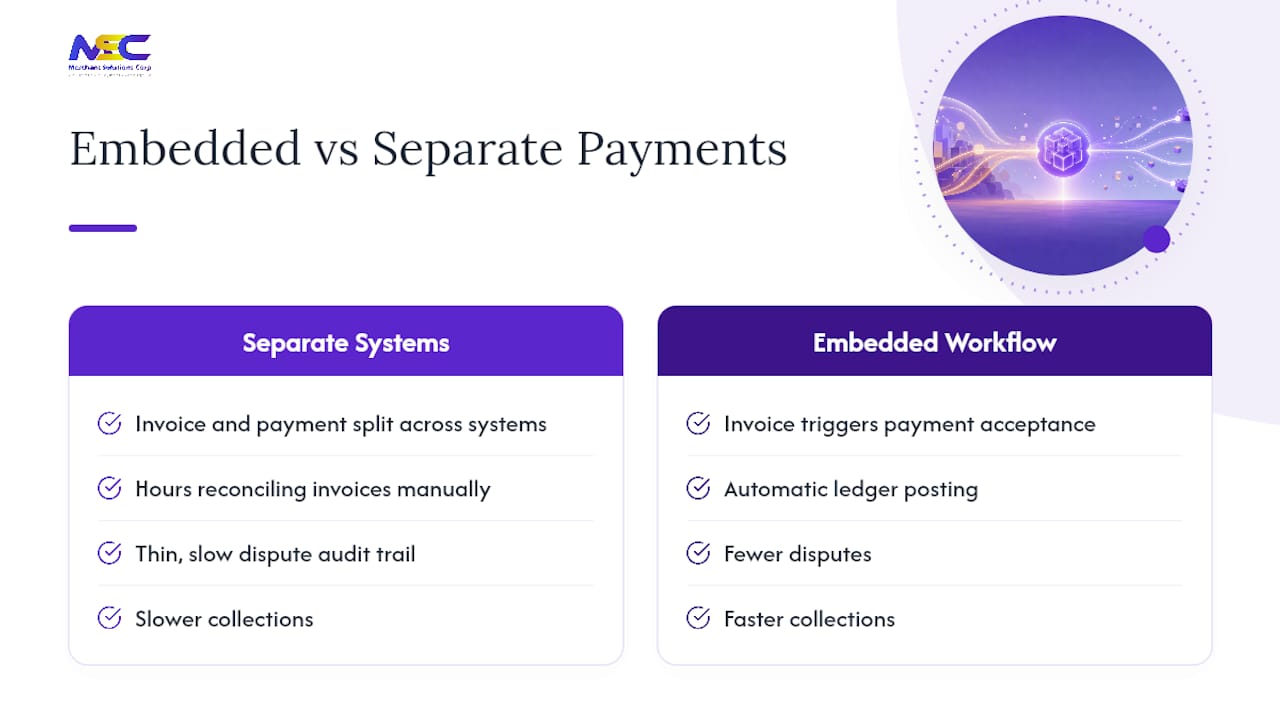
Most contractors treat invoicing and payment acceptance as separate problems handled by separate vendors. That separation creates a reconciliation gap: the invoice lives in one system, the payment confirmation lives in another, and someone on your accounting team spends hours every month matching them up manually. When a dispute arises, that manual trail is thin and slow to produce.
The contractors who close that gap, by connecting invoice submission directly to payment acceptance and automatic ledger posting, report fewer disputes, faster collections, and cleaner job-cost data at closeout. The embedded payment workflow model, where payment is triggered directly from the approved invoice, is the direction the industry is moving. Contractors who adopt it now build a structural advantage over competitors still chasing paper checks.
Merchantsolutionscorp payment solutions built for contractor billing
Contractors who need faster collections without adding headcount get a direct advantage from Merchantsolutionscorp’s integrated payment processing. The platform supports ACH and eCheck for large commercial payments, credit card acceptance with dual pricing to offset processing fees, and payment links that let you collect from owners and GCs by email or text without a terminal on site. Mobile terminals handle field collections, and the reporting layer exports payment data in formats that feed directly into QuickBooks, Sage, and other accounting systems your team already uses.
Services relevant to contractors:
- ACH and eCheck processing for commercial pay applications
- Credit card acceptance with dual pricing to protect your margin
- Payment links for remote invoice collection
- Mobile POS terminals for field and on-site payments
- Integration support for accounting and project management platforms
Getting started is straightforward. Visit Merchantsolutionscorp payment processing to review options and connect with a specialist who can configure a solution around your billing cycle and accounting system.
Useful sources
These primary sources support the guidance in this article and are worth bookmarking for ongoing reference:
- Forms and associated taxes for independent contractors | Internal Revenue Service
- Reporting payments to independent contractors | Internal Revenue Service
- How a construction retention payment affects ongoing projects | CFMA
- How AI Is Simplifying Purchasing and Accounts Payable for Contractors | Contractor Magazine
- Construction Invoicing Explained: Methods, Best Practices, and Tools | Autodesk
- The ROI of AP Automation for Construction Companies | Vergo (Learn)
- Construction AP Automation Software: The 2026 Buyer’s Guide — Ruh AI Blog
- Progress billing and progress billing best practices | Centsight
- Construction Invoicing Guide: Progress Billing and Retention | InvoiceQuickly
This article provides general operational guidance, not legal, tax, or financial advice. Confirm current IRS reporting thresholds, contract requirements, and lien law deadlines with a qualified professional or the relevant primary source.
FAQ
What documents must travel with every contractor pay application?
Every pay application should include the completed G702/G703 (or owner-required equivalent), a conditional lien waiver for the current period, an unconditional waiver for the prior period, signed change orders referenced in the billing, and any T&M tickets or certified payroll required by the contract.
How does retainage work in a contractor invoicing workflow?
Retainage, typically 5–10% of each progress payment per contract terms, is withheld by the owner until substantial completion. Each invoice should display gross earned, retainage held, and net due as separate line items. Release the retainage invoice only after substantial completion is certified and all lien waivers are collected, as the CFMA’s retention guidance explains.
When does a contractor need to file a 1099-NEC for a subcontractor?
You must file a Form 1099-NEC for any unincorporated subcontractor or individual you pay during the calendar year for services. Your payment processor’s year-end reporting should make pulling this data straightforward.
What is the fastest way to reduce invoice rejections?
Agree on the SOV line items with the owner before the first pay application, use a consistent invoice template with all required fields, and attach a document checklist to every submission. Most rejections trace back to missing lien waivers, unapproved change orders billed, or SOV line items that do not match the agreed schedule.
How does Merchantsolutionscorp fit into a contractor invoicing workflow?
Merchantsolutionscorp supports ACH, eCheck, credit card via payment link, and mobile terminal acceptance, with reporting that integrates with standard accounting platforms. That means payment receipts can post directly to your job-cost ledger without manual re-entry, closing the reconciliation gap between invoice submission and payment confirmation.