eCheck vs ACH: Stop Reconciliation Headaches for B2B Payments
eCheck vs ACH: Stop Reconciliation Headaches for B2B Payments
An eCheck is a type of ACH debit, not a separate payment network, so “eCheck vs ACH” is really a question of which ACH use case fits your transaction. Choose standard ACH for recurring billing, payroll, and high-volume vendor payments. Choose eCheck when a customer wants the feel of writing a check without mailing paper.
TL;DR:
- Standard ACH is best suited for high-volume recurring payments like payroll, subscriptions, and vendor credits, offering faster settlement within one to three days.
- eChecks are ideal for one-time large transactions, rent collection, or customers preferring check-style payments, but they typically take up to five days to process due to extra verification steps.
- Both ACH and eChecks follow NACHA rules, with eChecks requiring additional authorization per transaction and more manual reconciliation, especially for large or first-time payments.
- Choosing between them depends on transaction volume, customer habits, reconciliation needs, and settlement speed, with both options often integrated into a single processing setup for flexibility.
- Implementing both methods effectively involves establishing a compliant processor, verifying customer bank details, and building automated workflows for reconciliation and dispute management.
Table of Contents
- eCheck vs ACH: The Quick Comparison
- What Is the ACH Network and How Does It Move Money?
- What Is an eCheck and How Does Processing Work?
- Speed, Cost, and Risk: Where the Real Trade-Offs Live
- Security and Compliance: What NACHA and Regulation E Require
- How to Choose Between eCheck and ACH for Your Business
- Setting Up ACH and eCheck Acceptance: A Short Checklist
- Why We Recommend Offering Both
- Get Your Business Set Up for ACH and eCheck Processing
- Sources
- FAQ
eCheck vs ACH: The Quick Comparison
Both payment types travel over the same ACH network, but they diverge in how they’re authorized, how fast they clear, and how much operational overhead they create for your accounting team.
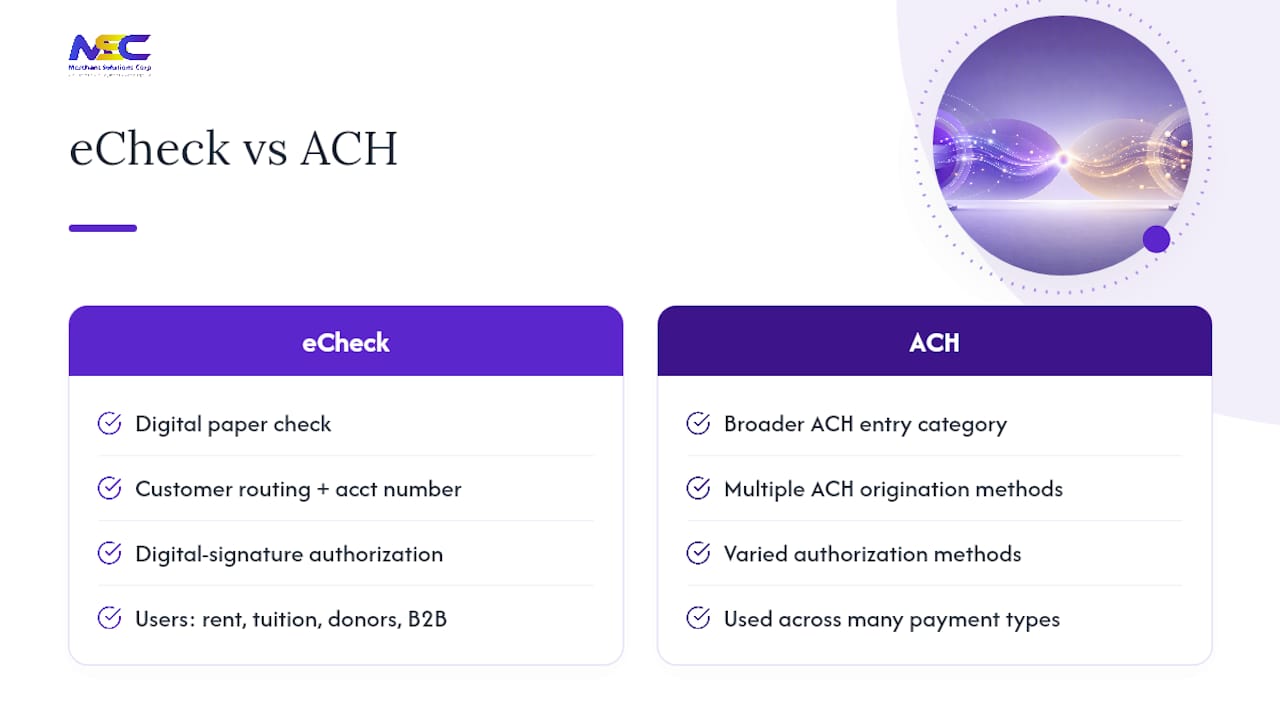
- Definition: ACH is the broader electronic funds transfer network; an eCheck is a specific ACH debit that mimics a paper check.
- Typical use: ACH suits payroll, subscriptions, and vendor credits; eChecks suit one-time invoices or customers who prefer check-style payments.
- Processing time: ACH settles in roughly 1 to 3 business days; eChecks often take 1 to 5 business days because of extra verification steps.
- Data storage: ACH commonly uses a stored mandate for recurring debits; eChecks are usually authorized per transaction.
- Typical fees: Both tend to run on flat per-transaction pricing or a small percentage, and rates vary widely by processor.
- Dispute window: Both fall under NACHA return rules, though verification method affects how fast a return surfaces.
For payroll or subscription billing, ACH wins on speed and reconciliation. For a one-off vendor invoice or a customer who insists on a check-like process, an eCheck gets the job done without asking them to change habits.
What Is the ACH Network and How Does It Move Money?
The Automated Clearing House network is the batch-processing system that moves money between U.S. bank accounts for direct deposit, bill payments, and business-to-business transfers. It has run reliably at massive scale for decades, and Nacha’s own volume data shows just how central it has become to everyday business banking.
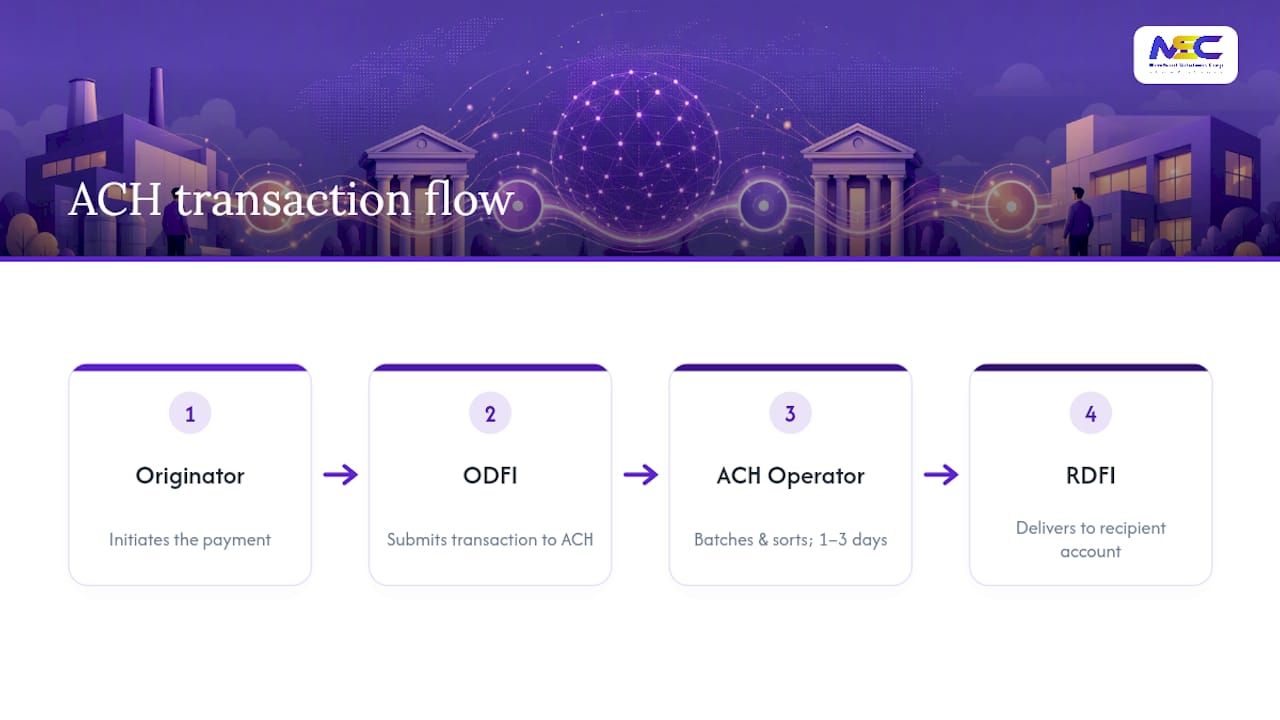
Four parties make an ACH transaction work. The Originator is the business or person initiating the payment. The Originating Depository Financial Institution (ODFI) submits the transaction into the network on the originator’s behalf. The Receiving Depository Financial Institution (RDFI) holds the recipient’s account. An ACH operator, typically the Federal Reserve or the Clearing House, sorts and delivers batches between institutions.
ACH transactions move in batches rather than one at a time, which is part of why they’re inexpensive at scale. Banks collect transactions throughout the day, bundle them, and submit them for settlement, usually clearing within 1 to 3 business days. Businesses lean on ACH for direct deposit payroll, recurring subscription billing, vendor payment credits, and B2B invoice settlement, exactly the use cases where predictable timing matters more than instant settlement.
Cost is where ACH shows its advantage. Because transactions batch together, per-transaction fees tend to stay low compared with card processing, and that gap widens as volume grows. A business running weekly payroll or monthly recurring billing for hundreds of customers typically sees the cost benefit compound month over month.
What Is an eCheck and How Does Processing Work?
An eCheck is the digital equivalent of a paper check, initiated with a customer’s routing and account number instead of a physical check, then processed as an ACH debit behind the scenes. Every eCheck is an ACH entry, but not every ACH entry is an eCheck, which is the core distinction worth remembering.
The initiation step usually involves an authorization form or an online checkout field where the customer enters bank details and a digital signature stands in for the pen-and-ink version on a paper check. That authorization becomes the legal basis for debiting the account, similar to how a signed check authorizes a bank to pay.
eChecks appeal to a specific type of customer: someone who still writes checks for rent, tuition, or larger purchases and wants a familiar-feeling process rather than entering a card number. Nonprofits collecting large one-time donations, landlords collecting rent, and B2B vendors billing occasional large invoices all lean on eChecks for this reason.
Processing time runs slightly behind standard ACH. Because eChecks often require additional verification, whether through micro-deposits or account validation, before the debit clears, businesses should plan for up to 5 business days rather than assuming next-day settlement.
Speed, Cost, and Risk: Where the Real Trade-Offs Live
Once you get past definitions, the operational differences are what actually affect your accounts payable and receivable workflows.
Settlement speed favors standard ACH. A stored mandate, the kind used for recurring subscriptions or payroll, skips the per-transaction authorization step that eChecks typically require, which shaves a day or two off clearing. eChecks that need micro-deposit verification add time upfront but reduce the odds of a failed transaction later.
Cost structure rarely differs by payment type alone. Both tend to price as a flat per-item fee or a small percentage, and the real driver is volume and processor negotiation, not whether you call the transaction an eCheck or standard ACH. Businesses processing high transaction counts should compare fee shape (flat versus percentage) rather than chasing a specific rate, since ranges vary significantly by provider.
Disputes and reversals work under the same NACHA rules for both payment types, including warranty and stop-payment provisions that protect originators and receiving banks alike. A customer can dispute an unauthorized eCheck debit much like they’d dispute a forged paper check, and the return timeline depends on the reason code, not the label you put on the transaction.
Roughly 1 to 3 business days covers standard ACH settlement, while eChecks commonly stretch to 1 to 5 business days once verification steps are factored in.
Reconciliation is where finance teams feel the difference most. Stored-mandate ACH debits post on a predictable schedule, which makes matching them against invoices in your accounting system straightforward. One-off eChecks require matching each transaction to a specific invoice or authorization form, adding manual review time if your volume is high.
Security and Compliance: What NACHA and Regulation E Require
Every ACH debit, eCheck included, runs under NACHA’s operating rules, which spell out warranties the ODFI makes to the network and the authorization standards originators must meet before debiting an account.
Regulation E adds a separate layer of protection for consumer transactions, giving account holders a defined window to dispute unauthorized debits. Business-to-business transactions carry different protections than consumer transactions, so it’s worth confirming which rules apply to your specific payment flow before assuming Reg E coverage extends to a vendor payment.
Third-party senders add another compliance layer. If your business routes payments through a payment processor rather than dealing directly with an ODFI, Nacha’s third-party sender guidance requires that processor to conduct annual risk assessments and, in many cases, undergo Rules Compliance Audits. The ODFI remains ultimately responsible for entries it submits, which is exactly why the contractual relationship between your business and its processor needs to be explicit.
Practical controls that reduce risk:
- Verify accounts with micro-deposits or instant verification before the first debit.
- Require dual authorization on large or first-time vendor payments.
- Reconcile ACH and eCheck batches daily rather than weekly.
- Confirm your processor performs regular NACHA compliance audits.
Pro Tip: Run a small test transaction, even a $1 authorization, before onboarding a new recurring vendor payment. It catches routing number typos before they turn into a failed payroll run.
How to Choose Between eCheck and ACH for Your Business
The right choice depends less on preference and more on transaction pattern. Match the method to the job, not the other way around.
- Check your volume and frequency. High-volume recurring billing (subscriptions, payroll, rent collection) favors standard ACH with a stored mandate.
- Consider customer habits. If customers are used to writing checks, an eCheck option reduces friction without forcing a card payment.
- Weigh reconciliation needs. If your finance team needs predictable batch posting, ACH’s stored-mandate model is easier to automate.
- Confirm settlement SLAs. Ask any processor for their typical settlement window in writing rather than accepting a vague estimate.
- Evaluate fraud tolerance. Higher-dollar or first-time transactions warrant micro-deposit verification regardless of which method you choose.
When vetting a processor, ask directly about their ODFI relationships, whether they undergo NACHA Rules Compliance Audits, what verification options they offer, and how they handle returns. Vague answers on fees, missing compliance documentation, or no verification options at all are red flags worth walking away from.
Setting Up ACH and eCheck Acceptance: A Short Checklist
Getting either payment method live takes fewer steps than most businesses expect.
- Establish a processor or ODFI relationship that supports both ACH debits and eCheck-style one-off authorizations.
- Collect routing and account numbers through a secure form, and choose micro-deposit or instant verification based on transaction size and risk.
- Connect the payment method to your invoicing or payment links system, run a test transaction, and build a reconciliation workflow that flags returns automatically.
Why We Recommend Offering Both
Businesses that accept only cards lose customers who prefer bank transfers, and businesses that accept only paper checks slow down their own cash flow. Offering ACH for recurring flows and eCheck for one-off, check-style payments improves acceptance rates without adding real complexity once the right ACH and eCheck setup is in place. Reach out to a processing partner who can walk through compliant setup before you commit to one method.
— Jonathan
Get Your Business Set Up for ACH and eCheck Processing
A single integration path can be set up for both payment types, offering businesses a streamlined solution without forcing a choice between speed and customer flexibility. That means one processor relationship, one reconciliation workflow, and one compliance partner handling verification, whether a customer pays through a recurring ACH mandate or a one-time eCheck.
The setup includes ACH and eCheck processing built into POS and online checkout, micro-deposit and instant verification options, and support for reconciling both payment types against your invoicing system. Retail and service businesses layering this into existing payment processing and POS systems skip the extra vendor management that comes with juggling separate providers. For businesses collecting recurring membership or subscription payments, the same setup extends naturally to workflows like the ones covered in online payment collection guides for service businesses.
Contact a payment processing provider to review your current payment mix and get a compliant ACH and eCheck setup running before your next billing cycle.
Sources
FAQ
Is Zelle Considered ACH or EFT?
Zelle operates as a separate peer-to-peer network built on bank partnerships rather than running through standard ACH batch processing, so it’s best described as an EFT method distinct from ACH.
How Does an eCheck Work?
A customer authorizes a debit using their routing and account number, often through a digital signature or authorization form, and that authorization gets processed as an ACH debit behind the scenes.
Can I Pay With an ACH eCheck?
Yes. An eCheck is simply an ACH debit initiated with check-style authorization, so paying “by eCheck” means the transaction settles through the ACH network like any other ACH debit.
Is an eCheck Just a Bank Transfer?
It’s a specific type of bank transfer. An eCheck moves through the ACH network using check-like authorization, while the term “bank transfer” can also refer to wire transfers, which settle faster but typically cost more and use different rails entirely.