Protect Sales During Outages: Merchant Offline Card Processing Playbook
Protect Sales During Outages: Merchant Offline Card Processing Playbook
Offline card processing, also called store-and-forward, lets your terminal capture a card sale during an internet outage and submit it for approval once the connection returns. It protects revenue during short disruptions but shifts risk to you: the bank hasn’t actually approved anything until the upload happens, which means declines, chargebacks, and settlement delays are all real possibilities. Use it as a short-term bridge, not a daily habit.
TL;DR:
- Offline card processing should only be used as a short-term solution during brief internet outages, not as a daily practice due to increased risk.
- Merchants must understand their submission window, typically 24 to 72 hours, and set spending limits before an outage occurs to minimize chargeback exposure.
- Proper preparation includes verifying firmware updates, encryption support, and staff training on when to seek voice authorization for high-value transactions.
- During outages, merchants should confirm the terminal has switched to offline mode, collect customer contact info, and upload transactions promptly once connectivity is restored.
- Businesses with high-value sales or high chargeback rates should avoid offline mode during extended outages or if the risk outweighs the benefit.
Table of Contents
- How Does Offline Card Processing Work?
- What Are the Risks and Limits of Offline Processing?
- How Do I Prepare for Offline Card Processing?
- What Should I Do During and After an Outage?
- What Hardware and Network Options Reduce Offline Risk?
- When Should You Avoid Offline Processing?
- An Editorial Take on Offline Acceptance
- Get Offline-Ready Payment Equipment Set Up Right
- Sources
- FAQ
How Does Offline Card Processing Work?
The mechanics are simpler than most merchants expect, but the timing matters more than people realize. When your terminal loses its connection, it doesn’t just freeze. Offline-capable devices switch into a queueing mode that lets you keep swiping, tapping, or dipping cards as if nothing happened.
Here’s what actually gets captured and stored at the point of sale:
- A masked version of the card number (not the full PAN in readable form)
- The expiration date
- The transaction amount
- A timestamp for each sale
That data doesn’t sit unprotected. Terminals built for offline credit card processing rely on point-to-point encryption (P2PE) to scramble transaction details the moment they’re captured, so even if a device were compromised, the stored data would be unreadable without the decryption keys held by the processor.
Once the internet returns, the terminal typically kicks off an automatic upload, though some systems allow a manual trigger if a manager wants to control timing. Each queued transaction gets submitted individually for authorization, in the order it was captured. This is the part merchants often misunderstand: uploading isn’t a formality. The bank can still decline any of those charges, whether from insufficient funds, a closed account, or a fraud flag. Most offline POS systems generate a reconciliation report after the batch runs, showing which transactions cleared and which bounced back, so your dashboard becomes the first place to check after any outage.
What Are the Risks and Limits of Offline Processing?
The core risk is straightforward: you’re extending credit on faith. A sale that looked completed at the counter can unwind hours later, and when it does, you’re the one absorbing the loss, not the customer who already walked out with the merchandise.
Processors manage their own exposure through a few built-in guardrails:
- Floor limits cap the dollar amount a terminal will accept without a live authorization; many terminals today set that limit to zero and only fall back to offline mode when the connection is genuinely down.
- Submission windows (often somewhere in the range of 24 to 72 hours) define how long you have to upload before the transaction is considered stale or void.
- Voice authorization through the processor’s phone line offers a fallback for verifying a card manually when both connectivity and stored floor limits work against you.
Statistic Callout: Industry guidance treats offline mode as a last resort rather than a routine operating mode, precisely because delayed settlement concentrates risk into the hours or days between capture and bank approval.
Chargeback exposure is where the gap really shows up. A transaction authorized by voice call carries a real approval code you can cite in a dispute. A transaction that simply sat in a queue and later declined has no such backing, which leaves you with weaker evidence if a customer disputes the charge after the fact.
There’s also a compliance layer that doesn’t disappear just because the internet did. Any cardholder data sitting on your terminal, even briefly, falls under PCI DSS obligations, and encryption isn’t optional.
How Do I Prepare for Offline Card Processing?
Preparation happens before the outage, not during it. Merchants who treat offline mode as a feature they configured once, months ago, tend to get burned by details they forgot to check.
- Confirm with your processor exactly which submission window applies to your account, whether that’s 24 hours or a longer grace period, and get it in writing.
- Set a conservative per-transaction ceiling and a queue limit for how many offline sales you’ll accept before switching to voice authorization or pausing card sales entirely.
- Verify your terminal’s firmware is current and that encryption is active. Older devices sometimes need a manual update before offline mode functions correctly.
- Train staff on a simple rule: above a certain dollar threshold, or after a certain number of queued sales, they call for voice authorization instead of letting the terminal queue another transaction.
Pro Tip: Ask your processor directly whether your terminal’s floor limit is set to zero by default. If it is, you may need to request offline capability be enabled before you ever need it, not during a live outage.
Regulators and payment authorities generally recommend merchants confirm these terms with their acquirer ahead of time rather than assuming offline acceptance works the same way everywhere.
What Should I Do During and After an Outage?
An outage tests whether your prep work actually holds up. The sequence matters, and skipping a step tends to cost you later, usually during reconciliation.
- Confirm the terminal has actually switched to offline mode rather than simply failing silently, and check that a receipt or on-screen indicator confirms the sale was queued.
- Collect a phone number or email for higher-value sales, so you have a way to reach the customer if the charge declines after upload.
- Limit or pause acceptance of unusually large purchases until connectivity returns, since those carry the most exposure if the card turns out to be invalid.
- Once the internet is back, trigger the upload promptly. Reconciling declines quickly matters more than people expect, because the longer a queue sits unprocessed, the harder it becomes to reach the customer or reverse the sale cleanly.
- For any transaction that declines, contact the customer the same day if possible, and offer an alternate payment method rather than writing off the sale.
- Close the day by matching your POS sales report against inventory movement and the actual bank deposit, so any gap between “sold” and “paid” gets caught before it becomes a bookkeeping headache.
What Hardware and Network Options Reduce Offline Risk?
Not all terminals handle offline mode the same way, and the differences show up exactly when you need them least. Queue size and battery life are the two specs merchants overlook most often, since both determine how long you can keep operating before the device simply stops accepting new transactions.
A few features worth checking before you buy or lease equipment:
- P2PE support built into the hardware itself, not added on as an afterthought
- Cellular fallback, ideally with dual SIM and automatic failover, so a Wi-Fi outage doesn’t take the whole terminal down with it
- Cloud-first POS software with a genuinely tested offline mode, rather than a legacy local-only system that was never designed for intermittent connectivity
- Rugged build quality for mobile or outdoor use cases, where drops and weather are as much a threat as dead internet
One limitation worth flagging directly: mobile wallets and tokenized contactless payments often depend on real-time verification in ways that traditional card-present transactions don’t, so offline acceptance for those payment types can be more limited or unavailable depending on the payment gateway behaviors and tokenization of the terminal.
When Should You Avoid Offline Processing?
Offline mode isn’t a fit for every business. High-ticket sales, businesses with elevated chargeback rates, and regulated industries carry too much exposure if a queued transaction unwinds after the customer has already left with a car part, a piece of jewelry, or a service already rendered.
Outages that stretch beyond a few hours also change the math, since a growing queue ties up working capital you can’t access until the bank actually clears each sale. In those cases, voice authorization, a temporary cash-only policy, or a cellular hotspot as a backup connection are usually the safer call.
An Editorial Take on Offline Acceptance
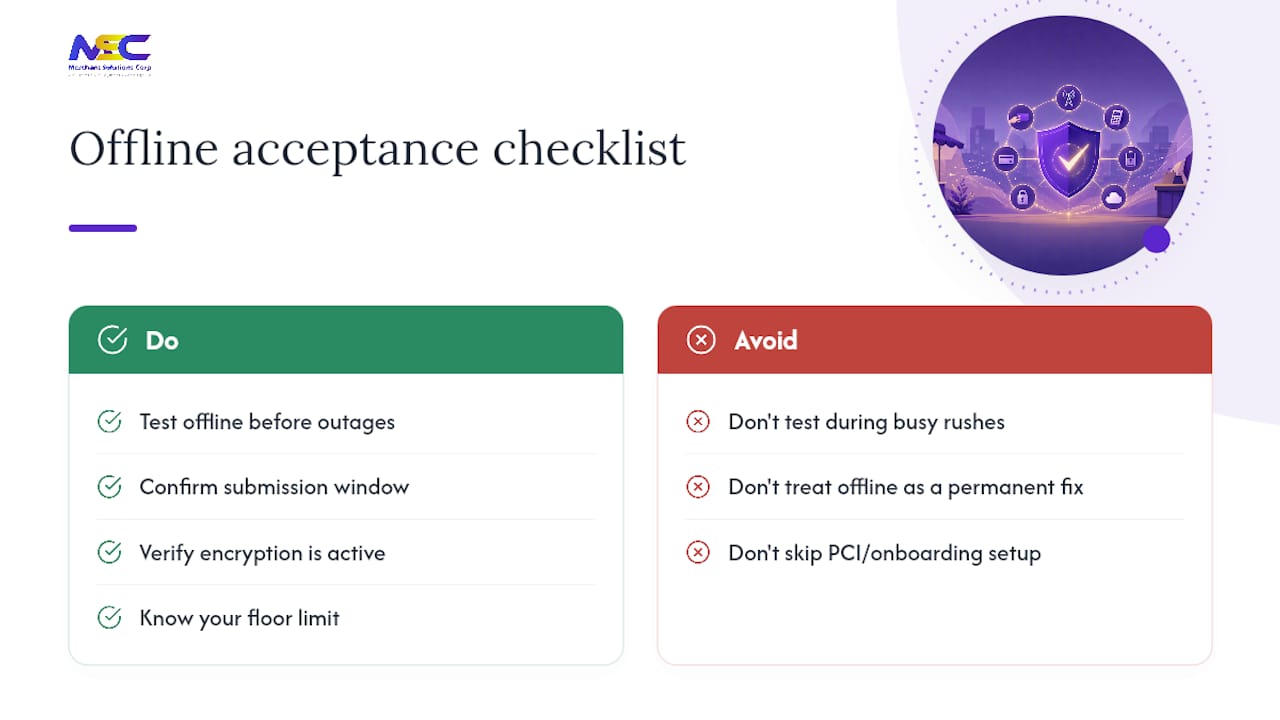
Offline processing works exactly once as intended: as a short bridge during an unplanned outage, not a substitute for reliable connectivity. The trade-off is simple. You keep the sale, but you accept real odds of a later decline.
The merchants who avoid getting burned are the ones who test offline mode before it matters, not during a Saturday rush. Confirm your submission window, check that encryption is active, and know your floor limit before an outage forces the question. Merchant Solutions Corp supports that kind of preparation directly, from onboarding through PCI-related setup, with free hardware programs that make testing a realistic option rather than an expense you have to justify separately.
— Jonathan
Get Offline-Ready Payment Equipment Set Up Right
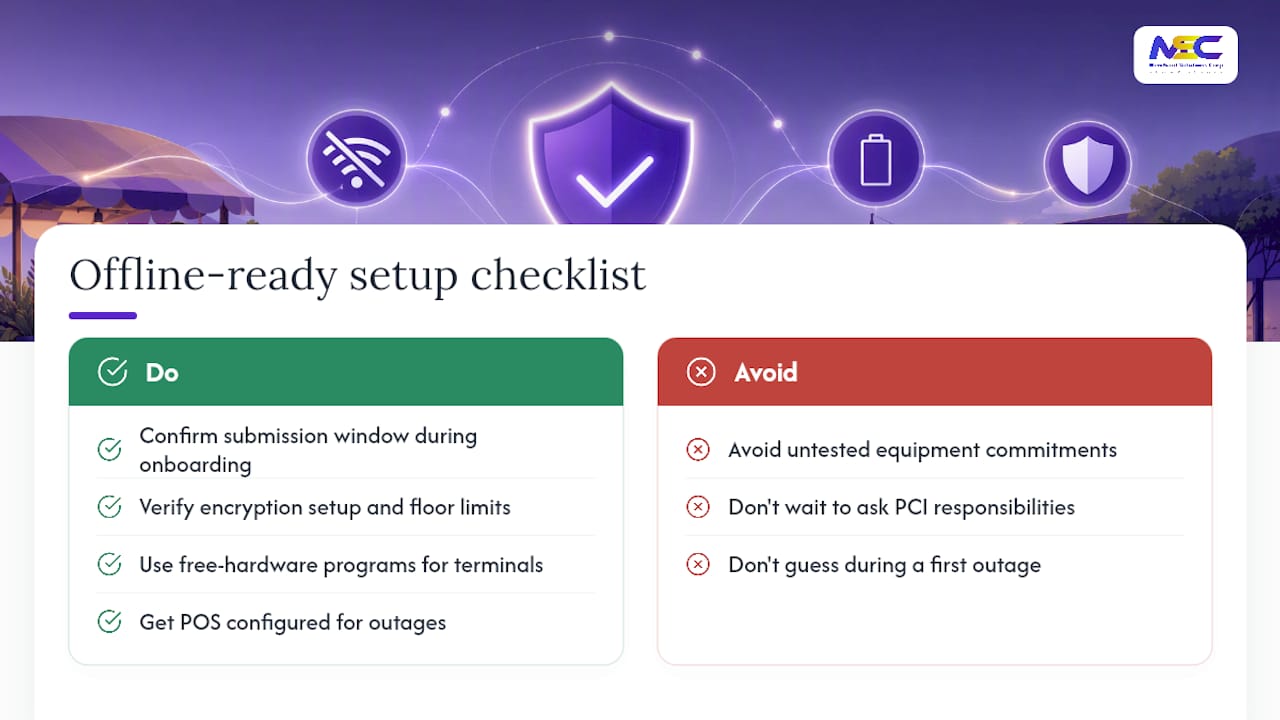
Merchant Solutions Corp gives you a practical path to offline-capable payment acceptance without locking you into equipment you haven’t tested. Compared to piecing together hardware and hoping it handles an outage, working with a provider that configures your POS system for store-and-forward from day one means you’re not guessing during your first real disruption. Merchant Solutions Corp’s payment processing and POS solutions come with onboarding support that walks you through your submission window, encryption setup, and floor limits before you ever need them.
Free hardware programs mean you can put a properly configured terminal in place without a large upfront cost, and support continues past setup into daily operations. If you’re evaluating POS systems for a retail counter, restaurant floor, or mobile setup, ask directly about offline submission windows and PCI compliance responsibilities before you sign anything. Reach out to Merchant Solutions Corp to compare your risk tolerance against what a given contract actually covers, and get equipment configured for the outages you can’t predict.
Sources
For deeper technical grounding, the PCI Security Standards Council documents encryption requirements for stored cardholder data. Danmarks Nationalbank’s merchant preparedness guidance covers offline acceptance readiness, and LegalClarity’s breakdown of floor limits explains store-and-forward mechanics in more detail.
- Offline Credit Card Processing: Floor Limits & Store-and-Forward - LegalClarity
- PCI Security Standards Council — participating organizations (resource for standards)
- How to run retail point of sale platforms offline and sync sales later - BC4
- Payment recommendations for merchants in physical commerce: Be prepared - Danmarks Nationalbank
FAQ
How long does it take for offline payments to go through?
Queued transactions typically upload automatically once connectivity returns, often within minutes, but processors generally require submission within a set window, commonly somewhere between 24 and 72 hours, after which the transaction can be voided.
What payment apps or methods work offline?
Traditional card-present transactions (chip, swipe, or contactless with a stored floor limit) are the most reliable offline option; mobile wallets and tokenized contactless payments often depend on real-time verification and may not work the same way without a connection.
How do I process a credit card transaction offline?
Enable offline mode on a supported terminal, capture the sale as usual, and let the device queue the encrypted transaction locally; if the amount exceeds your floor limit or you’re uncertain about the card, call your processor’s voice authorization line instead.
What are some examples of offline payment methods?
Store-and-forward card transactions, phone-based voice authorization, and cash are the three most common fallbacks merchants use when a card-present terminal loses its internet connection.
Does Merchant Solutions Corp support offline-capable POS setups?
Merchant Solutions Corp configures POS hardware and processing accounts with offline acceptance in mind, including guidance on submission windows and encryption, as part of its onboarding and ongoing support.