Retail Payment Systems: A Practical U.S. Merchant Guide
Retail Payment Systems: A Practical U.S. Merchant Guide
Retail payment systems are the networks, rules, and providers that move a checkout transaction from customer to merchant account. Every sale you process touches authorization, clearing, and settlement — three phases that determine when you get paid, what it costs, and who holds your data. Before reading further, take three immediate actions:
- Acceptance checklist: Confirm which instruments you currently accept (cards, ACH, checks, cash, mobile wallets) and identify any gaps that could cost you sales.
- Cash-flow check: Ask your processor exactly when settled funds post to your bank account — settlement typically takes multiple business days, and batch timing is the lever you control.
- Vendor check: Verify your payment provider’s PCI DSS compliance status and confirm they carry a current Attestation of Compliance (AOC); request their SOC report and breach-notification terms in writing.
The sections below walk through each layer of the U.S. payment infrastructure, from ACH mechanics to card acquiring to emerging contactless rails, with selection criteria and compliance controls you can apply immediately.
Key Takeaways
The most effective retail payment strategy combines multi-instrument acceptance, disciplined batch management, and vendor due diligence — not just the lowest advertised processing rate.
| Point | Details |
|---|---|
| Accept multiple instruments | U.S. retail remains paper-heavy; supporting cards, ACH, cash, and mobile wallets prevents lost sales across customer segments. |
| Control your batch timing | Closing batches daily before your processor’s cut-off is the single fastest fix for settlement delays that affect cash flow. |
| Verify vendor compliance | Require a current PCI AOC and SOC 2 report from every payment provider before signing; add breach-notification terms to every contract. |
| Reduce PCI scope with tokenization | Tokenization and P2PE remove raw card data from your systems, lowering your SAQ tier and compliance cost. |
| Merchantsolutionscorp for retail | Merchantsolutionscorp offers card and ACH processing, integrated POS, free hardware programs, and dual pricing for U.S. retailers with fast approval and full onboarding support. |
Table of Contents
- How do retail payment systems actually work in the U.S.?
- What payment instruments should your retail business accept?
- How does the transaction lifecycle affect your cash flow?
- What do checks and remote deposit capture mean for retail merchants?
- How does ACH work, and when should merchants use it?
- How does the card acquiring ecosystem affect your costs and controls?
- What emerging payment methods should retailers prepare for now?
- What compliance and fraud controls does your payment setup require?
- How do you choose the right retail payment system for your business?
- How Merchantsolutionscorp supports U.S. retailers from setup to daily operations
- Payments are a revenue lever, not just a cost center
- Lower your payment costs and get set up faster with Merchantsolutionscorp
- Sources
- FAQ
How do retail payment systems actually work in the U.S.?
Every retail payment transaction involves more participants than most merchants realize. Understanding who does what — and where risk concentrates — is the foundation of any sound payment strategy.
The primary actors
- Payer (customer): Initiates the transaction at checkout.
- Merchant: Accepts the payment and bears the cost of processing.
- Payment gateway: Encrypts and routes transaction data from the point of sale to the processor.
- Processor: Handles the technical routing between the merchant’s acquirer and the card networks or ACH operators.
- Acquirer (merchant bank): The financial institution that holds the merchant account and receives settled funds.
- Issuer: The bank or credit union that issued the customer’s card or account.
- Card network: Visa, Mastercard, American Express, or Discover — sets interchange rules and routes authorization messages.
- ACH operators: FedACH (operated by the Federal Reserve) and EPN (a private-sector operator) batch and settle ACH transactions.
- Clearing houses: CHIPS and the ACH network handle large-value and retail electronic settlements respectively.
The three-phase lifecycle
Authorization happens in seconds: the gateway sends the transaction to the processor, which routes it to the card network, which contacts the issuer for an approve/decline decision. Clearing follows — typically within hours — when transaction data is exchanged between the acquirer and issuer to establish the obligation. Settlement is the final transfer of funds, commonly completing within 1–5 business days depending on the rail and your processor’s funding schedule.
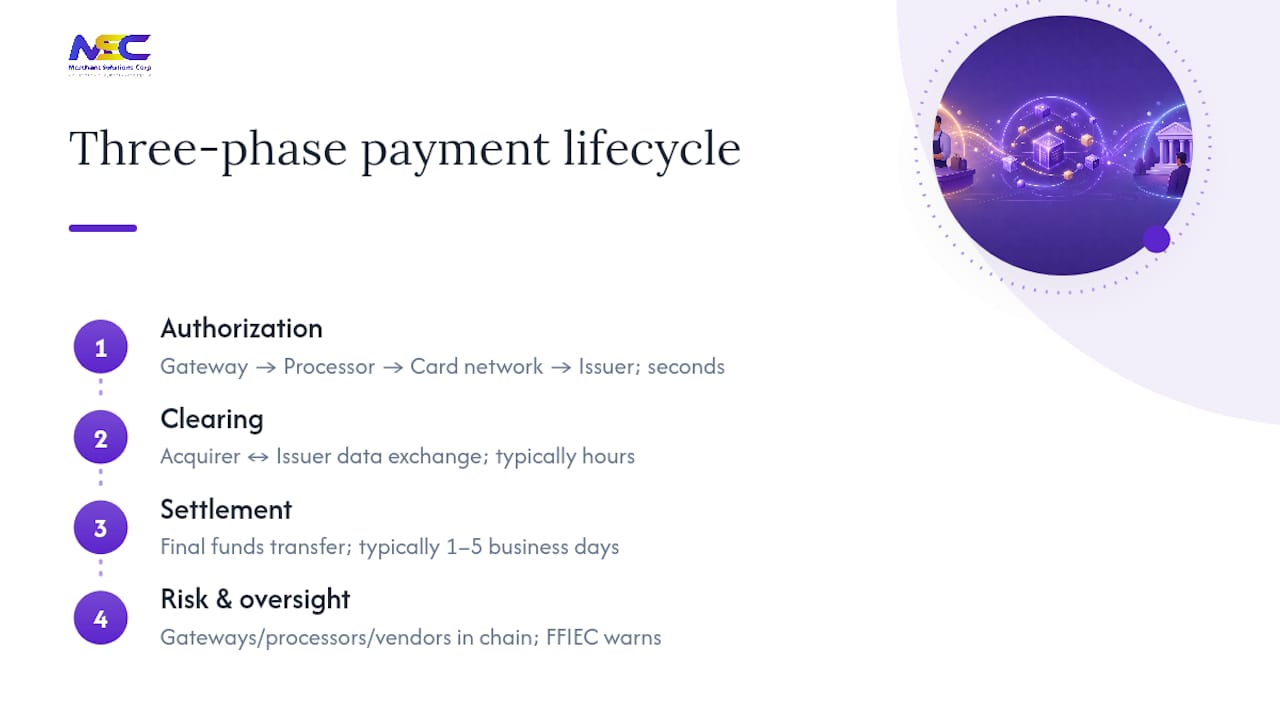
Nonbank third parties — gateways, processors, software vendors — now sit inside nearly every transaction chain. FFIEC guidance warns directly that this lengthening of the chain raises operational and compliance risk, requiring merchants and financial institutions to perform robust vendor due diligence and ongoing oversight. That warning is not theoretical: a weak link anywhere in the chain can delay settlement, expose cardholder data, or trigger a compliance finding.
What payment instruments should your retail business accept?
The Federal Reserve Bank of Boston documents that the U.S. retail payments system remains comparatively paper-heavy relative to other major economies, with checks and cash still comprising a meaningful share of transactions. That hybrid reality means a single-instrument strategy leaves revenue on the table.

When to offer multiple options: In-store retail benefits from card-present, contactless, and cash acceptance at minimum. E-commerce merchants should add ACH and digital wallets to reduce cart abandonment. Recurring-billing businesses (subscriptions, memberships) gain the most from ACH because the per-transaction cost is lower and returns are more predictable than chargebacks. B2B buyers often prefer check or ACH; refusing both can lose you the sale entirely.
Pro Tip: If you serve a mix of consumer and B2B customers, configure your POS to accept ACH or eCheck at the register — not just online. Many B2B buyers still pay by check, and converting those at the point of sale to ACH reduces your paper-handling cost and speeds funds availability.
How does the transaction lifecycle affect your cash flow?
The gap between “approved” and “funded” is where cash-flow problems live. Understanding each phase gives you concrete levers to pull.
Authorization, clearing, and settlement step by step
- Authorization (seconds): Customer presents payment. Your terminal or gateway encrypts the data and sends an authorization request through the processor to the card network and issuer. The issuer checks the account and returns an approve or decline code. No money moves yet — only a hold is placed.
- Clearing (hours to one business day): At end of day (or when you close your batch), your processor bundles authorized transactions into a clearing file and submits it to the card network. The network routes obligations to the issuer. This is where transaction data becomes a financial obligation.
- Settlement (1–5 business days): The issuer transfers funds through the network to your acquirer, who posts them to your merchant account. The U.S. Chamber of Commerce confirms that authorization occurs in seconds while settlement typically completes within a few business days, with costs including interchange, network fees, and processor markups that vary by card type and transaction method.
Pro Tip: Batch closure time directly controls when your settlement clock starts. Merchants who close batches daily — ideally before your processor’s cut-off time — trigger faster settlement. Leaving a batch open overnight or over a weekend can push your funding out by an additional business day or more, which compounds across a week of sales.
Daily operational controls for settlement
- Set a fixed batch-close time in your POS or terminal, aligned with your processor’s cut-off window.
- Reconcile your daily batch total against your POS sales report before closing — discrepancies caught here are far easier to resolve than after settlement.
- Monitor your merchant account daily for posted deposits; flag any day where expected funds do not appear.
- Keep a log of batch IDs and submission timestamps so disputes with your processor have a paper trail.
What do checks and remote deposit capture mean for retail merchants?
Paper checks have not disappeared from U.S. retail. The BIS/CPSS analysis of U.S. payment infrastructure documents how Check 21 legislation and Remote Deposit Capture (RDC) changed check processing from a physical-transport model to an image-based electronic one — a shift that benefits merchants who handle check volume.

Check 21 allows banks to process a digital image of a check as the legal equivalent of the original, eliminating the need to ship paper between banks. For merchants, the practical effect is faster clearing and reduced risk of lost items in transit.
Remote Deposit Capture lets merchants scan checks at their location and transmit images electronically to their bank, rather than making a physical deposit run. The FFIEC Glossary defines RDC as a service that allows customers to make deposits without visiting a branch — and for retail, that means same-day or next-day availability in many cases instead of the 2–5 day float of a mailed or branch-deposited check.
RDC pros, cons, and controls
Pros:
- Faster funds availability compared to branch deposit
- Reduced transportation cost and risk
- Audit trail via digital images
Cons:
- Duplicate presentment risk (same check deposited twice)
- Requires scanner hardware and software maintenance
- Fraud risk if physical originals are not secured after scanning
RDC controls checklist:
- Apply a “For Mobile/Remote Deposit Only” endorsement stamp to every check before scanning
- Retain physical originals for a minimum period per your bank’s policy (typically 14–90 days), then destroy securely
- Reconcile scanned batches against your deposit confirmation daily
- Set per-item and daily deposit limits to cap exposure
- Enable duplicate-detection features in your RDC software
When to convert checks to ACH
Check-to-ACH conversion (using SEC codes like ARC for accounts-receivable checks or BOC for back-office conversion) lets you process a paper check as an ACH debit. This reduces paper handling, speeds settlement, and lowers per-item cost. It works best for recurring customers whose authorization you can capture upfront. You must provide proper consumer notice and follow NACHA rules on authorization and return handling before converting.
How does ACH work, and when should merchants use it?
ACH (Automated Clearing House) is a batch-processed electronic transfer network used for payroll, bill payments, recurring charges, and check conversion. FedACH (operated by the Federal Reserve) and EPN (Electronic Payments Network, a private operator) are the two principal ACH operators in the U.S. Transactions are grouped into files, submitted at defined windows, and settled in batches rather than in real time.
NACHA — the organization that governs ACH operating rules — defines Standard Entry Class (SEC) codes that specify how a transaction was authorized and what return rules apply. Key codes for retail merchants include:
- WEB: Internet-initiated debit entries (e-commerce recurring billing)
- TEL: Telephone-authorized debits (call-center payments)
- ARC / BOC: Check conversion at point of sale or back office
- CCD: Corporate credit or debit (B2B payments)
- IAT: International ACH transactions (cross-border, with additional compliance requirements)
Merchant use cases for ACH
- Recurring billing: Subscription services, memberships, and installment plans benefit from ACH’s lower per-transaction cost relative to cards.
- B2B payments: Large invoices where card interchange would be prohibitive are natural ACH candidates.
- Payroll: ACH is the standard rail for direct deposit.
- Check conversion: Converts paper checks at point of sale or back office to reduce handling cost.
Return risk is the ACH equivalent of a chargeback. Returns occur for insufficient funds (R01), unauthorized transactions (R10), or account closed (R02). Unlike card chargebacks, ACH returns typically resolve faster, but unauthorized return codes carry a 60-day window for consumers — so authorization documentation matters.
ACH operational controls
- Obtain written or recorded authorization before initiating any ACH debit; retain authorization records for at least two years.
- Monitor your return rate; NACHA thresholds for unauthorized returns are strict, and exceeding them can result in suspension of your origination privileges.
- Vet your ACH originator or third-party processor for NACHA compliance, SOC 2 reports, and data-security controls — the same due-diligence standard that applies to card processors.
How does the card acquiring ecosystem affect your costs and controls?
Card payments flow through a layered stack, and each layer adds cost and complexity. Knowing who does what helps you negotiate better terms and build tighter controls.
The acquiring stack, plainly explained
- Gateway: Encrypts card data at the point of entry and routes it to the processor. Examples include hosted payment pages and terminal-integrated gateways.
- Processor: The technical intermediary that communicates with card networks on the acquirer’s behalf.
- Acquirer: Your merchant bank — holds your merchant account, funds your deposits, and bears chargeback liability.
- Card network: Sets interchange rates, dispute rules, and brand standards (EMV, contactless).
- Issuer: The cardholder’s bank; approves or declines the authorization and funds the settlement.
Interchange is the largest component of your processing cost. It flows from your acquirer to the issuer and is set by the card network based on card type (credit vs. debit, rewards vs. standard), transaction method (card-present vs. card-not-present), and merchant category code (MCC). You do not negotiate interchange directly — but your transaction mix, terminal configuration, and data quality all affect which interchange tier your transactions qualify for.
Integration checklist for card acceptance
- EMV chip: Require chip-read for all card-present transactions; swipe-only terminals shift fraud liability to you.
- NFC/contactless: Enable tap-to-pay on all terminals to support mobile wallets and contactless cards.
- Tokenization: Replace stored card numbers with tokens so your systems never hold raw PAN data, reducing PCI scope.
- Receipts and reconciliation: Configure your POS to produce itemized receipts and daily settlement reports that match your batch totals.
- Refund and chargeback workflow: Document your refund policy at the point of sale and train staff on the evidence requirements for dispute responses — card-present and card-not-present disputes require different documentation.
Merchants processing both in-store and e-commerce transactions should segment their reconciliation and dispute workflows. Chargeback risk and evidence requirements differ between card-present and card-not-present environments, and mixing them in a single workflow leads to missed deadlines and lost disputes.
What drives your effective rate: Card type mix is the single largest variable — a high share of premium rewards cards raises your average interchange cost. Transaction method matters too: card-present rates are lower than card-not-present. Monthly fees, gateway fees, and network assessments add to the total. Reviewing your monthly processing statement line by line, at least quarterly, is the fastest way to identify cost leakage.
What emerging payment methods should retailers prepare for now?
The checkout experience is shifting faster than most merchants’ terminal refresh cycles. Several trends are near-term enough to act on today.
- Contactless adoption: Tap-to-pay volume has grown consistently since 2020. If any of your terminals still require a swipe or dip for contactless-capable cards, upgrading is a straightforward cost reduction and speed improvement at checkout.
- Tokenization: Card networks and processors are expanding network tokenization, where the card number is replaced at the network level before it ever reaches your system. This reduces fraud and simplifies PCI scope — ask your processor whether network tokens are enabled on your account.
- Instant payments: The Federal Reserve’s FedNow Service and RTP (Real-Time Payments) from The Clearing House are expanding merchant access to near-real-time settlement. Pilot programs are active; monitor your acquirer’s roadmap for merchant-facing instant-pay settlement options.
- Mobile wallets: Apple Pay, Google Pay, and Samsung Pay are now mainstream at point of sale. Enabling NFC acceptance costs nothing if your terminal already supports it — it is a configuration step, not a hardware purchase in most cases.
- QR-code ordering: For restaurants and retail with self-service components, QR-based ordering integrates payment directly into the customer’s phone, reducing staff touchpoints and capturing order data in your POS.
Practical actions to take now:
- Audit your terminal fleet for NFC capability and enable contactless if not already active.
- Ask your processor about network tokenization enrollment.
- Review your acquirer’s FedNow or RTP timeline and assess whether faster settlement would materially improve your working capital.
- Test mobile wallet acceptance with your own device before assuming it works at every terminal.
Instant payments and tokenization are the two trends most likely to change merchant economics in the next 24 months. Contactless and mobile wallets are already table stakes.
What compliance and fraud controls does your payment setup require?
Payment compliance is not optional, and the cost of a breach or a compliance finding far exceeds the cost of the controls that prevent them. The FFIEC Retail Payment Systems Booklet groups risk into operational, fraud, legal, and compliance categories — each requiring specific controls.
Vendor due-diligence checklist
- Obtain a current PCI DSS Attestation of Compliance (AOC) from every payment vendor before signing a contract.
- Request SOC 2 Type II reports for processors, gateways, and any cloud-hosted payment software.
- Confirm contractual breach-notification timelines — 72 hours is a common standard; anything longer is a red flag.
- Review SLAs for uptime, dispute resolution, and support response times.
- Verify encryption standards: TLS 1.2 or higher for data in transit, AES-256 for data at rest.
- Confirm tokenization is applied to stored card data so your systems are out of PCI scope for that data.
- Establish a right-to-audit clause or require annual third-party security assessments.
PCI DSS basics for merchants
PCI DSS (Payment Card Industry Data Security Standard) applies to any merchant that stores, processes, or transmits cardholder data. Your compliance level (SAQ type) depends on transaction volume and how you accept cards:
- SAQ A: Card data fully outsourced; merchant never touches raw card numbers (e.g., hosted payment page only).
- SAQ B: Imprint-only or standalone dial-up terminals with no electronic storage.
- SAQ C: POS systems connected to the internet but not storing card data.
- SAQ D: All other merchants, including those with e-commerce and stored data.
Reducing PCI scope through tokenization and point-to-point encryption (P2PE) is the most cost-effective compliance strategy for most retailers. You can find Merchantsolutionscorp’s approach to security and compliance on their website.
Incident response quick-steps
- Isolate the affected system immediately — do not power it off, as forensic evidence may be lost.
- Notify your acquirer and processor within the timeframe specified in your contract.
- Preserve logs and transaction records for forensic review.
- Follow your state’s breach-notification law for customer notification timelines.
- Engage a PCI Forensic Investigator (PFI) if card data may have been compromised.
For AML and KYC considerations, higher-risk merchant categories (money services, high-ticket retail, certain e-commerce) should implement transaction monitoring and customer due-diligence procedures aligned with FinCEN guidance. Practical fraud prevention controls — velocity checks, address verification, CVV matching — apply across retail verticals, not just restaurants.
How do you choose the right retail payment system for your business?
Selection is where most merchants lose money — either by overpaying on fees they never scrutinized or by choosing a system that does not integrate with their existing stack. Use the checklist and questions below before signing any agreement.
Selection checklist
- Supported instruments: Does the system accept credit, debit, ACH, contactless, and mobile wallets?
- Integration: Does it connect natively to your existing POS, inventory, and accounting software?
- Reporting: Can you export daily settlement reports, batch summaries, and chargeback data in a format your accounting team can use?
- Fee transparency: Does the provider give you a complete fee schedule — interchange, processor markup, network fees, monthly fees, hardware costs — in writing before you sign?
- Support hours: Is live support available during your peak business hours, including weekends?
- Hardware programs: Does the provider offer $0 upfront hardware options or subscription-based equipment to reduce capital outlay?
- Data ownership: Do you retain full ownership of your transaction data if you switch providers?
Questions to ask prospective providers
- What is your batch cut-off time, and what is the typical funding timeline to my bank account?
- How do you handle chargebacks — do you provide dispute management tools, or is that entirely on me?
- What PCI compliance tier do I fall into with your system, and what does your setup do to reduce my scope?
- Who owns my transaction data, and what happens to it if I terminate the agreement?
- What is your uptime SLA, and what is your remediation process if the system goes down during business hours?
- Do you support dual pricing or cash discount programs to offset processing fees?
Cost components and a sample implementation timeline
Cost buckets to budget for:
- Interchange (set by card networks, passed through at cost or marked up)
- Processor markup (flat rate, tiered, or interchange-plus pricing)
- Network assessment fees
- Monthly account and gateway fees
- Hardware (purchase, lease, or $0 program with processing commitment)
- PCI compliance fees (some processors charge separately; others include it)
Sample 30–90 day implementation timeline:
- Days 1–10: Evaluate providers, collect fee schedules, and run your current processing statement through an interchange-plus comparison.
- Days 11–20: Select provider, sign agreement, and order hardware.
- Days 21–35: Configure POS, integrate with accounting and inventory systems, and complete staff training.
- Days 36–50: Run parallel processing (old and new system) to validate reconciliation accuracy.
- Days 51–90: Full cutover, monitor settlement timing daily, and review first full monthly statement for fee accuracy.
Cloud infrastructure supporting your payment-data environment matters too. Retailers evaluating back-office integrations should consider AWS-based retail architectures that provide secure, scalable hosting for payment-related services and data.
How Merchantsolutionscorp supports U.S. retailers from setup to daily operations
Merchantsolutionscorp is a nationwide payment processing and POS provider built specifically for the operational realities of U.S. retail, restaurant, and service businesses. Their retail payment solutions cover the full stack a merchant needs to go from application to live acceptance.
What Merchantsolutionscorp offers retail merchants
- Card and ACH processing: Credit, debit, and ACH/eCheck acceptance across card-present and card-not-present environments.
- POS systems: Clover, Square, Skytab, Talech, Dejavoo, Ingenico, PAX, and Payanywhere — configured for retail workflows.
- Free hardware programs: $0 upfront equipment options with qualifying processing agreements, reducing capital requirements at launch.
- Dual pricing and cash discount programs: Offset processing fees by presenting separate cash and card prices at checkout, within card network rules.
- Online ordering and kiosks: Integrated self-ordering kiosk and online ordering tools that connect directly to your POS and payment processing.
- Loyalty and rewards: Built-in loyalty software to capture repeat customer data alongside payment data.
- Industry-specific setups: Configurations for high-risk categories, healthcare, hospitality, and specialty retail.
What onboarding looks like
- Application and approval: Submit your merchant application; most standard retail accounts receive approval within 1–3 business days.
- Equipment configuration: Hardware arrives pre-configured for your business type, reducing setup time.
- Training: Merchantsolutionscorp provides onboarding support covering terminal operation, batch management, and reconciliation.
- Ongoing support: Live support during business hours for troubleshooting, chargeback assistance, and reporting questions.
For merchants evaluating retail industry-specific setups, Merchantsolutionscorp’s team can walk through instrument acceptance, fee structure, and integration requirements before you commit.
Payments are a revenue lever, not just a cost center
Most retail operators treat payment processing as a utility bill — something to minimize and ignore. That framing costs them more than the processing fees themselves.
Your payment data is one of the richest operational datasets your business generates. Transaction timestamps, basket sizes, tender types, and return rates tell you which customer segments are growing, which product categories drive repeat visits, and where checkout friction is killing conversion. Merchants who instrument that data — even at the level of a weekly settlement report review — make better merchandising and staffing decisions than those who look only at the net deposit.
Checkout friction is the other underweighted variable. A customer who abandons a cart because you do not accept their preferred payment method is a lost sale with no visibility in your POS. Adding a contactless or mobile wallet option at an NFC-capable terminal you already own costs nothing but a configuration change — and the conversion lift at checkout is immediate and measurable.
The merchants who grow fastest are not necessarily the ones with the lowest processing rates. They are the ones who reduce friction at every tender point, protect cash flow through disciplined batch management, and use payment data to drive decisions that go well beyond the finance team.
Lower your payment costs and get set up faster with Merchantsolutionscorp
If this guide surfaced gaps in your current setup — instruments you are not accepting, settlement delays you did not know were controllable, or compliance steps you have not completed — Merchantsolutionscorp is built to close those gaps quickly. Their nationwide payment processing and POS platform gives U.S. retailers card and ACH acceptance, integrated POS hardware, and dual pricing options that offset processing fees, all with $0 upfront hardware programs for qualifying merchants.
Setup is fast: most accounts are approved within 1–3 business days, equipment arrives pre-configured, and their team supports you through reconciliation and daily operations from day one. Whether you are launching a new location, replacing an underperforming processor, or adding online ordering to your existing retail setup, Merchantsolutionscorp has the infrastructure and the support model to get you processing without a prolonged implementation. Contact Merchantsolutionscorp to review your current processing costs and get a fee comparison before your next statement closes.
Sources
The following primary and regulatory sources informed this guide. Each is worth bookmarking for ongoing compliance and operational reference.
- FFIEC IT Examination Handbook - Retail Payment Systems booklet (Introduction)
- How Credit Card Processing Works: A Guide for Small Businesses | CO- by US Chamber of Commerce
- The U.S. Retail Payments System: Moving To The Future | Federal Reserve Bank of Boston
- The Fed Explained - Payment Systems
- Payment, clearing and settlement systems in the United States - CPSS / BIS
- Retail payment processing guide | The Retail Executive
FAQ
What are retail payment systems?
Retail payment systems are the networks, rules, and providers that process transactions between customers and merchants, covering instruments like cards, ACH, checks, cash, and mobile wallets through a three-phase lifecycle of authorization, clearing, and settlement.
What are the three types of payment systems used in retail?
The three principal retail payment rails are card-based systems (credit and debit), ACH and electronic funds transfer networks, and paper-based instruments (checks and cash) — each with different speed, cost, and risk profiles for merchants.
What payment systems work best for small retail businesses?
Most small retailers benefit from a setup that accepts credit and debit cards (card-present and contactless), ACH for recurring or B2B transactions, and cash. Merchantsolutionscorp offers integrated card, ACH, and POS solutions with $0 upfront hardware programs designed for small and mid-sized retail operations.
How long does retail payment settlement take?
Card settlement typically completes within a few business days after batch closure, per U.S. Chamber of Commerce guidance. ACH settlement generally takes 1–3 business days. Closing your daily batch before your processor’s cut-off time is the most direct way to keep settlement on the faster end of that range.
What is PCI DSS and does it apply to my retail store?
PCI DSS (Payment Card Industry Data Security Standard) applies to any merchant that stores, processes, or transmits cardholder data — which includes virtually every retail business that accepts cards. Your required compliance level (SAQ type) depends on transaction volume and how card data flows through your systems; tokenization and point-to-point encryption are the most effective tools for reducing your compliance scope.