POS Kiosk Buying Guide for Restaurants and Retail
POS Kiosk Buying Guide for Restaurants and Retail
Choose a turnkey self-ordering POS kiosk — integrated with your back-end POS and payment processing — and you’ll cover the two decisions that trip up most buyers: hardware fit and software compatibility. Merchantsolutionscorp packages both into a single deployment, including the iTab QSR kiosk POS, integrated payment processing, and onboarding support.
Before you contact any vendor, confirm your shortlist covers these four requirements:
- Direct POS integration with no middleware layer between the kiosk and your back-end system
- Offline-capable ordering so transactions queue locally when your connection drops and sync when it returns
- Fleet management tools for remote monitoring, menu updates, and device health across every unit
- ADA-compliant hardware and software to meet U.S. accessibility requirements and avoid legal exposure
Request a demo or an all-in site quote from Merchantsolutionscorp before committing to any configuration.
Table of Contents
- What is a POS kiosk and how does it work with your back-end system?
- Which kiosk hardware form factor fits your space?
- What software and integration features should you require from vendors?
- What does a POS kiosk cost, and which pricing model fits your business?
- How do you deploy a POS kiosk from pilot to full rollout?
- How do you keep a kiosk deployment secure and PCI-compliant?
- How do you choose the right kiosk vendor and avoid costly mistakes?
- How Merchantsolutionscorp supports your kiosk deployment end to end
- Key Takeaways
- Why turnkey kiosks deliver more than operators expect
- Merchantsolutionscorp turnkey kiosk solutions for restaurants and retail
- Useful sources
- FAQ
What is a POS kiosk and how does it work with your back-end system?
A POS kiosk is a customer-facing touchscreen terminal that accepts orders and payments, then injects those transactions directly into your merchant POS. The POS remains the source of truth for inventory, pricing, and reporting. The kiosk is the front end.

That distinction matters operationally. When a customer orders at the kiosk, the transaction hits your POS in real time, updates stock counts, and fires a ticket to your kitchen display system (KDS). Nothing lives in a silo. Real-time POS sync prevents the inventory mismatches and reconciliation problems that plague disconnected setups.
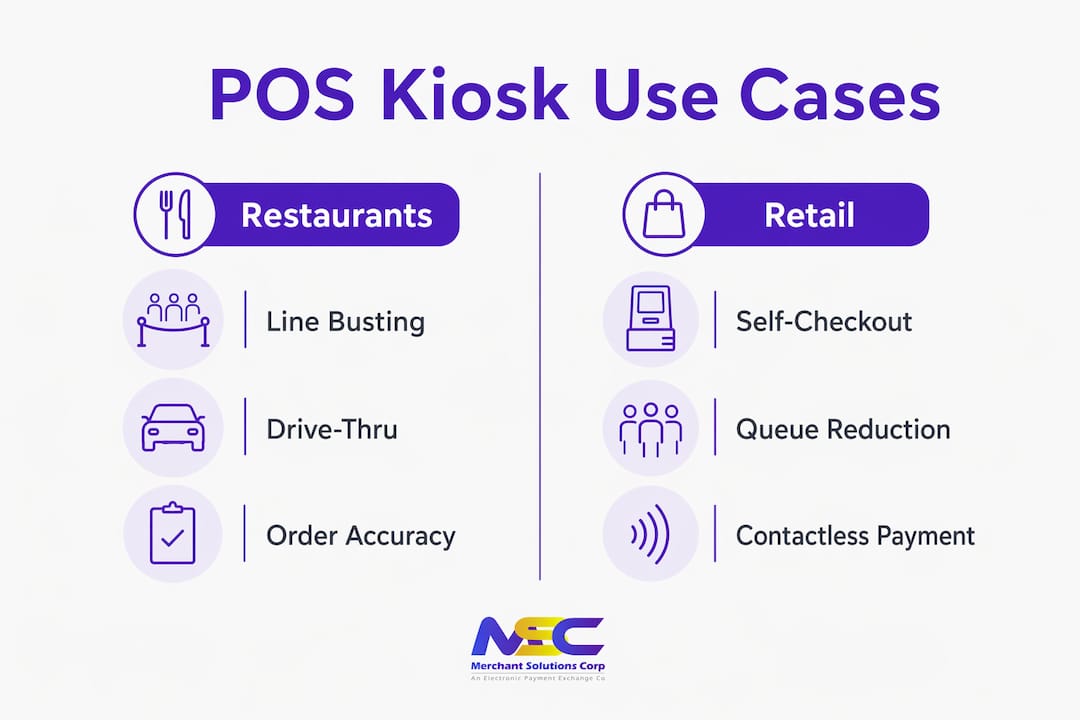
Primary use cases split across two categories. In restaurants, self-ordering kiosks handle line-busting at the counter, tabletop ordering for full-service environments, and drive-thru queue management. In retail, they serve as self-checkout stations, interactive price checkers, and loyalty enrollment points. The key difference: a restaurant kiosk is menu-based and optimized for modifiers and combos, while a retail self-checkout terminal relies on barcode scanning and weight sensors. Mixing the two hardware types adds cost and complicates your workflow.
Which kiosk hardware form factor fits your space?
Choosing the wrong form factor is one of the most common and expensive mistakes in a kiosk deployment. Map your floor plan before you spec hardware.
| Form Factor | Best Use Case | Typical Footprint | Installation Notes |
|---|---|---|---|
| Freestanding floor kiosk | QSR lobby, food court, high-traffic retail | 2–3 sq ft base | Requires floor anchoring; ADA height adjustment recommended |
| Countertop kiosk | Smaller QSR, café, pharmacy counter | Under 1 sq ft | Minimal install; power and network at counter level |
| Tablet-on-stand | Fast casual, pop-up, line-busting | Under 1 sq ft | Portable; easiest to reposition |
| Tabletop unit | Full-service restaurant, hotel F&B | Per-table | Requires table-level power; higher per-seat cost |
| Drive-thru kiosk | QSR drive lane | Outdoor enclosure | Weatherproofing and sunlight-readable display required |
| Rugged/industrial | Warehouse, outdoor retail, high-humidity | Varies | IP-rated enclosure; extended temperature range |
Every form factor needs peripheral decisions. A receipt printer is standard for most deployments. An EMV-certified card reader is required for contactless payment acceptance. Barcode scanners apply to retail self-checkout but are unnecessary for menu-based restaurant kiosks. Cash-handling modules add cost and maintenance overhead; most QSR operators skip them entirely.
Freestanding units offer the best visibility and ADA adjustability but demand the most floor space. Countertop and tablet-on-stand options are faster to deploy and easier to reposition during a pilot, though they carry less visual presence. Drive-thru kiosks require weatherproofing and a sunlight-readable display rated for outdoor brightness, which pushes hardware costs higher than an indoor unit.
What software and integration features should you require from vendors?
Software is where most kiosk deployments succeed or fail. Hardware is commoditized. Integration depth is not.
Core requirements to confirm before signing any contract:
- Bidirectional, real-time POS sync with no extra middleware for order injection
- KDS compatibility so kiosk tickets appear alongside counter orders on the same display
- EMV-certified payment terminal with NFC/contactless support
- Offline-resilient ordering: local order queue with store-and-forward payment processing
- Centralized CMS for remote menu, pricing, and promotional updates across all devices
- Fleet monitoring dashboard for device health, uptime alerts, and remote restarts
- ADA-compliant UI and hardware (screen readability, audio prompts, adjustable height)
- Open API or documented integration layer for loyalty, online ordering, and third-party platforms
When scoring vendors, weight integration depth first. A centralized CMS with out-of-the-box integrations lets your marketing and operations teams push menu changes and promotions across every device without touching each unit individually. That matters even more at scale.
Pro Tip: Require kiosk software that supports both Windows and Android. OS flexibility lets you source hardware from a wider pool, apply your existing MDM and antivirus policies, and avoid being locked into a single vendor’s hardware refresh cycle.
What does a POS kiosk cost, and which pricing model fits your business?
Hardware, software, and payment processing are three separate cost lines. Budget for all three before you request a quote.
Hardware ranges from a few hundred dollars for a tablet-on-stand to several thousand for a fully configured freestanding unit with printer, card reader, and enclosure. Software licensing typically runs in a monthly or annual per-device fee structure. A reasonable planning range is $50–$200 per kiosk per month for the software layer alone, depending on feature set and integration complexity.
Common pricing models:
- Capex purchase: You own the hardware outright. Higher upfront cost, lower long-term spend, full control over refresh cycles.
- Lease or financing: Spreads hardware cost over 24–48 months. Preserves cash flow but increases total cost over the term.
- SaaS per-device subscription: Monthly fee covers software, updates, and sometimes support. Predictable operating expense.
- $0 upfront with processing contract: Hardware is provided at no initial cost in exchange for a payment processing agreement. Common with turnkey providers.
Ongoing costs to include in your total cost of ownership (TCO): software subscription renewals, payment processing fees (typically 2.5–5.0% per transaction depending on card type and volume), fleet monitoring or support plan fees, consumables (receipt paper, cleaning supplies), and periodic hardware refresh. Kiosk deployments can lift average order value through consistent upsell prompts, which helps offset recurring costs faster than most operators expect.
How do you deploy a POS kiosk from pilot to full rollout?
A structured rollout protects you from committing budget to a configuration that doesn’t perform in your actual environment.
- Discovery: Audit your current POS, network infrastructure, and floor plan. Confirm integration compatibility before ordering hardware.
- Pilot scope: Select one location and one or two kiosk units. Define success metrics upfront: order uptake rate, average order value change, order accuracy, and service time.
- Integration testing: Verify real-time POS sync, KDS ticket formatting, offline order queuing, and payment flow before any customer touches the screen.
- Pilot run: Run the kiosk live for 30–60 days alongside your existing counter. Keep at least one staffed register active during this period.
- Training and feedback: Brief staff on their new roles around the kiosk. Collect customer and staff feedback on UI friction points and edge cases.
- Staged rollout: Expand to additional locations using the pilot configuration as your baseline. Push menu and pricing updates from the central CMS.
- Optimization: Review metrics at 90 days. Adjust upsell prompts, screen flow, and peripheral placement based on real transaction data.
A 90-day pilot framework gives you enough transaction volume to make a data-backed rollout decision rather than relying on vendor demos. For a single-site pilot, plan for roughly one week of physical setup and integration work, then 30–60 days of live operation before drawing conclusions. Chain rollouts add time for per-location POS pairing and staff training at each site.
Menu redesign for kiosk flows deserves more attention than most operators give it. A screen cannot describe a combo the way a cashier can, so photos, modifier prompts, and upsell suggestions need to be configured deliberately before go-live.
How do you keep a kiosk deployment secure and PCI-compliant?
Security for a kiosk deployment spans the device, the network, and the payment flow. Each layer has specific requirements.
Compliance and payment security checklist:
- Confirm the kiosk software vendor’s PCI PA-DSS or PCI DSS scope and documentation
- Use only EMV-certified card readers with NFC/contactless support to reduce card-present fraud exposure
- Enforce TLS encryption for all network traffic between the kiosk, POS, and payment processor
- Implement secure key management for payment credentials; never store card data on the device
Device management:
- Deploy a mobile device management (MDM) solution to enforce antivirus, remote patching, and configuration policies across your fleet
- Enable remote restart and lockdown capabilities for each unit
- Schedule regular peripheral health checks (printer status, card reader firmware, screen calibration)
Network segmentation:
- Place kiosks on a dedicated VLAN, isolated from your POS back-office and guest Wi-Fi networks
- Apply firewall rules that restrict kiosk traffic to approved endpoints only
- Use a VPN or private link for cloud sync if your kiosk vendor requires it
Physical security matters too. For guidance on hardening the storefront environment where kiosks operate, commercial door security practices apply directly to kiosk enclosure placement and access control.
Verify these trust signals with every vendor before signing: documented PCI stance, EMV certification for the card reader, published warranty terms, and a defined SLA for support response and hardware replacement.
How do you choose the right kiosk vendor and avoid costly mistakes?
The evaluation process is straightforward when you work through it in order.
Evaluation checklist:
- Confirm certified, direct POS integration with your specific back-end system
- Verify offline order flow works end-to-end, including store-and-forward payment processing
- Test KDS ticket formatting with modifiers and combo items in a live or sandbox environment
- Run a pilot in a live shift before committing to a chain rollout
- Confirm fleet management tools cover remote monitoring, alerts, and centralized menu updates
Questions to ask every vendor:
- Which POS systems do you have certified, direct integrations with, and how is the sync structured?
- What is your SLA for support response and hardware replacement?
- Can you provide a sample TCO worksheet covering hardware, software, processing, and support over three years?
- Do you have references or case studies from deployments similar to mine in size and concept?
- Can you provide documentation of your PCI DSS scope and EMV certification for the card reader?
Red flags that should stop a deal:
- Reliance on unproven middleware for order injection into your POS
- Single-OS hardware lock-in with no MDM flexibility
- No offline mode or vague answers about what happens when connectivity drops
- All-in pricing that bundles hardware, software, and processing without itemizing each line
Score vendors across four dimensions weighted by your priorities: integration depth, uptime and fleet tools, user experience, and total cost over three years. High-volume businesses that prioritize speed and upsell capability get the most from a well-integrated kiosk. Businesses where human interaction is central to the experience should weigh that tradeoff carefully before committing.
How Merchantsolutionscorp supports your kiosk deployment end to end
Merchantsolutionscorp offers turnkey kiosk configurations for U.S. restaurants and retail operators, including the iTab QSR kiosk POS built for quick-service environments. Each deployment packages hardware, integrated payment processing, and onboarding support into a single agreement.
The iTab configuration addresses the primary evaluation criteria directly: certified POS integration, offline-resilient ordering, EMV-ready contactless payment acceptance, and a centralized CMS for menu and promotional updates. Merchantsolutionscorp also supports retail point of sale deployments with kiosk-compatible hardware and payment processing bundles.
Onboarding includes pilot assistance, POS integration setup, fleet monitoring configuration, and staff training. Warranty and support tiers are documented upfront, so you know your replacement SLA before the first unit ships. The $0 upfront hardware option is available for qualifying operators who prefer to preserve capital and offset costs through the processing agreement.
To request a demo or an all-in site quote, visit the self-ordering kiosk page or start the application process directly through the POS systems overview.
Key Takeaways
A turnkey POS kiosk integrated with your back-end system and payment processing is the lowest-risk path to self-ordering for U.S. restaurants and retail operators.
| Point | Details |
|---|---|
| Direct POS integration is non-optional | Require certified, real-time sync with no middleware to prevent inventory and menu mismatches. |
| Offline capability protects revenue | Hybrid kiosks queue orders locally and sync payments when connectivity returns, keeping you operational during outages. |
| AOV lift offsets recurring costs | Kiosk deployments typically raise average order value by 15–30% through consistent upsell prompts. |
| Pilot before you scale | A 90-day single-site pilot gives you the transaction data to make a confident chain rollout decision. |
| Merchantsolutionscorp offers a turnkey path | The iTab QSR kiosk POS bundles hardware, payments, and onboarding for a single-vendor deployment. |
Why turnkey kiosks deliver more than operators expect
The conventional wisdom treats a kiosk as a labor-saving device. That framing undersells what a well-integrated unit actually does. Kiosks reduce order processing time by roughly 40% from order start to handover, but the more durable business case is what happens to the average check. A screen never forgets to suggest the add-on. It never rushes a customer through a combo upgrade. The upsell logic runs on every order, every shift, without training or supervision.
The operators who get the most from kiosks are the ones who treat the menu configuration as seriously as the hardware selection. Poorly structured screens with no photos and no upsell prompts produce mediocre results. The same hardware with a well-designed flow and deliberate modifier prompts produces the 15–30% order value lift the data shows. The technology is the enabler. The menu design is the driver.
Merchantsolutionscorp packages kiosks with payment processing and onboarding support specifically to reduce the rollout risk that comes from managing three separate vendor relationships. One agreement, one support contact, one TCO conversation.
Merchantsolutionscorp turnkey kiosk solutions for restaurants and retail
Merchantsolutionscorp gives you a faster path to self-ordering than sourcing hardware, software, and payment processing separately. The iTab QSR kiosk POS comes fully configured with integrated payment acceptance, POS connectivity, and onboarding support included. No separate payment processor to negotiate. No middleware to troubleshoot.
For retail operators, kiosk-compatible payment bundles cover contactless payment terminals, POS integration, and dual pricing options to offset processing fees. Pilot assistance and documented warranty terms are available for every deployment.
Request a demo or get an all-in quote at merchantsolutionscorp.com/pos/itab-kiosk-qsr and start your 90-day pilot with full support from day one.
Useful sources
- PCI Security Standards Council — Confirm your kiosk vendor’s PCI DSS scope, PA-DSS status, and EMV certification documentation here before signing any contract.
- NIST Cybersecurity Framework — Use NIST guidance to structure your network segmentation, MDM policy, and remote-patching requirements for kiosk fleets.
- ADA National Network — Technical Guidance — Verify U.S. ADA obligations for kiosk height, reach range, audio output, and screen accessibility before hardware procurement.
- XPR POS: 90-Day Kiosk Pilot Playbook — Vendor-neutral pilot framework covering success metrics, integration testing steps, and rollout sequencing.
- BusinessNewsDaily: Self-Service POS Kiosks — Balanced overview of business fit, tradeoffs, and the types of operations that benefit most from self-ordering technology.
FAQ
What is a POS kiosk?
A POS kiosk is a customer-facing touchscreen terminal that accepts orders and payments, then syncs transactions in real time with the merchant’s back-end POS system for inventory, reporting, and kitchen display routing.
How much does a self-serve kiosk cost?
Hardware ranges from a few hundred dollars for a tablet-on-stand to several thousand for a freestanding unit with peripherals. Software licensing typically adds $50–$200 per device per month, and payment processing fees generally run 2.5–5.0% per transaction depending on volume and card type.
What is the most practical POS system for a restaurant kiosk?
The most practical setup pairs a menu-based self-ordering kiosk directly with your existing restaurant POS, using a certified integration that syncs pricing, inventory, and KDS tickets in real time. Merchantsolutionscorp’s iTab QSR kiosk POS is built specifically for this configuration in quick-service environments.
What are the main types of POS kiosk hardware?
The four most common form factors are freestanding floor kiosks, countertop units, tablet-on-stand configurations, and tabletop units. Drive-thru and rugged outdoor kiosks serve specialized environments and require weatherproofing and high-brightness displays.
Does a kiosk need to work when the internet goes down?
Yes. A hybrid kiosk architecture runs a local ordering engine that queues transactions during outages and syncs with the cloud when connectivity returns, keeping your operation running without interruption.