Square Kiosk POS
Self-service ordering that reduces lines and increases revenue
Overview
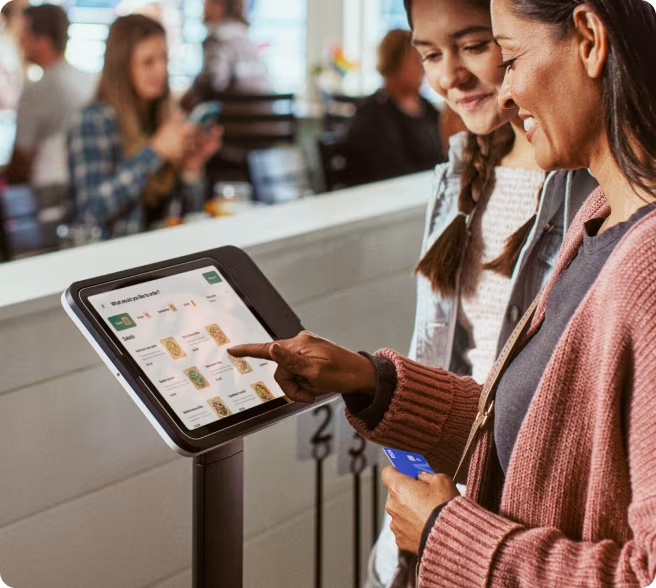
The Square Kiosk is an iPad-powered self-ordering system designed to automate ordering and checkout for restaurants.
Customers place orders themselves, reducing wait times and freeing up staff.
It is widely used in quick-service restaurants and high-traffic environments.
Key Features
Self-Service Ordering & Checkout
Customers browse the menu, customize items, and pay — all without staff.
Built-in Contactless & Chip Payments
Accept tap, dip, swipe, Apple Pay, and Google Pay right at the kiosk.
Works with Square POS Ecosystem
Fully integrated with your existing Square POS, inventory, and reporting.
Real-Time Menu Sync & Reporting
Menu changes and sales data sync automatically across all devices.
Offline Payments Supported
Keep processing orders even when internet drops. Syncs once reconnected.
LED Payment Guidance
Visual LED indicators guide customers through the payment process.
Hardware Details
Core Components
- Kiosk enclosure
- USB hub
- Power adapter and cables
- Mounting hardware (wall + VESA)
Compatibility
- iPad (10th gen and newer)
- iPad Air / Pro models
Mounting Options
- Countertop
- Wall-mounted
- Floor stand (VESA compatible)
Power
- Can run on iPad battery if unplugged
Self-Ordering Kiosk Demo
Watch how customers order and pay in seconds — no staff needed.
Use Cases
Quick-service restaurants
Automate ordering for burger chains, pizza shops, and taco stands.
Fast casual dining
Build-your-own concepts where customers customize every order.
Coffee shops
Reduce counter lines with self-service ordering and payment.
Stadiums and venues
Handle massive volume with simultaneous self-service orders.
Retail self-checkout
Let customers scan and pay without waiting for a cashier.
Best For
High-volume businesses
Businesses with long lines
Restaurants replacing cashiers
Businesses scaling without adding staff
Pricing
ROI: Why Kiosks Pay for Themselves
+15-30%
Average Order Value
Automated upselling prompts consistently increase ticket size compared to counter ordering.
-30%
Labor Cost Reduction
Fewer front-counter staff needed. Redeploy to prep, service, or skip hiring entirely.
2x Faster
Ordering Speed
Customers order at their own pace while multiple kiosks handle simultaneous orders.
Hardware
iPad-powered kiosk enclosure with mounting hardware, USB hub, and power adapter.
or ~$19/month
Includes
Software
RequiredSquare Kiosk software subscription for self-ordering, menu management, and kitchen sync.
per device
Includes
Pros & Cons
Pros
Cons
Why Choose Square Kiosk
Square vs Clover vs Toast
How do the top kiosk POS providers compare?
| Feature | Square Kiosk | Clover Kiosk | Toast Kiosk |
|---|---|---|---|
| Setup Speed | Fast | Moderate | Slower |
| Hardware Cost | Low (~$149) | Medium | High |
| Software Simplicity | Very easy | Moderate | Complex |
| Customization | Limited | Medium | High |
| Best For | SMB / QSR | Growing restaurants | Enterprise chains |
| Integration | Native Square | Clover apps | Deep restaurant stack |
| Deployment Time | Same day | Few days | Weeks |
How to Get Started
From signup to self-service ordering — we handle the heavy lifting so you can focus on your business.
Choose Your Pricing
Pick what works for your business
Apply in Minutes
No paperwork. No back and forth.
Subscribe or Purchase
Easy monthly payments in-house, which can convert to a free POS system after 60 days.
Watch Videos & Go Live
Or schedule an onsite installation.
After Our Go Live
Start taking payments immediately
Build Your Square Kiosk
Configure your setup — we'll show your exact subtotal so you know the all-in price before you order.
In stock · Free standard shipping available
Square Kiosk (USB-C)
Base hardware: $149.00
Kiosk Subtotal
This is an estimate so you know the total price — not a cart.
Subtotal does not include software subscription or sales tax.
Free shipping (3-4 business days)
Expedited shipping (1-2 business days)
Square offsets the carbon emissions from shipping.
Alternatives
Square Terminal
All-in-one countertop POS with built-in printer.
View DetailsSquare Register
Dual-screen countertop POS for high-volume.
View DetailsSquare Stand
iPad-based swiveling countertop POS.
View DetailsSquare Handheld
Portable POS for tableside and mobile.
View DetailsAlso compare with:

AI-Powered Automation for Modern Businesses
Modern POS systems are no longer just payment terminals. Today's platforms combine payment processing, artificial intelligence, and automation to help businesses operate more efficiently and deliver better customer experiences.
Merchant Solutions integrates POS technology with AI-driven tools that automate customer communication, order management, and operational workflows.
These AI automations help businesses reduce labor costs, respond faster to customers, and capture more sales opportunities.
AI Phone Ordering
Voice AI can answer incoming calls and take customer orders automatically, sending them directly to the POS system.
This reduces missed calls during busy hours and increases revenue from phone orders.
AI Appointment Scheduling
Businesses such as salons, spas, and service providers can use AI to schedule appointments and confirm bookings automatically.
The AI assistant interacts with customers through phone or chat and updates the POS or scheduling system.
AI Voice Appointment Reservations
Voice AI can handle inbound reservation calls for restaurants, answering availability questions and booking tables in real time.
Customers call, the AI confirms the reservation, and it syncs directly with your POS or booking system — no staff intervention needed.
AI Customer Support
AI assistants can answer common questions about business hours, menu items, or services, reducing the workload for staff.
Customers receive instant responses while employees focus on operations.
AI Order Notifications
Automated messages notify customers when orders are received, prepared, or ready for pickup.
This improves communication and customer satisfaction.
AI Marketing Automation
POS systems collect customer purchase data, which AI tools use to generate targeted promotions and loyalty campaigns.
Businesses can automatically send offers and promotions based on buying behavior.
Upgrade Your POS with AI Automation
Voice AI Business Automation

Frequently Asked Questions
Explore the Square Lineup
Payment Solutions