POS Tablet for Small Business: Configure Your Kit
POS Tablet for Small Business: Configure Your Kit
For most small and mid-size U.S. retail and restaurant businesses, a configured tablet POS kit from Merchantsolutionscorp is the fastest, lowest-risk path to live tablet-based point of sale. A typical configured kit includes a tablet (iPad, Android, or purpose-built), a stand or handheld mount, an EMV/NFC card reader, a receipt printer, a cash drawer, pre-loaded POS software, and onboarding support. The mobile POS market is projected to grow at a 16.39% CAGR between 2023 and 2032, which means the hardware and software options available today are more capable and affordable than ever. PCI DSS compliance is non-negotiable in any kit you choose. Contact Merchantsolutionscorp to configure a kit or request a quote before you spend another hour comparing spec sheets.
Key Takeaways
A configured tablet POS kit from Merchantsolutionscorp is the fastest, most supported path for U.S. SMBs to go live with tablet-based point of sale, with PCI DSS compliance and $0 upfront financing available.
| Point | Details |
|---|---|
| Choose a configured kit | Single-vendor bundles simplify support, compatibility, and billing compared to assembling your own. |
| Match form factor to environment | Handheld for tableside service, countertop stand for checkout, ruggedized for food-service or outdoor use. |
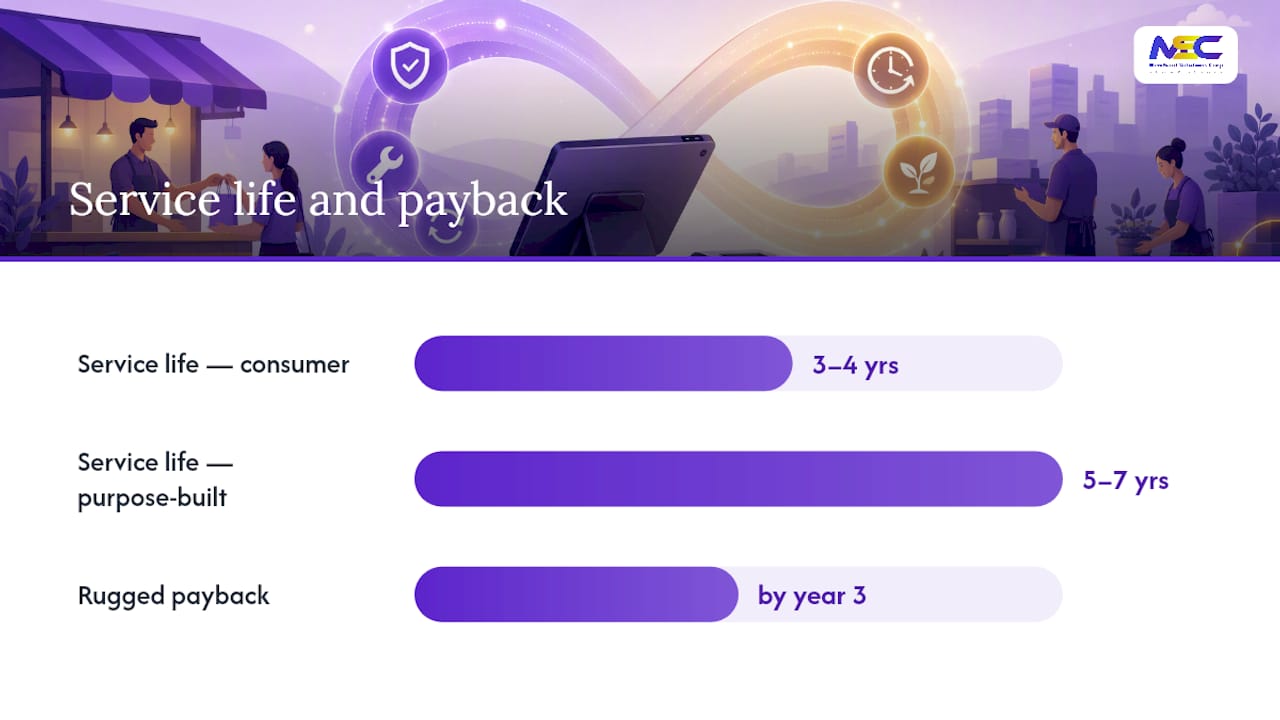
| Calculate 3–5 year TCO | Include hardware replacement cycles (3–4 years for consumer tablets, 5–7 for commercial units) and processing fees. |
| Demand PCI DSS compliance | Require EMV/NFC readers, E2EE, tokenization, and a private POS network from any vendor. |
| Merchantsolutionscorp | Offers configured Clover Flex and Skytab kits with $0 upfront programs, certified integrations, and nationwide support. |
Table of Contents
- What is a POS tablet and which type fits your business?
- How do you choose the right POS tablet for your operation?
- What accessories complete a tablet POS kit?
- What does a tablet POS setup actually cost?
- How long does it take to go from order to live?
- Consumer tablet vs. purpose-built POS tablet: which should you choose?
- What security standards should your POS tablet meet?
- Why Merchantsolutionscorp is the recommended choice for tablet POS kits
- The Merchantsolutionscorp approach to choosing a tablet POS
- Ready to configure your tablet POS kit?
- Sources
- FAQ
What is a POS tablet and which type fits your business?
A POS tablet is a touchscreen device running point-of-sale software that integrates payments, inventory, and reporting in one place. mPOS solutions require less setup than traditional POS systems and can run on smartphones, tablets, or dedicated wireless devices with a small hardware footprint. The form factor you choose shapes everything from counter space to staff workflow.
Main form factors:
- Countertop tablet on a stand: An 8–11" or 12"+ tablet mounted on a fixed or swivel stand. Best for retail checkout lanes and full-service restaurant host stands.
- Handheld/tableside tablet: A 6–8" device carried by servers or sales associates. Speeds tableside ordering and payment in restaurants and enables floor-roaming in retail.
- Kiosk/self-service: A larger tablet (10–15") in a fixed enclosure. Common in quick-service restaurants (QSR), hotel lobbies, and high-traffic retail.
- Hybrid/multi-device setup: A mix of countertop and handheld units sharing one back-end. Scales well for multi-lane retail or full-service dining rooms.
OS options at a glance:
- iOS (iPad): Widest app selection, strong security model, predictable hardware refresh cycle. Most POS software launches on iOS first.
- Android: More device variety, lower entry-level hardware cost, flexible peripheral support. Some enterprise-grade Android tablets are purpose-built for POS.
- Windows: Best for complex inventory or back-office integrations. Less common in restaurants; more common in specialty retail.
- Purpose-built/ruggedized: Proprietary OS or hardened Android. Designed for spill resistance, drop tolerance, and 24/7 operation in demanding environments.
Self-identify your category:
- Restaurant server handheld → iOS or Android handheld kit
- QSR countertop → compact Android or iOS tablet on a fixed stand
- Retail mobile sales floor → lightweight iOS or Android tablet with a clip-on reader
- Food truck or caterer → mobile POS with cellular backup and a rugged case
How do you choose the right POS tablet for your operation?
A buying checklist keeps the conversation with any vendor honest. Tablet-based POS advantages include portability, cloud analytics, and easier staff training, but OS choice and compatibility details can quietly limit what you can actually do.
Must-haves:
- OS compatibility with your chosen POS software. Confirm the app version, not just the platform name.
- Screen size and form factor matched to your physical space. A 10" tablet on a tight food-truck counter is different from a 12" kiosk in a retail store.
- Processor and RAM sufficient for smooth operation. Most modern POS apps run well on mid-range hardware, but check the software vendor’s minimum specs.
- Connectivity: Wi-Fi 5 or 6 at minimum; cellular (LTE/5G) as a backup for mobile or outdoor deployments. NFC/contactless support is required for tap-to-pay. Bluetooth for peripheral pairing. Physical USB-C or Lightning ports for wired printers and scanners.
- Battery life: Handheld tablets need at least 8–10 hours of active use per shift. Countertop units can run on AC power with a battery backup.
- Offline mode: The POS must queue transactions locally when Wi-Fi drops and sync when connectivity returns.
Nice-to-haves:
- Multi-user account support with role-based permissions
- Kitchen display system (KDS) routing for restaurants
- Built-in barcode scanner or camera-based scanning
- Customer-facing display on a swivel stand
Future-proofing:
- Software update policy and hardware compatibility roadmap
- Ease of adding terminals as your business grows
- API or integration support for accounting, loyalty, and delivery platforms
Pro Tip: Before committing to any tablet POS configuration, run a demo account through a full transaction flow: open a tab, split a check or apply a discount, process a refund, and pull an end-of-day report. Issues that surface in a demo are far cheaper to resolve than after go-live.
What accessories complete a tablet POS kit?
The tablet itself is only part of the equation. Peripherals determine whether your setup actually works in a real business environment.
Essential peripherals:
- Payment reader: Integrated (built into the tablet or stand) vs. external (Bluetooth or USB). Integrated readers reduce cable clutter; external readers offer more flexibility for handheld use.
- Receipt printer: Thermal printers are standard. Confirm Bluetooth vs. USB vs. Ethernet connectivity matches your tablet’s ports.
- Cash drawer: Connects via the receipt printer’s RJ11 port or directly via USB. Match the drawer size to your cash volume.
- Barcode scanner: USB or Bluetooth. Critical for retail; optional for most restaurants.
- Stand or mount: Fixed countertop stand, swivel stand for customer-facing display, or handheld grip/case. Square POS accessories and similar peripheral lines cover most standard configurations.
- Charging dock or cradle: For handheld tablets that need to charge between shifts.
- Rugged case: Silicone or polycarbonate cases rated for drops and spills. Required for food-service and outdoor deployments.
Bundle vs. assemble-your-own:
Buying a pre-configured bundle from a single vendor simplifies billing, support, and compatibility. Assembling your own kit from separate sources can save money upfront but creates split-vendor support headaches when something breaks. For most SMBs, a single-vendor bundle wins on total cost of ownership.
Compatibility note: Lightning, USB-C, and Bluetooth all behave differently across tablet generations. Verify that your receipt printer and card reader are certified for your specific tablet model, not just the OS.
Site-specific checklist:
- Outdoor seating or patio: weatherproof case, cellular backup, portable battery pack
- Food truck: industry-specific mobile configuration, inverter or generator power, compact thermal printer
- Festival or pop-up: cellular-only setup, lightweight handheld, no cash drawer required
- Multi-lane retail: Ethernet-connected printers, centralized cash drawers, retail payment solutions bundle
What does a tablet POS setup actually cost?
Tablet POS systems generally cost less upfront than traditional POS, but total cost of ownership (TCO) tells a more complete story. Here are the cost categories to budget:
- Tablet hardware: Consumer tablets range from a few hundred dollars; commercial or ruggedized units run higher.
- Peripherals: A full kit (reader, printer, cash drawer, stand) typically adds several hundred dollars per station.
- POS software subscription: Monthly fees vary by feature tier and number of terminals.
- Payment processing fees: Typically 2.5–5.0% per transaction, depending on card type, volume, and pricing model. Dual pricing programs can offset this cost for qualifying businesses.
- Installation and onboarding: One-time cost that varies by complexity and whether on-site setup is included.
- Training: Factor in staff time even when the software is intuitive.
- Financing: “$0 upfront” hardware programs shift cost to monthly fees or processing rates. Read the contract terms carefully.
What changes your TCO most:
- Number of terminals (each adds hardware, software, and processing costs)
- Multi-location sync requirements
- Offline mode and redundancy needs
- Warranty and support tier selected
- Consumer tablet replacement cycle (typically 3–4 years) vs. commercial/rugged units (often 5–7 years)
Calculate a 3–5 year TCO before signing. A lower hardware price paired with a higher processing rate often costs more over three years than a slightly higher upfront kit with a competitive rate.
How long does it take to go from order to live?
mPOS solutions require less setup than traditional POS, but “less setup” still means real milestones with real lead times. Here is a typical deployment sequence:
- Quoting and configuration: 1–3 business days to finalize hardware selection and software options
- Merchant account underwriting: 1–5 business days, depending on business type and documentation
- Hardware procurement and shipping: 3–7 business days for in-stock items; longer for backordered or custom configurations
- Software configuration and data import: 1–3 days for menu/product catalog setup, tax rates, and employee roles
- On-site installation (if included): Scheduled after hardware arrives; typically a half-day to full-day visit
- Staff training: 2–4 hours for basic operations; more for multi-role or multi-location setups
- Go-live: Most SMB deployments reach live status within 2–3 weeks of signing
Common causes of delay:
- Incomplete merchant underwriting documents (bank statements, voided check, business license)
- Custom software integrations with third-party platforms
- Backordered hardware during peak seasons
- Wi-Fi infrastructure that needs upgrading before installation
Have these ready before onboarding starts: your full product catalog or menu, applicable tax rates, employee names and roles, and your preferred receipt header/footer text.
Consumer tablet vs. purpose-built POS tablet: which should you choose?
The honest answer depends on your environment and how long you need the hardware to last. Practical setup considerations include choosing between rugged vs. consumer devices based on environment, and that choice ripples through your warranty, repair logistics, and replacement budget.
| Category | Consumer Tablet (iPad/Android) | Purpose-Built POS Tablet |
|---|---|---|
| Upfront cost | Lower | Higher |
| Durability | Consumer-grade; vulnerable to spills and drops | Ruggedized; rated for harsh environments |
| Typical service life | 3–4 years in POS use | 5–7 years |
| Repairability | Manufacturer or third-party repair; parts widely available | Vendor-specific repair; may require RMA |
| App availability | Widest selection (iOS App Store, Google Play) | Limited to certified POS apps |
| Best fit | Low-traffic retail, office services, pop-ups | Restaurants, QSR, high-volume retail, outdoor |
| TCO over 5 years | May be higher due to replacement cycle | Often lower when durability is factored in |
For restaurants, tablet POS systems speed order transmission to kitchen displays, enable tableside payments, and support digital menu management. That workflow demands reliable hardware. A consumer tablet dropped in a busy kitchen costs more in downtime than the price difference justifies.
Pro Tip: If you choose a consumer tablet, buy AppleCare+ or the equivalent extended warranty and budget for a replacement unit every 3–4 years. For high-volume or food-service environments, the ruggedized option usually pays for itself by year three.
What security standards should your POS tablet meet?
Payment security is not optional, and the baseline is straightforward. PCI DSS (Payment Card Industry Data Security Standard) sets the minimum requirements for any business accepting card payments.
Security checklist:
- Use a PCI DSS-compliant payment processor with a current attestation on file
- Require EMV chip and NFC/contactless-capable readers on every terminal
- Confirm end-to-end encryption (E2EE) and tokenization so raw card data never touches your tablet
- Run POS devices on a private, dedicated Wi-Fi network, separate from guest or staff networks
- Enforce automatic firmware and software updates on all devices
- Set role-based access controls so employees see only what their job requires
What to ask any vendor before signing:
- Where is card data stored, and for how long?
- Is tokenization handled at the hardware level or the software level?
- Does the processor carry breach insurance or a liability program?
- What is the SLA for hardware replacement if a terminal fails during business hours?
Merchantsolutionscorp configures every tablet POS kit with PCI DSS-compliant processing, certified hardware integrations, and onboarding support that walks you through network setup and security policies before your first transaction.
A strong private Wi-Fi network is often the single most overlooked security and reliability factor. Operational failures that look like software bugs frequently trace back to network architecture.
Why Merchantsolutionscorp is the recommended choice for tablet POS kits
Merchantsolutionscorp is a nationwide payment processing and POS provider with configured solutions for restaurants, retail, and service businesses across the U.S. The company supports named product lines including Clover Flex handheld kits, Skytab restaurant POS, and configured iPad and Android tablet bundles, all available with onboarding support and financing options.
What sets a Merchantsolutionscorp configured kit apart:
- $0 upfront hardware programs available for qualifying businesses, reducing the barrier to entry
- Authorized partnerships with Shift4 and Clover, meaning hardware and software are certified integrations, not generic assemblies
- Industry-specific configurations for restaurants, QSR, retail, food trucks, and high-risk categories
- Nationwide installation and repair options so you are not left troubleshooting alone after go-live
- PCI DSS-compliant processing built into every kit, with transparent hardware and processing financing terms
- Onboarding support covering software configuration, data import, staff training, and go-live readiness
Contact Merchantsolutionscorp to configure a tablet POS kit, request a demo, or apply for $0 upfront hardware financing.
The Merchantsolutionscorp approach to choosing a tablet POS
The right tablet POS decision balances three things: cost, durability, and integration depth. Chasing the lowest hardware price without accounting for processing rates, replacement cycles, and support costs is the most common mistake SMB buyers make. When speed and support matter, a configured kit from a single vendor with certified integrations and a national support footprint is the lower-risk path. Merchantsolutionscorp’s service model is built around exactly that: get you configured, get you live, and keep you running.
Ready to configure your tablet POS kit?
Merchantsolutionscorp cuts the time between decision and first transaction by delivering fully configured kits with certified hardware, PCI DSS-compliant processing, and hands-on onboarding. For retail businesses, the retail payment solutions package pairs the right tablet form factor with inventory integrations and a cash drawer setup matched to your volume. For restaurants, Skytab and Clover Flex configurations include tableside payment, KDS routing, and digital menu management out of the box.
Before you reach out, have these ready: your product list or menu, expected number of terminals, average daily transaction count, and your preferred deployment timeline. That information lets the team configure an accurate quote on the first call.
Request your configured kit or apply for $0 upfront financing at Merchantsolutionscorp today.
Sources
FAQ
What is a POS tablet?
A POS tablet is a touchscreen device running point-of-sale software that processes payments, tracks inventory, and generates sales reports. It typically pairs with a card reader, receipt printer, and cash drawer to replace a traditional cash register.
What is the best tablet for a POS system?
The best choice depends on your environment and software. iOS tablets (iPad) offer the widest POS app selection and a strong security model; Android tablets provide more hardware variety and lower entry costs. For high-volume or food-service environments, a purpose-built ruggedized tablet often delivers better long-term value.
Can you use any tablet as a POS system?
Yes, most modern iOS and Android tablets can run POS software with an external card reader. However, consumer tablets lack the durability and certified integrations of purpose-built POS hardware, which can affect reliability in demanding environments.
Can an iPad work as a full POS system?
An iPad paired with a certified card reader, receipt printer, and POS software subscription functions as a complete point-of-sale system. Merchantsolutionscorp offers pre-configured iPad-based kits with PCI DSS-compliant processing and onboarding support included.