Payment Pending: A Merchant's Guide to Getting Paid
Payment Pending: A Merchant’s Guide to Getting Paid
“Payment pending” on the merchant side means one thing: a sale has been authorized, but the money has not yet settled into your account. It is not lost, and it is usually not a problem. It is a transaction sitting somewhere in the chain between the customer’s card and your bank deposit.
Before you worry, check three things in this order:
- Capture status — confirm the sale was captured, not just authorized, in your POS or gateway dashboard.
- Batch cut-off and batch ID — find out whether the transaction made today’s batch or rolled into tomorrow’s.
- Provider payout schedule — check your processor’s standard payout timeline and look for any hold or reserve notice.
Pro Tip: Record revenue on the sale date, not the deposit date. If your books track cash received instead of sales made, every pending payout will look like a discrepancy instead of a normal delay.
Key Takeaways
Pending payments almost always trace back to timing gaps between the sale date, the settlement date, and the bank deposit date, not lost money.
| Point | Details |
|---|---|
| Definition | “Payment pending” means the sale is authorized but not yet settled or paid to your account. |
| First three checks | Confirm capture status, batch ID and cut-off time, then the processor’s payout schedule. |
| Reconciliation rule | Record sales on the sale date; match payouts to settlement reports later, not to deposits directly. |
| Escalation trigger | Contact your processor when a payout is overdue beyond the stated window or a hold has no explanation. |
| Operational fix | Merchant Solutions Corp pairs configured POS hardware with settlement reporting and onboarding support to reduce reconciliation guesswork. |
Table of Contents
- What “Payment Pending” Really Means in the Settlement Chain
- Five Common Reasons a Payout Stays Pending
- Where to Check First When a Payout Looks Stuck
- Batch Processing vs. Real-Time Processing
- A Compact Reconciliation Workflow for Pending Payouts
- When Holds and Reserves Explain the Delay
- Reducing Pending-Payment Friction Before It Starts
- When to Contact Your Processor
- Merchant Solutions Corp’s Practical Viewpoint
- How Merchant Solutions Corp Can Help
- Where to Learn More
- Sources
- FAQ
What “Payment Pending” Really Means in the Settlement Chain
A card sale moves through five distinct stages before it becomes cash in your bank account: authorization, capture, batch submission, clearing, and settlement, followed by funding. Each stage can happen on a different calendar day, which is exactly why the money you “made” on Monday might not land until Wednesday or Thursday.
Authorization confirms the customer has funds or credit available. Capture locks in the sale amount for that specific transaction. From there, your processor bundles captured transactions into a batch and submits it to the card networks. Clearing is where card issuers and your acquiring bank match records and agree on who owes whom. Settlement is the actual movement of funds between those institutions. Funding is the last step: the deposit hitting your merchant bank account.
Card transactions typically settle within one to three business days, but cut-off times, weekends, and bank processing rules routinely push that window wider. The distinction between clearing, settlement, and funding matters because each stage can occur on a different day, and a delay in one doesn’t necessarily mean anything is wrong with the others.
| Stage | What Happens | Typical Timing |
|---|---|---|
| Authorization | Card issuer confirms funds available | Instant |
| Capture | Merchant finalizes the sale amount | Same day as sale |
| Batch submission | Transactions grouped and sent to acquirer | End of business day |
| Clearing & settlement | Funds move between issuer and acquirer | 1–3 business days |
| Funding/payout | Deposit lands in merchant bank account | Per processor schedule |
Pro Tip: Treat your settlement report and batch ID as the single source of truth for tracing any payout. Bank deposit descriptions rarely tell you which sales they cover, but the settlement report always does.
Five Common Reasons a Payout Stays Pending
Most pending payouts trace back to one of five predictable causes.
- Missed batch cut-off. If a transaction is captured after your terminal’s daily cut-off, it doesn’t disappear, it just rolls into the next batch and settles a day later.
- Mismatched settlement cycles. Card payments, ACH transfers, and marketplace payouts each run on separate clocks, so a multi-channel business is really juggling several settlement calendars at once.
- Refunds, chargebacks, and adjustments. These get applied against your payout after the original sale, which can shrink or delay a deposit you were expecting at full value.
- Account-level holds or reserves. Processors sometimes hold a percentage of funds or freeze a payout entirely while reviewing account activity.
- Bank holidays and netting. Weekends and holidays push deposits to the next business day, and processors often bundle several days of sales into a single netted deposit.
Payment delays happen because sales, settlement, and bank deposits follow three different timelines. The fix isn’t panic, it’s treating each timeline as its own record and reconciling them separately instead of expecting them to match dollar for dollar.
Where to Check First When a Payout Looks Stuck
Work through this order before you assume something is wrong.
- Open your POS or gateway dashboard and confirm the transaction shows as captured, not just authorized.
- Find the batch close time for that business day and note the batch ID.
- Pull the settlement or payout report from your processor to see the full gross-to-net breakdown.
- Scan for any processor message about a hold, reserve adjustment, or account review.
- Check your bank account for a deposit tied to that specific payout reference number.
- If you sell across multiple platforms, repeat this check for each one separately.
| Check | Where to Look | What You’re Confirming |
|---|---|---|
| Capture status | POS/gateway dashboard | Sale was finalized, not just authorized |
| Batch ID and close time | Terminal or gateway batch history | Which settlement cycle the sale belongs to |
| Settlement report | Processor merchant portal | Gross sale amount minus fees, refunds, reserves |
| Hold or reserve notice | Processor dashboard or email | Whether funds are intentionally withheld |
| Bank deposit reference | Business bank account | Whether funding already occurred but wasn’t matched |
Pro Tip: Bookmark your processor’s settlement report page. It’s the fastest way to answer “where’s my money” without waiting on a support call.
Batch Processing vs. Real-Time Processing
Batch processing groups every capture from a business day and submits them together, once the batch closes. It’s cost-efficient, but it comes with a built-in delay: if you miss the cut-off window, that transaction moves to the next day’s batch, pushing funding back by 24 hours or more.

Real-time or straight-through processing settles transactions closer to the moment they happen, which reduces that lag. The tradeoff is usually a higher per-transaction cost compared with standard batch settlement. Most small and mid-sized businesses stick with batch processing because the savings outweigh the delay, as long as the delay is predictable.
| Model | Typical Cut-Off | Funding Behavior |
|---|---|---|
| Batch processing | Once daily, set by acquirer | Next-business-day funding for transactions before cut-off |
| Real-time processing | No fixed cut-off | Faster funding, generally higher processing cost |
Set an internal alert for your batch-close time and check it weekly. A terminal that’s closing batches late, or not closing automatically, is the single most common self-inflicted cause of “delayed” payouts.
A Compact Reconciliation Workflow for Pending Payouts
Reconciliation gets easier once you stop trying to match individual sales to individual deposits. A ledger-based approach works better because a single bank deposit often bundles sales from more than one day along with fees and refunds from separate periods.
- Record sales on the sale date, not the deposit date, using your POS or accounting system.
- Download the settlement report for the relevant batch period from your processor.
- Break out each deduction line: processing fees, refunds, chargebacks, and any reserve holdback.
- Match the payout total to settlement report lines, not to your daily sales log directly.
- Post variance adjustments for anything that doesn’t reconcile cleanly, and log the reason.
The core formula stays simple: Gross sales − Fees − Refunds − Chargebacks − Reserves = Net payout. Track every deviation from that formula in a running log rather than trying to force each transaction to match a specific deposit.
| Line Item | Source Document | Posted To |
|---|---|---|
| Gross sales | POS daily sales report | Revenue account (sale date) |
| Processing fees | Settlement report | Expense account |
| Refunds/chargebacks | Settlement report | Contra-revenue account |
| Reserve holdback | Processor account statement | Reserve/asset account |
| Net payout | Bank deposit | Cash/bank account |
Pro Tip: If you’re processing more than a handful of transactions a day, keep a dedicated payout variance log instead of matching cash line by line. It turns hours of detective work into a five-minute weekly review. Businesses researching their monthly financial report process often find this is the missing link between messy books and clean ones.
When Holds and Reserves Explain the Delay
Not every pending payout is a timing issue. Sometimes it’s a review.
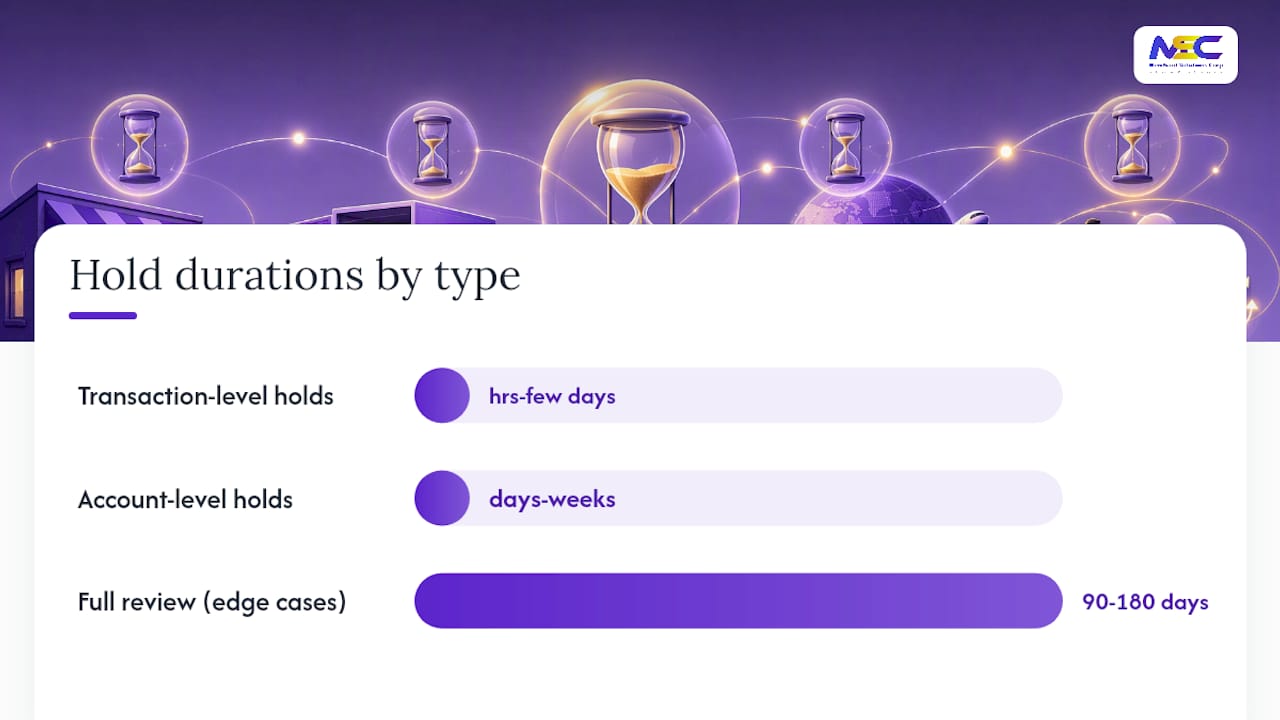
Transaction-level holds are usually short, resolving in hours to a few days. Account-level holds and rolling reserves last longer, often days to weeks, and in edge cases can stretch to 90 to 180 days while the provider completes a full review.
Common triggers include:
- A sudden spike in sales volume compared to your historical average.
- An unusually high refund or chargeback rate.
- Large-ticket transactions outside your normal range.
- Cross-border sales activity.
- New account status with limited processing history.
If you’re flagged, gather your documentation fast:
- Order IDs and timestamps for the transactions in question
- Shipping or delivery receipts and tracking numbers
- Customer communication records
- The relevant settlement report slice covering the disputed period
Pro Tip: Don’t make abrupt account changes, like switching bank accounts or business names, while a review is active. That resets the clock more often than it speeds things up. This applies just as much to specialty and high-risk merchant categories as it does to standard retail accounts.
Reducing Pending-Payment Friction Before It Starts
Prevention beats troubleshooting every time. Build these habits into your operations:
- Set a fixed batch-close time and put a calendar alert on it.
- Automate settlement report imports into your accounting system instead of pulling them manually.
- Categorize fees, refunds, and reserves separately from day one.
- Keep a running payout variance log rather than reconciling from memory.
- Standardize how and when refunds get processed across your team.
Manual reconciliation works fine at low volume, but it breaks down fast as you add sales channels. Automation that maps settlement lines to payouts is the recommended path once you’re managing more than one platform or payment type. Businesses running industry-specific payment setups tend to hit this threshold sooner than expected, especially once they add online ordering or kiosk channels on top of a physical POS.
When to Contact Your Processor
Escalate when any of these apply:
- The expected payout is overdue beyond your provider’s stated service window.
- You see an account-level hold with no explanation.
- A net debit or reversal appears on your statement that you can’t trace to a refund or chargeback.
- A deposit that should have posted after a weekend or holiday still hasn’t arrived.
Before you call or email, assemble:
- The transaction reference number and batch ID
- The relevant settlement report page
- Timestamps for the original sale and expected payout
- Screenshots of any hold or error notice
- Your bank statement showing the missing deposit window
Pro Tip: Lead with specifics in your outreach. “My batch from March 12 settled but hasn’t funded, batch ID 4471, expected by March 14” gets a faster response than “my money is missing.” Most support teams respond within one to two business days once they have a clear reference trail.
Merchant Solutions Corp’s Practical Viewpoint
Most pending-payment confusion isn’t a processing failure. It’s a bookkeeping mismatch between when a sale happens and when it settles. Merchants who adopt ledger-based revenue recognition, recording sales on the sale date and reconciling payouts separately, eliminate most of the anxiety around “missing” money before it starts.
Automated settlement imports remove the manual matching that causes most of the confusion in the first place. Configured hardware and processing setup matter here too: a terminal with a properly set batch-close time and clear capture settings produces predictable, traceable payouts instead of mystery gaps.
Faster onboarding and clearer settlement reporting won’t change how long clearing and funding naturally take, but they remove the guesswork that makes a normal delay feel like a crisis.
How Merchant Solutions Corp Can Help
Merchant Solutions Corp is built for the reconciliation problem this article just walked through, not just for accepting cards. Settlement reporting, configured batch settings, and hardware support across Clover, PAX, and Ingenico terminals work together so your capture and batch-close behavior stays predictable instead of guesswork. Onboarding includes mapping your platform payouts to your accounting process, so sale-date recognition and payout-date reconciliation are set up correctly from day one instead of patched together later.
If pending payouts have been eating into your bookkeeping time, start with a review of your current payment processing setup to see where batch timing, fees, or reserve rules might be creating avoidable delays.
Where to Learn More
- Payment settlements: the process and how long they take explains typical card settlement windows and what affects them.
- What Is Batch Processing? breaks down batch cut-offs and how missed windows delay funding.
- How the Payment Settlement Process Works details clearing, settlement, and funding as distinct stages.
- Merchants selling internationally can review how cross-border processors handle payout timing for additional context on extended settlement windows.
- For terminal and hardware setup questions, see POS hardware comparisons to understand how capture settings affect batch behavior.
Sources
- How to Manage Payment Delays and Partial Payouts Across Settlement Periods - Webgility
- Payment settlements: the process and how long they take - Wise
- What Is Batch Processing? – Definition & Guide | Tagada
- How the Payment Settlement Process Works: Steps, Timelines, and Settlement Reports - Akurateco
FAQ
What Does “Payment Pending” Mean for a Merchant?
It means a sale was authorized but hasn’t yet settled or been paid out to your merchant account. It’s a normal stage in the payment chain, not a sign of a problem.
Why Does My Deposit Amount Differ From My Sales Total?
Processing fees, refunds, chargebacks, and reserve holdbacks are deducted before funding, so the net deposit is almost always lower than gross sales for that period.
How Long Should a Pending Payment Take to Settle?
Card transactions typically settle within one to three business days, though missed batch cut-offs, weekends, and holidays can extend that window.
When Should I Contact My Processor About a Pending Payment?
Reach out if the payout is overdue beyond your provider’s stated window, you see an unexplained account hold, or a deposit that should have posted after a weekend never arrives.
Can Merchant Solutions Corp Help With Pending Payment Issues?
Yes. Merchant Solutions Corp configures POS hardware and batch settings, provides settlement reporting, and supports onboarding that maps payouts to your accounting process to reduce reconciliation confusion.