Online Payment Integration for Developers and Merchants
Online Payment Integration for Developers and Merchants
For most mid-market merchants, the best starting point is hosted fields, not a full custom API build. You get a PCI scope roughly equivalent to a hosted redirect, but you keep your own checkout page, branding, and conversion flow intact. A full server-side API integration only earns its extra development time and compliance burden when you need custom flows a hosted solution can’t support, like marketplace payouts or highly specific subscription logic.
Here’s how to think about the three main starting points before you write a line of code:
- Choose a hosted redirect if you have limited engineering resources, sell a small catalog, or need to launch in days rather than weeks.
- Choose hosted fields (also called an iFrame or embed) if you want your own checkout page design without taking on full card-data handling responsibility.
- Choose direct API integration only if you need deep customization: marketplace splits, complex subscription proration, or a fully native mobile checkout experience.
Pro Tip: Never trust a client-side “success” message alone. Confirm the transaction server-to-server through the gateway’s API before you release inventory or mark an order fulfilled, and attach an idempotency key to every request so a retried webhook doesn’t charge the customer twice.
Key Takeaways
Most merchants should default to hosted fields for web checkout, verify every transaction server-to-server, and treat integration as an ongoing operational commitment rather than a one-time project.
| Point | Details |
|---|---|
| Default to hosted fields | Balances PCI scope, checkout branding, and development time for most mid-market merchants. |
| Verify payments server-to-server | Never trust a client-side success message; confirm status through the gateway API before fulfillment. |
| Match SAQ scope to method | Hosted and payment-link approaches typically qualify for SAQ A, while full API integration requires SAQ D. |
| Test failure paths, not just success | Run sandbox tests for declines, 3D Secure challenges, and webhook retries before go-live. |
| Engage Merchant Solutions Corp for managed setup | Provides merchant account setup, tokenization, webhook configuration, and combined POS and ecommerce onboarding. |
Table of Contents
- What Online Payment Integration Means for Your Site or App
- Compare the Main Integration Methods and When to Use Each
- A Step-by-Step Checklist From Planning to Go-Live
- Security Best Practices and How PCI Scope Shifts by Method
- Which Payment Methods and Features Actually Move Revenue
- Testing, Monitoring, and Staying Operational After Launch
- What Integration and Processing Actually Cost
- How to Choose an Integration Path and What to Ask
- Legal and Regulatory Considerations Beyond PCI
- Merchant Solutions Corp’s View on Choosing an Integration Path
- Merchant Solutions Corp’s Managed Payment Integration Services
- Sources
- FAQ
What Online Payment Integration Means for Your Site or App
Online payment integration is the process of connecting your website or app to a payment gateway, processor, and acquiring bank so customers can pay with cards, wallets, or bank transfers without leaving your platform. Under the hood, four pieces work together: the gateway (encrypts and routes transaction data), the processor (moves the transaction through card networks), the acquirer (the bank that receives funds on your behalf), and your merchant account, where settled funds land. Most providers wrap these into SDKs and APIs so you’re not managing each layer separately.

The method you pick determines more than how the checkout looks. It shapes your PCI compliance scope, your exposure to fraud, which payment methods you can offer, and ultimately how many shoppers complete a purchase instead of abandoning the cart. Worldwide retail e-commerce sales continue climbing year over year, and the U.S. digital payments market is expanding right alongside it. That growth means slow or clunky checkout experiences cost real revenue, not just theoretical conversion points.
A handful of forces should shape your integration decision from day one:
- PCI DSS sets the baseline security standard every merchant accepting cards must meet, regardless of size.
- Conversion friction rises with every redirect, extra field, or unclear error message during checkout.
- Payment method mix matters more each year, as wallets and local payment rails pull volume away from plain card entry.
Compare the Main Integration Methods and When to Use Each
Every integration pattern trades security responsibility for control. A hosted redirect sends the customer to the provider’s own payment page, so your servers never touch card data and your PCI scope stays minimal. Hosted fields, sometimes called an iFrame or embed integration, let you keep your checkout page while the actual card fields load from the provider’s secure domain. Client-side tokenization uses JavaScript to convert card details into a token in the browser before anything reaches your server. Direct API integration puts your server in the middle of the entire transaction, giving you full control but the heaviest compliance burden. Mobile SDKs handle native in-app payments, and payment links or CMS plugins let non-technical teams accept payments with no custom code at all.
GR4VY’s guidance on integration patterns notes that most growing merchants don’t pick just one method. They mix patterns by transaction surface: hosted fields for web checkout, mobile SDKs for the app, and payment links for invoicing or phone orders. That approach avoids over-engineering one channel while under-serving another.
| Integration Method | Checkout Location | Typical PCI Scope | Time to Launch | Customization |
|---|---|---|---|---|
| Hosted redirect | Provider’s domain | Lowest (SAQ A) | Days | Minimal |
| Hosted fields / iFrame | Your page, embedded fields | Low (SAQ A / A-EP) | 1-2 weeks | Moderate |
| Client-side tokenization | Your page, JS tokenizes | Low to moderate | 1-3 weeks | Moderate to high |
| Direct API / server-side | Fully custom | Highest (SAQ D) | Weeks to months | Full |
| Payment links / plugins | Provider-hosted link or CMS plugin | Lowest | Hours to days | Minimal |
A comparison of hosted, API, and self-hosted models frames the decision as speed versus control versus compliance responsibility, and that trade-off holds regardless of which provider you evaluate. Common use cases break down this way:
- Small catalogs and fast launches: hosted redirect or a payment link.
- Brand-conscious ecommerce wanting a native feel: hosted fields.
- Native mobile apps: provider mobile SDK paired with server-side confirmation.
- Marketplaces, complex subscriptions, or multi-party payouts: direct API.
- CMS-based stores (WordPress, Shopify-style platforms): a vetted plugin, since plugins move faster on standard CMS platforms while APIs suit unique or complex flows.
Most teams start with a hosted approach, prove out volume and conversion, then migrate specific flows to hosted fields or API as the business justifies the extra engineering.
A Step-by-Step Checklist From Planning to Go-Live
Before any code gets written, nail down the business decisions that shape everything downstream:
- Confirm your merchant account and which payment methods (cards, ACH, wallets) you’ll support at launch.
- Decide your currency and localization needs if you sell internationally.
- Assign a compliance owner responsible for PCI scope and ongoing attestation.
- Define your fraud strategy: rules-based screening, 3D Secure, or a combination.
Once the plan is set, developer work follows a fairly consistent sequence:
- Request sandbox and live API keys from your gateway provider.
- Build and test the full flow in sandbox mode, including declines and edge cases.
- Implement the client-side SDK or hosted fields on your checkout page.
- Build server-side endpoints to create transactions, verify status, and process refunds.
- Add idempotency keys to every write operation that could be retried.
- Set up webhook endpoints to receive asynchronous status updates.
Before flipping the switch to production, run through a go-live checklist: test successful and declined card flows, trigger a full 3D Secure challenge, confirm webhook retries fire correctly, verify refund flows end-to-end, and set up monitoring and alerts for transaction failures. Keep a backup payment path or fallback provider in mind for outages.
Pro Tip: Run your sandbox tests with intentionally bad data, expired cards, insufficient funds, malformed webhooks, before you ever process a real transaction. Most integration bugs surface in the failure paths, not the happy path.
Security Best Practices and How PCI Scope Shifts by Method
Your integration method is the single biggest lever you have over PCI compliance burden. A hosted redirect or payment link typically qualifies for the simplest self-assessment questionnaire, SAQ A, because your servers never see card data. Hosted fields usually land in SAQ A or a slightly expanded A-EP scope, since the card fields are visually embedded but functionally isolated on the provider’s domain. Direct API integration, where your servers handle raw card data at any point, pushes you into the much heavier SAQ D, requiring far more extensive security controls and documentation.
The PCI Security Standards Council publishes the official SAQ types and requirements, and its guidance on securing e-commerce breaks down exactly how redirect, iFrame, direct post, and JavaScript tokenization models each affect scope differently.
| Security Control | What It Does | Methods That Benefit Most |
|---|---|---|
| TLS version 1.2 or higher | Encrypts data in transit | All methods |
| Tokenization | Replaces card data with a non-sensitive token | Hosted fields, API, subscriptions |
| P2PE / E2EE | Encrypts card data at the point of entry | Card-present and hybrid setups |
| Network tokenization | Reduces stored-credential risk for repeat charges | Subscriptions, saved cards |
| 3D Secure version 2 | Adds risk-based authentication to reduce fraud and disputes | Card-not-present, direct API |
| Logging and monitoring | Flags anomalies and failed authentication attempts | All methods, critical for API |
Checkout.com’s security guidance recommends reducing the number of parties that touch raw card data as one of the most effective ways to shrink both fraud exposure and audit overhead. A more recent payment security guide adds that merchants should be actively mapping gaps against PCI DSS 4.0 requirements, since older SAQ assumptions don’t always carry over cleanly.
A few operational habits matter regardless of method:
- Verify every payment webhook server-to-server before treating an order as paid.
- Build idempotency into every endpoint that creates or modifies a transaction.
- Enable network tokenization for any stored card credentials used in repeat billing.
- Schedule regular penetration testing, especially if you’re on SAQ D.
For merchants running physical locations alongside an online store, retail payment security practices need to stay consistent across both channels so fraud controls don’t have blind spots at the seams.
Which Payment Methods and Features Actually Move Revenue
Cards remain the default, but they’re no longer the whole story. Payment method usage data from Statista shows a steady shift toward digital wallets and local payment rails, and merchants that don’t support them are quietly losing customers who simply abandon checkout rather than dig out a card.
Here’s how to prioritize by business model:
- B2C ecommerce: cards, Apple Pay and Google Pay, and buy-now-pay-later options for higher-ticket items.
- SaaS and subscriptions: card vaulting with network tokenization so renewals don’t fail when a card expires, plus ACH for lower-cost recurring billing.
- Marketplaces: split payments and payout support alongside standard card acceptance.
- B2B invoicing: ACH/eCheck processing and payment links, since many B2B buyers don’t want to enter a card for large invoices.
Feature-level details matter as much as the payment method list itself. Vaulting stored cards properly requires network tokenization support, not just a stored card number, to keep renewal charges from failing after a reissue. ACH processing needs a reconciliation process, since bank transfers settle on a different timeline than card transactions. Refund handling should be tested as carefully as the initial charge flow, since a broken refund process generates support tickets and chargebacks alike.
If you’re weighing which of these to launch with first, a payment links feature covers a surprising amount of ground for invoicing and phone-order scenarios without requiring any custom checkout development.
Testing, Monitoring, and Staying Operational After Launch
Launch day isn’t the finish line. It’s the start of an operational routine that determines whether your integration keeps working as volume grows. Before go-live, run a full sandbox test covering the happy path, a declined card, a 3D Secure challenge, and a simulated webhook failure. Test what happens when a network token needs to renew after a card reissue, since this is a common blind spot in subscription businesses.
Three operational controls separate a stable integration from one that generates 2 AM alerts:
- Webhook signing confirms that incoming status updates genuinely came from your payment provider, not a spoofed request.
- Retry and backoff logic ensures a temporary network blip doesn’t get treated as a permanent failure.
- Idempotency keys on every transaction-creating request prevent duplicate charges when a retry fires. OWASP’s payment gateway integration guidance treats server-side status verification and idempotency as non-negotiable, not optional hardening.
Once live, build a runbook for the recurring operational tasks: a documented chargeback response process, a clear refund service-level target your support team can quote to customers, and a monthly integration health check that reviews decline rates, webhook failure rates, and any fraud spikes.
What Integration and Processing Actually Cost
Budgeting for online payment integration means accounting for more than the advertised per-transaction rate. On top of that, expect monthly gateway fees, potential setup costs, and ongoing PCI compliance or audit expenses if you land in a higher SAQ tier.
Chargebacks carry their own cost beyond the disputed transaction amount, since most processors charge a per-dispute fee regardless of outcome. Businesses using physical terminals alongside online checkout should also budget for hardware, though many providers now offer terminals at reduced or no upfront cost as part of a processing agreement.
The deeper trade-off is between per-transaction savings and total cost of ownership. A full API integration might negotiate a slightly better processing rate, but it demands more engineering hours, a heavier PCI compliance lift, and ongoing maintenance that a hosted solution avoids entirely. For a first rollout, budget for:
- Engineering hours for integration, testing, and QA.
- Any third-party service fees beyond the core processing rate.
- Dedicated testing time, especially around edge cases and failure scenarios.
- A contingency buffer, since payment integrations reliably surface unexpected issues during testing.
Small businesses launching online payments for the first time often underestimate the engineering time required more than the processing fees themselves. A practical guide for small businesses can help set realistic expectations before you commit engineering resources.
How to Choose an Integration Path and What to Ask
Start with four questions before evaluating any specific approach: How much engineering time do you actually have? What transaction volume are you expecting in year one? Do you need international or local payment method support? And how much PCI compliance overhead can your team realistically absorb?
If you’re evaluating a payment partner, bring a specific list of questions rather than a general “what do you offer”:
- Which SDKs and platforms do you support natively, and which require custom work?
- What’s your documented uptime SLA, and how is downtime communicated?
- How are disputes and chargebacks handled, and what documentation do you provide?
- How strong is your sandbox environment, does it mirror production behavior closely?
- Do you support tokenization and network tokens for stored credentials?
- What’s on your product roadmap for the next 12 months?
Watch for red flags during evaluation: vague answers about PCI scope, no documented sandbox environment, or reluctance to share SLA terms in writing.
Pro Tip: If you expect to route transactions across multiple providers, whether for redundancy, cost optimization, or geographic coverage, consider a payment orchestration layer or gateway abstraction from the start. Retrofitting that abstraction after you’ve hardcoded one provider’s API is far more expensive than building it in from day one.
Legal and Regulatory Considerations Beyond PCI
PCI DSS covers card data security, but it isn’t the only regulatory framework touching your payment integration. If you serve customers in the European Union, GDPR governs how you collect, store, and process any personal data tied to a transaction, including names, addresses, and order history, not just card numbers. PSD2, the EU’s revised Payment Services Directive, mandates Strong Customer Authentication for many card-not-present transactions in Europe, which is part of why 3D Secure 2 adoption has become standard practice rather than optional friction.
For U.S.-based merchants, state-level data breach notification laws and industry-specific rules (particularly in healthcare and financial services) can layer additional obligations on top of PCI requirements. If your business handles recurring billing, review your states’ rules around negative-option billing disclosures, since regulators have increased scrutiny of subscription cancellation flows in recent years.
This is general information, not legal advice. Confirm current requirements for your specific business and markets with a qualified compliance professional before finalizing your integration approach.
Merchant Solutions Corp’s View on Choosing an Integration Path
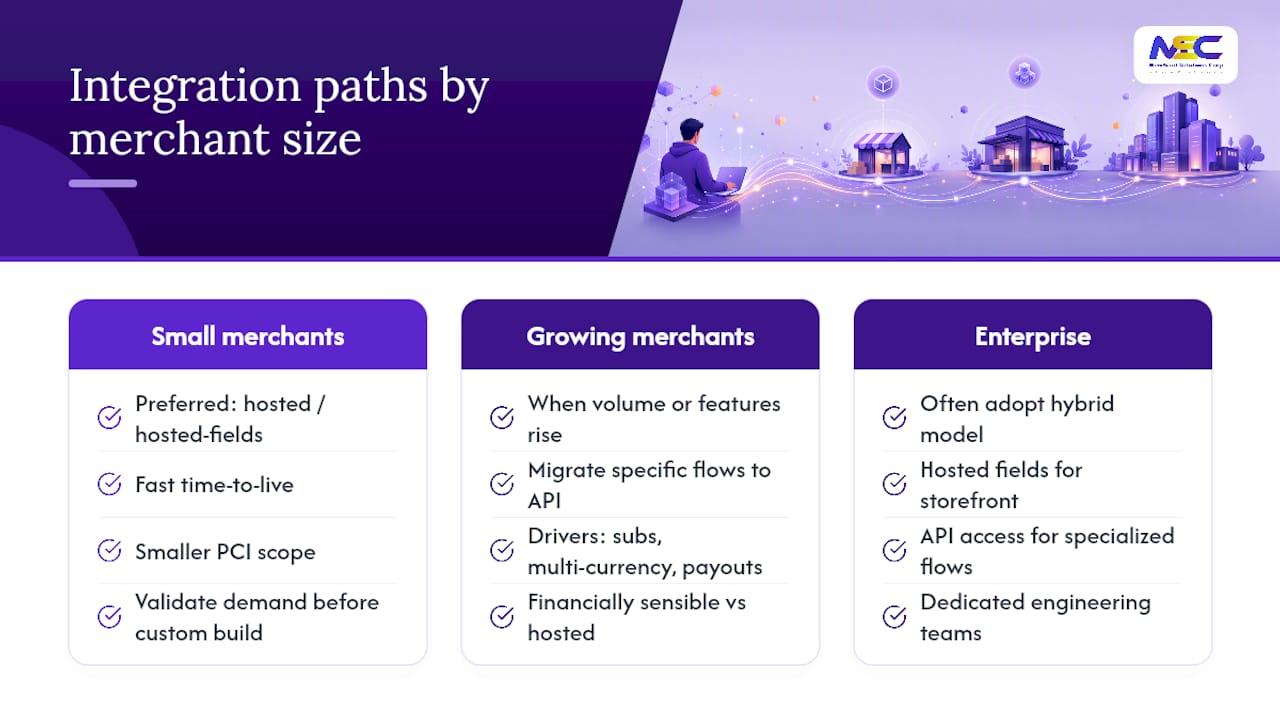
Small businesses launching their first online storefront rarely need a custom API build and can benefit from examples like online payments for small martial arts schools to understand tailored small-business prioritization. A hosted or hosted-fields approach gets them live faster, keeps PCI scope manageable, and lets them validate demand before investing in custom engineering. Growing ecommerce businesses hit a different inflection point: once volume and feature needs (subscriptions, multi-currency, marketplace payouts) outgrow a hosted solution, migrating specific flows to a direct API integration starts to make financial sense. Enterprise merchants with dedicated engineering teams often land on a hybrid model from the outset, mixing hosted fields for the main storefront with API access for specialized flows.
What consistently gets underestimated is the operational work that continues after go-live. Onboarding support, PCI guidance, and integrated POS-to-ecommerce setup matter more over the life of a merchant account than the initial integration sprint. A merchant that treats payment integration as a one-time project rather than an ongoing operational relationship tends to run into avoidable problems: expired network tokens nobody renewed, webhook failures nobody monitored, or a PCI questionnaire nobody updated after adding a new sales channel.
Businesses evaluating providers should weigh how much ongoing support comes bundled with the integration itself, not just the headline processing rate.
Merchant Solutions Corp’s Managed Payment Integration Services
Merchant Solutions Corp handles the parts of online payment integration most teams find tedious: merchant account setup, hosted or embedded checkout configuration, tokenization and card vaulting, webhook setup, and ongoing PCI compliance support. Instead of assembling these pieces yourself across multiple vendors, you get a single point of onboarding that covers both your online storefront and any in-person POS hardware you run.
That combination matters if you operate a restaurant, retail location, or service business with both a countertop terminal and an online ordering page. Rather than reconciling two disconnected systems, you get dedicated onboarding support, faster time to live, and features like payment links for invoicing or phone orders alongside your standard checkout.
If you’re ready to move from planning to a working integration, start with Merchant Solutions Corp’s payment processing solutions to review setup options and get a rate quote based on your actual transaction volume.
Sources
For teams that want to go deeper on any single piece of this integration process, these sources cover the technical and regulatory ground in more detail:
- PCI Security Standards — PCI Security Standards Council
- Hosted checkout vs API checkout: which payment integration is right for your business? — GR4VY
- Third-Party Payment Gateway Integration Cheat Sheet — OWASP
FAQ
What Is Online Payment Integration?
Online payment integration connects your website or app to a payment gateway, processor, and acquiring bank so customers can complete purchases with cards, wallets, or bank transfers without leaving your platform.
How Do I Integrate an Online Payment System Into a Website?
Start by choosing an integration method (hosted fields is the common default), obtain sandbox and live API keys from a provider, build and test the checkout flow, then set up server-side verification and webhooks before going live.
What Are the Different Types of Payment Integration?
The main types are hosted redirect, hosted fields (iFrame or embed), client-side tokenization, direct API/server-side integration, mobile SDKs, and payment links or CMS plugins, each with different PCI scope and development effort.
How Does the Integration Method Affect PCI Compliance Scope?
Hosted redirects and payment links typically qualify for the simplest SAQ A questionnaire, hosted fields usually fall into SAQ A or A-EP, and direct API integration that touches raw card data requires the more extensive SAQ D.
How Long Does Online Payment Integration Take?
A hosted redirect or payment link can launch in days, hosted fields typically take one to two weeks, and a full API integration can take several weeks to months depending on complexity.
Can Merchant Solutions Corp Help With Payment Integration?
Yes. Merchant Solutions Corp provides managed integration services covering merchant account setup, checkout configuration, tokenization, webhook setup, and combined POS and ecommerce onboarding.